

SIP Protocol: From Basic to Advanced

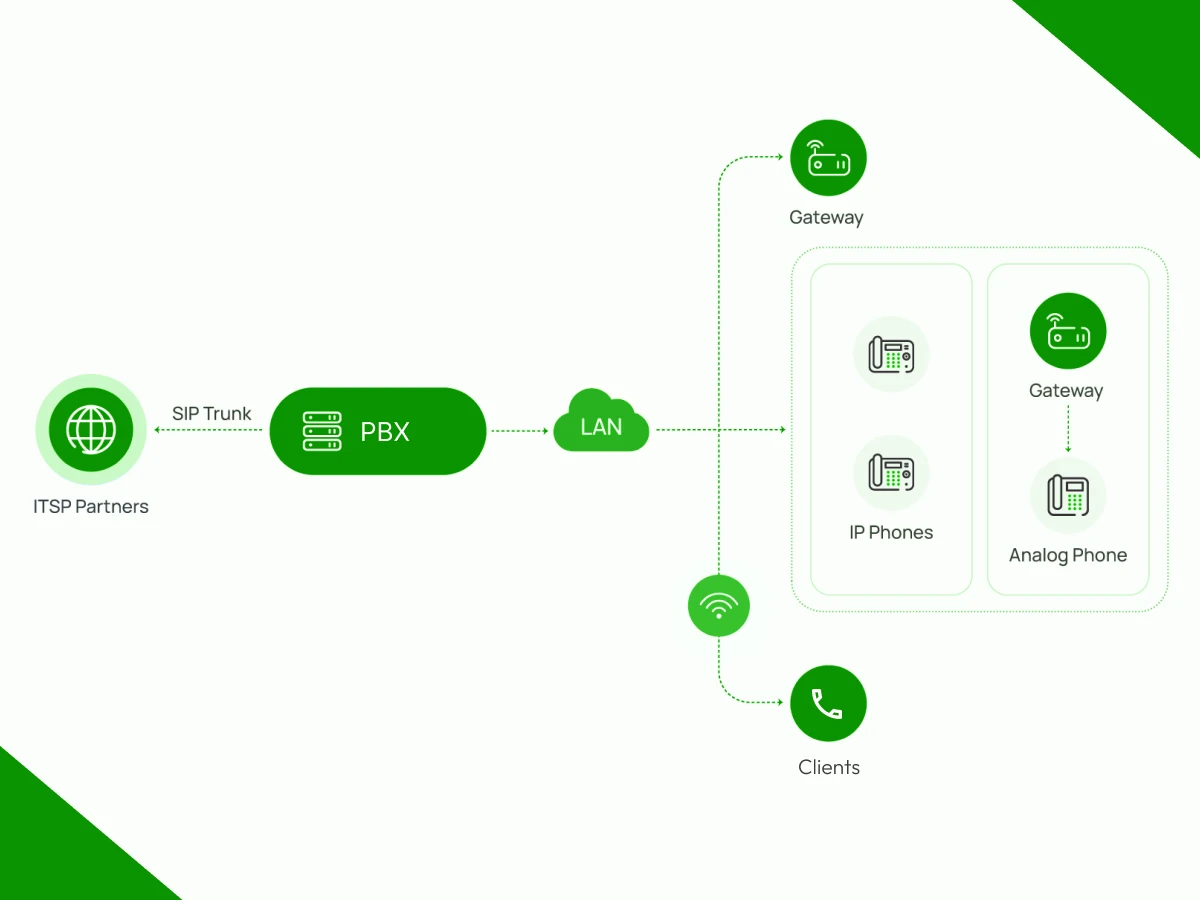
Every VoIP call, video meeting, or text message you send? SIP Protocol makes it work. It started as a technical standard but now runs most business communications.
Moving off old phone lines or setting up global communications? You need to understand SIP.
This guide covers the basics, how calls get set up, how multimedia sessions work, and what keeps everything secure and running smoothly. You’ll see why this matters for voice, video, and messaging.
At its core, the Session Initiation Protocol (SIP) is a signaling protocol. Its job is not to carry voice or video. Its job is to create, manage, and end a communicate session between SIP devices.
When you make a phone call, several things must happen before you hear audio:
You can think of SIP as the manager of a phone call. Its job is to handle the instructions, not the actual work of moving sound.
In the computer world, we say SIP works at the Application Layer. This just means it is the part of the software that knows how to “talk” about phone calls. To send its messages across the IP network, SIP sits on top of other workers called transport protocols (usually TCP or UDP).
SIP starts the call, but RTP carries the sound. This protocol moves the actual audio and video data between devices. It works while you speak to keep the media moving fast. Each tiny piece of data gets a number. This helps the computer put the sounds back in the right order.
Before the SIP protocol, businesses used the PSTN (Public Switched Telephone Network). This was an old system made of physical copper wires and PRI lines.
The Old Way: Your phone number was tied to a physical plug in the wall. If you wanted to add more workers, you had to pay for new hardware and wait for a technician to install it. It was slow, expensive, and made business communications very difficult to change.
The SIP Way: In a SIP network, everything is software. There are no physical lines to tie you down. You can take your SIP phone to a different office, plug it into the internet, and it still works. Adding new users is as simple as clicking a button in your hosted PBX settings.
| Aspect | Traditional PSTN Systems | SIP Networks |
|---|---|---|
| Core technology | Circuit-switched network | Packet-switched IP network |
| Call transport | Dedicated physical lines | Data packets over IP |
| Phone number binding | Physical port-based | Logical SIP identity |
| Scalability | Hardware-dependent | Software-based |
| User mobility | Location-bound | Supports remote endpoints |
| Multimedia support | Voice only | Voice, video, multimedia |
| Cost model | High operational costs | Lower long-term costs |
SIP networks replace physical limitations with software-driven signaling. Calls travel across IP networks, and phone numbers register dynamically with SIP gateways. This design allows users to keep the same identity while connecting from different locations or devices.
Switch to SIP and free your business communications.
VoIP (Voice over Internet Protocol) is just the broad term for sending voice communications over an internet connection or IP network. It describes the result, making a phone call online, rather than the technical machinery making it happen. Since many different protocols can power VoIP, the term can sometimes be vague or misunderstood.
SIP is the most common set of rules for these calls. It handles more than just voice data. It also manages video chats and text messages. While VoIP focus only on the sound, SIP adds more features to the mix.
| Aspect | VoIP | SIP |
|---|---|---|
| What it represents | Voice over IP service | Signaling protocol |
| Scope | Broad concept | Specific standard |
| Primary function | Delivers calls | Controls call setup |
| Media transport | Included | Not included |
| Role in systems | End result | Control mechanism |
| Common examples | Internet phone calls | INVITE, BYE, ACK |
Without SIP signaling, a VoIP call would lack structure. Devices would not know where to send requests, how to negotiate codecs, or how to terminate sessions. SIP provides the rules that allow different vendors and devices to communicate reliably.
Every SIP network is built around a clear separation of roles. Your phones (SIP devices) and apps handle the user stuff, while servers take care of routing calls, keeping track of who’s registered, and managing sessions. This setup works whether you’ve got ten people in one office or thousands spread across the country.
The system uses different tools to keep your calls steady. One part acts as a personal assistant for your device. It writes down your current network location so people can find you. This prevents missed calls when you change offices or networks. Another part directs traffic across the internet. It looks at the destination and chooses the fastest route.
| Component | Role in the SIP Network |
|---|---|
| User Agent Client (UAC) | Initiates SIP requests such as INVITE or REGISTER |
| User Agent Server (UAS) | Receives requests and sends responses |
| SIP Proxy Server | Routes SIP requests between devices |
| SIP Registrar Server | Stores user IP address and port |
| Redirect Server | Returns alternative destinations |
| User Location Service | Maps SIP addresses to network addresses |
The network relies on several specific tools to make your calls work. The User Agent Client starts the request when you dial a number. On the other end, the User Agent Server receives that request to accept the call. A SIP Proxy Server acts as a middleman to send data to the right place. To keep track of you, the SIP Registrar Server stores your current network location.
If a user moves, the Redirect Server provides their new contact information. The User Location Service acts like a map to link names to digital addresses. These tools handle the technical steps in the background while you talk. This teamwork keeps your connection fast and clear for every session. You press a button, and the system manages the complex routing for you.
To understand how these parts work together, you must look at the path of a call. This process follows a clear set of rules to link two users. It acts like a digital script for every conversation. Understanding this flow makes it easier to diagnose failed calls and session setup issues.
From registration to teardown, SIP signaling focuses on state control. Each request and response marks a clear step in the communicate session, ensuring both sides agree on call status before media begins or ends.
| Stage | SIP Message Exchange |
|---|---|
| Registration | REGISTER → 200 OK |
| Call setup | INVITE → 180 Ringing → 200 OK → ACK |
| Media transfer | RTP media stream flows |
| Call teardown | BYE → 200 OK |
A SIP call flow follows a few easy steps to connect you. First, your phone sends a message to ask for a chat. The other phone hears this and starts to ring. It sends a signal back to show it is ready. This setup happens in a split second before you hear any sound.
When the person answers, the two devices agree to talk. They stop using SIP for a moment and start sending your voice data. This is the part where you actually hear the other person. The system stays quiet in the background while you have your conversation.
Once you hang up, your phone sends a final note to end the session. The other side confirms the call is over. This step cleans up the connection so the line is ready for a new call. The process is like a quick handshake at the start and end of a meeting.
SIP messages use plain text, which is honestly pretty nice. It’s like HTTP or email; you can crack open a packet capture and just read what’s happening. No mysterious binary code to decipher.
Every SIP message has the same basic structure. Your phone, the server, everything in between can parse these messages the same way, even if they’re made by completely different companies on opposite sides of the world.
What’s inside a SIP message:
SIP methods are specific commands that tell the network what to do. Each method starts a different action for your call or device. They work like simple instructions in a conversation. Here are the most common methods used in every chat.
| SIP Method | Category | What It Does in Practice |
|---|---|---|
| INVITE | Core | Starts a SIP call and proposes a media session. It usually includes SDP to define codecs, IP address, and port for the media stream. |
| ACK | Core | Confirms session establishment after a successful response. Once ACK is exchanged, RTP media begins flowing between endpoints. |
| BYE | Core | Terminates an active SIP call. It signals both sides to stop the media session and release call resources. |
| CANCEL | Core | Stops a pending INVITE before the call connects. It prevents unnecessary session creation and media negotiation. |
| REGISTER | Core | Binds a SIP address to an IP address and port with the SIP registrar, allowing incoming calls to reach the correct endpoint. |
| OPTIONS | Core | Queries another SIP device or server to check capabilities and availability without starting a call. |
| REFER | Extended | Enables call transfer by instructing a SIP device to initiate a new call to a different destination address. |
| SUBSCRIBE | Extended | Requests updates about a specific event, such as user presence or call state. Commonly used for BLF. |
| NOTIFY | Extended | Sends updates triggered by a SUBSCRIBE request, such as availability or call status changes. |
| INFO | Extended | Carries mid-call signaling data, such as DTMF tones, without altering the media session. |
| PRACK | Extended | Acknowledges provisional responses to improve reliability during early call setup. |
| UPDATE | Extended | Modifies session parameters, such as media attributes, without restarting the SIP call. |
Core methods are responsible for the entire lifecycle of a call, starting from registration and setup all the way to termination. Typically, in a telephone conversation carried out through a normal phone, the use of these four methods alone, i.e.. INVITE, ACK, BYE, and REGISTER are sufficient to ensure stable voice communications without the need for any additional or complex features.
Extended methods expand what SIP can do without changing its foundation. They make features like call forwarding, presence monitoring, and advanced business communications possible while keeping the signaling predictable and based on open standards that everyone follows.
SIP response codes tell the calling device what is happening at every stage of a SIP call. Each response is part of the request and response model that keeps session initiation predictable and allows SIP devices to react correctly during call setup and session progress.
| Response Class | Code | Meaning in a SIP Call |
|---|---|---|
| 1xx Provisional | 100 Trying | Request received and being processed |
| 1xx Provisional | 180 Ringing | Destination is alerting and ringback tone plays |
| 2xx Success | 200 OK | Request succeeded and session is accepted |
| 3xx Redirection | 301 Moved Permanently | Call should be routed to a new destination |
| 3xx Redirection | 302 Moved Temporarily | Call should try an alternate address |
| 4xx Client Error | 401 Unauthorized | Authentication required or failed |
| 4xx Client Error | 403 Forbidden | Call is not allowed |
| 4xx Client Error | 404 Not Found | Destination does not exist |
| 4xx Client Error | 408 Request Timeout | No response from destination |
| 4xx Client Error | 486 Busy Here | Destination is already in another call |
| 5xx Server Error | 500 Server Internal Error | Server failed to process the request |
| 5xx Server Error | 503 Service Unavailable | Server cannot handle the request |
| 6xx Global Failure | 603 Decline | Call rejected globally by the endpoint |
Provisional responses like 100 Trying and 180 Ringing indicate session progress but do not finalize the call. They tell the caller that signaling continues and help maintain user feedback during call setup.
Final responses determine the outcome of the SIP call. A 200 OK leads to session establishment, while error and redirection codes guide retries, authentication, or alternative routing through SIP proxy servers.
SIP signaling controls call setup, but it never carries audio or video itself. Media flows separately using the Real-time Transport Protocol. This separation allows SIP to manage sessions while RTP handles real-time voice and video delivery between endpoints.
This design improves flexibility. SIP messages travel through servers, while media streams usually flow directly between endpoints. As a result, call control stays stable even when network paths change or media routes differ.
The Session Description Protocol, or SDP, is the language SIP uses to describe media. SDP does not transport media itself. It simply tells both sides what kind of media is supported and how that media should be exchanged.
| SDP Element | Purpose |
|---|---|
| Offer | Proposes media type, codecs, and ports |
| Answer | Accepts or modifies the offer |
| Codec list | Defines supported audio or video formats |
| IP address | Indicates where media should be sent |
| Port numbers | Specify RTP listening ports |
| Media direction | Controls send and receive behavior |
The session description protocol SDP uses an offer and answer model. One SIP endpoint sends an offer describing its media capabilities. The receiving endpoint replies with an answer that selects compatible codecs and network parameters.
SIP and SDP work together to set the rules for your audio and video. They decide on the best codec to use for the call. Common choices include G.711 for high quality or G.729 to save data on slow networks.
Modern systems often pick Opus because it handles different internet speeds very well. The devices also share their digital addresses and ports. This ensures your voice packets reach the right place at the right time.
For years, businesses connected their phone systems using Primary Rate Interface (PRI) lines. These were physical circuits delivered over copper and tied to fixed capacity. Every call consumed one channel, and scaling meant ordering more hardware and waiting weeks for installation.
SIP trunking replaces those physical lines with virtual connections over IP networks. Instead of fixed channels, calls share bandwidth dynamically. Phone numbers are no longer bound to a location, which makes modern voice systems far more flexible.
| Aspect | SIP Trunking | PRI |
|---|---|---|
| Line type | Virtual trunks over IP | Physical digital circuits |
| Scalability | On-demand, near instant | Fixed, hardware-limited |
| Cost model | Pay for usage or capacity | Pay per circuit |
| DID support | Native and flexible | Limited and costly |
| Geographic limits | Location-independent | Tied to the site |
| Failover | Easy rerouting | Complex |
SIP trunking supports Direct Inward Dialing (DID) without adding physical lines. Businesses can assign numbers globally and route calls anywhere. This flexibility drives strong ROI, especially for growing or distributed teams.
There are two connection types for SIP trunks. They are:
SIP trunks work with both legacy and cloud PBXs. Traditional systems like Avaya or Cisco connect using gateways. Cloud PBXs such as Dialaxy, 3CX, Asterisk, and RingCentral integrate natively, reducing complexity and maintenance.
Cut costs, scale fast, and connect anywhere with SIP.
SIP relies on transport protocols to move signaling messages between devices. The choice affects performance, reliability, and security. Most SIP systems support multiple transports and select based on message size and network conditions.
Transport protocols handle signaling only. Media traffic uses separate mechanisms, which allow SIP signaling to remain lightweight and responsive even during heavy call volumes.
Let’s look at some of the transport protocols:
| Protocol | Role |
|---|---|
| UDP | Fast and lightweight, default for SIP |
| TCP | Prevents fragmentation for large messages |
| TLS | Encrypts SIP signaling |
| DTLS | Secures media negotiation |
This table lists the different sets of rules, or protocols, that control how call information travels across the network. UDP is the standard choice for most calls because it is fast and lightweight, which helps prevent delays in your conversation. For larger messages that might break apart, the system uses TCP to keep everything in the correct order.
Security is handled by two other protocols that lock your data. TLS acts like a shield for your signaling, encrypting the details of who you are calling so they stay private. Meanwhile, DTLS is used specifically to secure the technical negotiation of your media.
NAT Traversal is a way to help your phone calls get through a home or office router. Most routers use NAT (Network Address Translation) to hide your phone’s private address for safety.
While this is good for security, it makes it hard for a caller from the outside to find you, because your phone is “hidden” behind the router’s single public address. To solve this, the system uses “traversal” techniques to find a path through the router.
Your phone uses STUN to talk to a special server outside your network and ask, “What address do others see when I send a message?” The server sends back your public address and port number, which your phone then shares with the person you are calling so the two of you can connect directly.
TURN relays media through a public server when direct communication fails. It guarantees audio flow even behind restrictive firewalls, but increases latency and bandwidth usage since all media passes through the relay.
ICE tests multiple connection paths using local addresses, STUN results, and TURN relays. It automatically selects the best working option, improving reliability while avoiding unnecessary relaying whenever possible.
SBCs sit at the network edge and manage SIP signaling and media centrally. They rewrite headers, anchor media streams, solve NAT issues, and enforce security policies across all inbound and outbound calls.
SIP ALG modifies SIP packets inside routers to assist NAT traversal. In practice, it often breaks SIP behavior and conflicts with encryption, which is why disabling it resolves many VoIP issues.
SIP threats mostly target signaling behavior, weak authentication, or open access. The table below summarizes the most common risks you see in real SIP networks before we break them down.
| SIP Threat | What It Targets | How the Attack Works | Real Impact |
|---|---|---|---|
| SIP Vishing / Phishing | Users and calling trust | Attackers spoof caller IDs and place SIP calls that impersonate banks or support teams | Credential theft, data leaks |
| Toll Fraud | SIP trunks and PBX routing | Unauthorized outgoing calls to premium-rate numbers | Massive financial loss |
| Registration Hijacking | SIP registrar and endpoints | Attacker registers using stolen SIP credentials | Incoming calls diverted |
| DoS / DDoS Attacks | SIP proxy servers | Floods of INVITE or REGISTER requests overload servers | Call outages, service downtime |
SIP attacks rarely break encryption directly. Instead, they exploit how open SIP signaling is by default. If a SIP server accepts requests from anywhere, attackers can test credentials, flood requests, or impersonate trusted calling parties.
Most real-world damage comes from toll fraud and registration hijacking. These attacks often run quietly and are only noticed after bills spike or users miss incoming calls.
Securing SIP is about protecting signaling, media, and access paths together. The table below shows the security mechanism.
| Security Mechanism | What It Protects | How It Works | Why It Matters |
|---|---|---|---|
| SIPS (SIP over TLS) | SIP signaling | Encrypts SIP messages using TLS | Prevents interception and tampering |
| SRTP | Media streams | Encrypts RTP audio and video | Protects call privacy |
| Digest Authentication | User credentials | Challenge–response authentication | Stops password exposure |
| Firewall Rules | Network access | Restricts SIP traffic by IP and port | Reduces attack surface |
| Geo-blocking | Call routing | Blocks traffic from unused regions | Prevents fraud in high-risk areas |
No single security mechanism is enough on its own. SIPS protects session initiation, SRTP secures the media stream, and authentication ensures only trusted SIP devices can register.
Firewalls and geo-blocking act as the first line of defense. By limiting who can even reach SIP servers, they prevent many attacks before SIP signaling begins.
When combined, these controls turn SIP from an open target into a controlled communication system that supports secure voice, video, and multimedia communications at scale.
SIP problems usually involve signaling or media issues. Signaling handles call setup and teardown, while RTP carries audio and video. Knowing which layer is failing makes troubleshooting faster and more precise.
Only one party can hear the other. This usually points to NAT or firewall issues blocking RTP packets, or private IPs in SDP that the remote side cannot reach.
How to fix it
SIP devices fail to register, preventing incoming calls. Causes include wrong credentials, authentication errors, or DNS failures.
How to fix it
Call sounds choppy or delayed due to network congestion affecting RTP traffic.
How to fix it
A 408 Request Timeout is a message that tells you the system waited for a response but never got one. It is often a “fake” error created by your own phone or app when it sends a request.
How to fix it
SIP functionality continues to evolve as multimedia communications move beyond voice. Today, SIP is more than a control protocol for phone calls. Let’s look into some of them.
SIP now manages voice, video calls, and instant messaging in a single session. This allows seamless multimedia sessions across phones, browsers, and softphones.
SIP trunking supports simultaneous voice and video. SIP extensions enable features like redirection requests and partner portal notifications without breaking existing setups.
Alice and Bob can communicate directly via browsers. SIP handles signaling, 1xx responses indicate session progress, and request retransmission ensures reliable connections.
TLS protects SIP signaling, and SRTP encrypts media streams. The header field indicates authentication and session details, keeping multimedia sessions secure.
Modern SIP platforms power UCaaS by merge video conferencing, voice, and messaging. Default values for codecs and ports simplify configuration, making SIP the control protocol behind next-gen communication.
SIP Protocol matters if you’re running a growing business. You’ve seen how it works, from the first connection request to security, network challenges, and phone system integration. SIP isn’t just replacing landlines. It pulls voice, video, and messaging into one system.
Communications keep changing: AI tools, browser-based calling, unified platforms. SIP’s importance grows with each shift. Now you can fix problems faster, secure your setup better, and build systems that actually scale. Modern business communication depends on SIP. Understanding it puts you ahead.
Upgrade your voice, video, and messaging, simplify it all with Dialaxy.
SIP handles call connections over IP networks. Do you pick up your VoIP phone or start a video call? SIP’s already working, keeping everything live while you talk, then wrapping it up when someone hangs up. Doesn’t matter if you’re using a desk phone, laptop app, or mobile client.
Not exactly, though it can use TCP. SIP’s more flexible than that. Most of the time, it runs on UDP because that’s faster. But if your network drops packets or you’ve got firewall issues, TCP works better. And when you need encrypted signaling, you switch to TLS. Just depends on what you’re dealing with.
No, that’s way too low in the stack. Layer 3 is where IP addresses and routing happen, getting packets from one place to another. SIP sits at layer 7, the application level. It’s not moving packets around; it’s controlling what happens during the call. When to ring, when to connect, when to disconnect.
Absolutely. Voice is just one piece. SIP coordinates video conferences, screen sharing, instant messages, and pretty much any real-time communication.
Think of them as two separate jobs. SIP is the coordinator; it sets up the call, manages any changes (like adding someone to a conference), and tears everything down at the end.
RTP does something completely different: it transports the actual media. Your voice, the video feed, that’s all RTP packets. SIP tells devices what to do, and RTP moves what people actually see and hear.
