

Shared Call Appearance: Meaning, Benefits & Setup (2026)

In business, missing a single call can mean missing a huge opportunity. In fact, over 90% of business leaders say phone calls remain a primary communication tool, with many relying on them for customer interaction.
Features like Shared Call Appearance (SCA) ensure that no call goes unanswered, keeping your team connected and your customers satisfied.
In this guide, we will break down what SCA is, how it works, and why your business might need it to stay ahead.
Shared Call Appearance (SCA) is a business VoIP feature that allows a single phone number or extension to be assigned to multiple IP phones or devices.
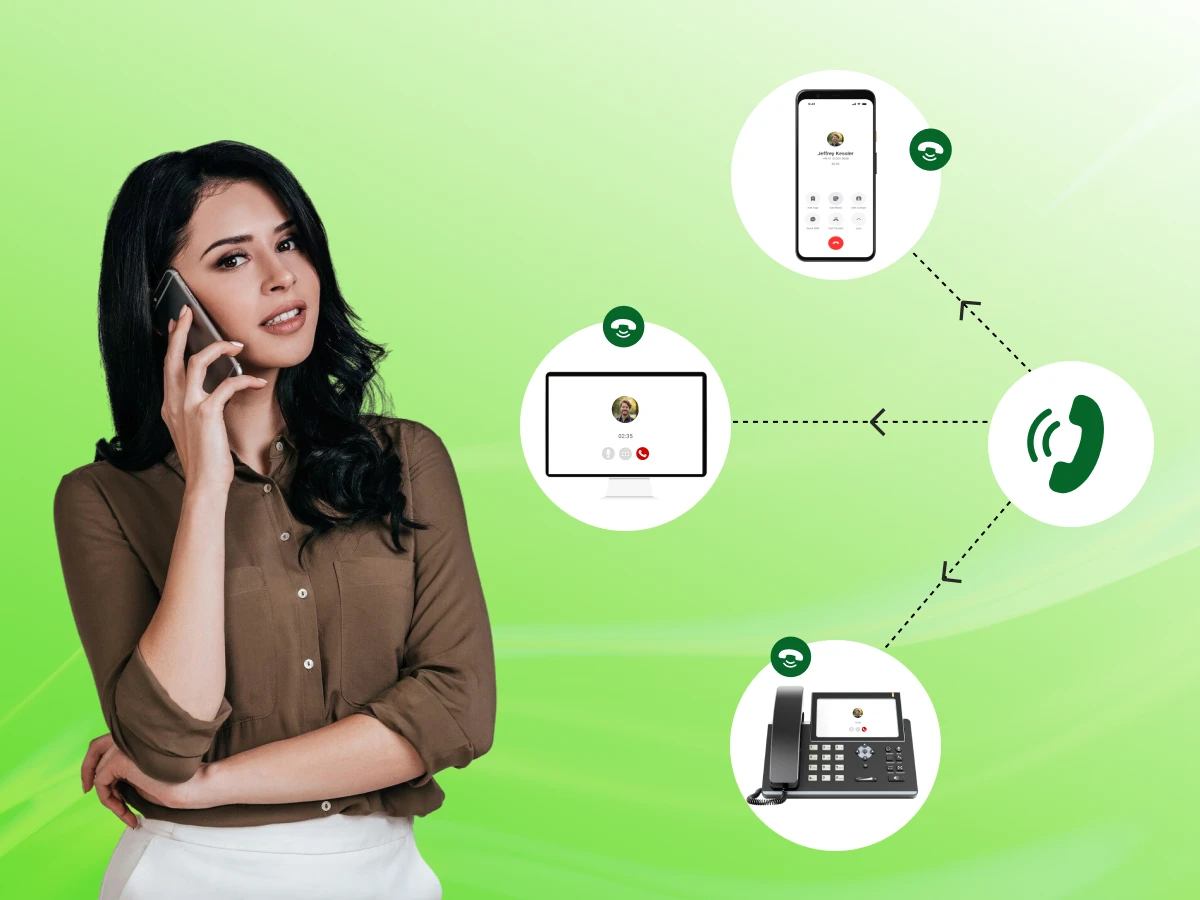
Think of it like a shared inbox, but for your phone calls. When an incoming call arrives, every device connected to that line rings at the same time.
This means a receptionist, an assistant, and a manager can all see the same incoming call. If the manager is busy, the assistant can pick it up.
This call-sharing setup ensures that your customers always reach a human being rather than a voicemail box. It is a fundamental part of modern cloud communication that keeps teams connected.
In short, SCA takes a single primary line and stretches it across your entire team. It simplifies call management and ensures your business phone systems are as efficient as possible.
Now that you have a basic idea of what it is, you might be wondering how the technology actually connects all those different phones at once.
Modern VoIP systems use the Internet to route calls. Unlike old analog systems, a VoIP provider can send call data to multiple places at once. This is where the shared line feature shines. It uses SIP trunking and cloud PBX technology to sync your devices in real-time.
When someone dials your VoIP phone number, the system sends a signal to all registered devices. Your VoIP desk phones, the Webex app on your laptop, and even your mobile device can ring together.
This “blast” of ringing ensures that someone, somewhere, is ready to receive calls the moment they happen.
One of the coolest parts of SCA is that it isn’t just about ringing. It’s about status. If one person picks up the call, the other phones show that the line is “busy.” This is often called a Busy Lamp Field (BLF).
It prevents two people from answering the same call or accidentally interrupting a live conversation.
All these actions are handled by a managed cloud server. The server tracks every call state. It knows who is on a call, who is on hold, and which lines are free.
Because everything is in the cloud, you don’t need bulky hardware in your office to manage these complex communication processes.
SCA makes it easy to move calls around. You can answer a call on your desk phone, put it on a “shared hold,” and your colleague can pick it up from their own desk. There is no need for complicated transfers or dialing long extension numbers. It’s as simple as pressing a line key.
SCA turns your telecommunications into a team sport. It uses the power of Internet Protocol technology to make sure no call goes unanswered.
The mechanics are impressive, but the real power of SCA lies in the specific tools it gives your team to handle calls more professionally.
What makes SCA different from a standard phone line? It’s the specific functionality built for teamwork. Let’s look at the features that make it a powerhouse for business communication efficiency.
Whether you use SIP phones, conference phones, or a Webex app, everything stays in sync. If you delete a missed call notification on one device, it disappears from the others. This keeps your device management clean and organized.
Sometimes, you need to join a call that is already in progress. If your settings allow it, SCA enables “bridging.”
This means a second user can jump onto a line to help with a customer query, effectively turning a two-way call into a quick three-way meeting without extra call routing steps.
With SCA, “holding” a call is a shared experience. When you put a caller on hold, the line appearance on other phones will flash.
Any authorized team member can then press that line to retrieve the caller. This is much faster than traditional call handling methods.
Visibility is key to productivity. The line appearance feature lets everyone see exactly what is happening. You can tell at a glance if your teammate is on a call, helping you decide whether to take a message or try to bridge them in.
When your team makes outgoing calls from a shared line, the caller ID remains consistent. The customer sees the business name or the main office number, regardless of which handsets or mobile devices the staff is using. This maintains a professional image.
SCA is perfect for executive assistant scenarios. An assistant can screen calls on the shared line and only involve the executive when necessary. It’s a built-in way to manage team settings and workloads.
You might worry about privacy with so many people sharing a line. Don’t worry; most VoIP systems allow administrators to set “private” modes.
If a call is marked private, others cannot bridge in or see the details, giving you total control over security considerations.
These features combine to create a telephony feature set that supports both high-volume call centers and small office environments.
Having these features is great, but how do they actually help your bottom line? Let’s look at the major perks for businesses trying to scale.
For a small business, every customer interaction counts. SCA allows you to act like a much larger company by improving your responsiveness and client satisfaction.
When multiple people can see an incoming call, the reduced wait times are noticeable. Customers don’t have to wait for a transfer or a callback. Faster service leads to higher customer engagement and better reviews.
In today’s work models, your team might be spread across different cities. Because SCA works through a cloud phone system, a remote worker can share a line with someone in the physical office. This mobility ensures your business stays “open” even if the office is empty.
Instead of buying a separate, expensive IP PBX for every person, you can use SCA to manage multiple users on fewer lines. 82% of businesses report that moving to cloud-based systems like this has significantly lowered their costs.
This cost-effectiveness is vital for growing companies that need to scale their communication systems without breaking the bank.
It takes the pressure off single individuals. If one person is overwhelmed, another can step in. This support for delegated calls ensures that service quality remains high, even during peak hours.
SCA fosters collaboration. It removes the “silos” of individual phone extensions. When everyone is on the same page regarding call information, the whole team works more harmoniously.
If one phone breaks or a wired headset fails, the call can still be answered on another device. This continuity is essential for uptime and ensures that your business communication solutions never let you down.
Investing in an SCA system is about more than just phones; it’s about building a foundation for efficient business communication.
The benefits sound good on paper, but seeing it in action makes it even clearer. Here’s how real teams use shared lines to stay organized every day.
How does this look in the real world? SCA isn’t just a technical term; it’s a tool used daily in various work environments.
This is the most common use. An executive and their assistant share a line appearance. The assistant screens the inbound call, places it on hold, and the executive picks it up when ready. It’s a classic executive assistant scenario made modern.
In sales teams, everyone wants to catch the lead. With SCA, the first available agent can grab the call. For customer service departments, it allows senior agents to monitor calls or jump in if a junior staff member needs help.
A worker at home using a wireless headset and a laptop can share a line with a colleague in the office using a VoIP desk phone. They both see the same calls, making the distance between them disappear.
This flexibility is more important than ever. Reports from 2023 show that 55% of the global workforce now uses VoIP for remote work communication. A shared line feature allows remote staff to stay connected just as those sitting at the office.
In healthcare, a shared line can be used for a nurse’s station. Multiple nurses can monitor the same line for patient inquiries. In law firms, several clerks might share a line for a specific case. The flexibility of shared lines makes it adaptable to almost any industry.
Whether you are using Microsoft solutions, the 3CX solution, or a standard SIP trunking phone system, these use cases prove that SCA is a versatile tool for any team.
At this point, you might think this sounds a lot like call forwarding or pickups, but there are some big differences you should know about.
These three features often get confused because they all help teams manage incoming calls. However, they work in very different ways.
“`html
| Aspect | Shared Call Appearance (SCA) | Call Forwarding | Call Pickup Groups |
|---|---|---|---|
| Call Handling | Multiple users handle the same call. | The call is redirected to one user. | Another user can pick up an incoming call. |
| Visibility | Real-time shared call status. | No shared visibility. | Limited visibility. |
| Control | Shared control across users. | Single-user control. | Control shifts to the person who answers. |
| Device Behavior | Rings on all assigned devices. | Rings only on the forwarded device. | Rings on individual devices. |
| Collaboration | High (team-based handling). | None. | Limited (one-time support). |
| Best Use Case | Teams managing one number together. | Redirecting calls when unavailable. | Backup call answering in teams. |
If your team needs real-time collaboration on calls, a shared line setup is the most powerful option.
If you just need basic redirection or backup answering, the other two features, call forwarding and call pick up groups, may be enough.
While we’re clearing up confusion, let’s look at one more technical term, Bridged Line Appearance, and see how it differs from shared lines.
Shared call appearance and bridged line appearance are closely related, which often causes confusion. While they sound similar, their functionality and flexibility differ.
| Aspect | Shared Call Appearance (SCA) | Bridged Line Appearance (BLA) |
|---|---|---|
| Technology | VoIP/cloud-based systems. | Traditional/on-premise systems. |
| Device Support | Desk phones, mobile apps, softphones. | Mostly desk phones. |
| Flexibility | High and scalable. | Limited flexibility. |
| Call Status | Real-time synchronization. | Basic line status. |
| Mobility | Supports remote and hybrid work. | Limited to physical locations. |
| Setup | Easy through the admin portal. | More hardware-dependent. |
| Best Fit | Modern businesses and remote teams. | Legacy office environments. |
Bridged line appearance can be seen as an older version of shared line functionality. It works, but it lacks the flexibility and scalability that modern VoIP systems provide.
If you’ve decided SCA is the right fit for your team, the next step is getting it up and running on your system.
Setting up SCA might sound technical, but most modern VoIP providers make it easy through a management console.
First, ensure your VoIP system and IP phones support SCA. Most modern SIP phones and cloud PBX systems do. Check with your VoIP provider to confirm that your current plan includes this telephony feature.
Log in to your admin portal. Look for the SCA setup or shared line appearances section. Here, you will select the primary line you want to share and assign it to specific users or teams.
On the actual phones, you need to assign a line key for the shared line. This usually involves clicking a few buttons in the device management section of your software to tell the phone which button corresponds to the shared line.
Finally, decide how the phones should behave. Do you want them all to ring at once, or should there be a ring order? You can also configure shared line appearance settings to decide who has permission to “barge in” on calls.
Once these network adjustments are made, your team is ready to start call sharing!
Now that your system is ready, you need to decide which specific team members will benefit the most from having a shared line.
Not every single employee needs the shared line feature, but for specific support roles, it is a game-changer.
If your team works closely together to handle clients, then configuring shared call appearance is a smart move for your business settings.
Simply turning the feature on isn’t enough; you need a solid plan to make sure your team uses these shared lines effectively without causing confusion.
To get the most out of your SCA system, you should follow some industry best practices.
At the end of the day, a shared line is only as good as the team using it. Setting these simple rules early on will help everyone stay on the same page and ensure your customers always get a smooth experience.
As helpful as this tool is, it isn’t a magic fix for everything. There are a few small hurdles and limitations you should keep in mind.
While SCA in telephony is robust, it is important to understand some technical “limitations” often discussed in the broader context of system integrations and Shared Call Appearance (SCA), which share the same acronym.
In some digital communication systems, if not configured correctly, you might get “ghost rings,” or alerts that aren’t actually calls. This can lead your team to ignore the phone.
Your cloud communication is only as secure as the server it sits on. Always ensure your VoIP provider stays updated against known security threats to protect your telecommunications.
If your business phone system relies on multiple third-party apps (like a CRM and a phone app), a failure in one can affect the shared line. This is a “blind spot” in your configuration.
If you have a highly customized IP PBX, it might be harder to troubleshoot SCA issues compared to a standard 3CX solution or Microsoft solutions.
Sometimes the system knows a line is busy but doesn’t tell you why. This lack of context can make it hard for supervisors to manage the flow of work in real-time.
If the admin portal is too complex, making a simple change to who can receive calls might take too long, creating a bottleneck in your business communication.
Every tool has its downsides, and SCA is no different. While these technical hiccups can happen, they shouldn’t stop you from using the system. Once you understand these limits, you can plan around them and still enjoy a much more connected, responsive team.
Shared Call Appearance (SCA) is a vital tool for any modern team. It bridges the gap between different devices, keeps teams in sync, and ensures that your customers always get the attention they deserve. By using shared line appearances, you move away from isolated extensions and toward a truly collaborative communication system.
From improving productivity to enhancing client satisfaction, the benefits are clear. While there are a few limitations of shared systems to keep in mind, the pros far outweigh the cons for most small and growing businesses.
Talk to your VoIP provider today about configuring shared call appearance and take your business communications to the next level!
Yes! Most modern VoIP systems, like the Webex app or 3CX solution, allow you to see and answer shared lines from your smartphone.
Absolutely. You can have your primary line for personal calls and several other lines for team-based call sharing.
A Hunt Group routes a call from one person to the next in a sequence. SCA allows everyone to see and interact with the call at the same time on their IP phones.
As long as you have compatible VoIP phones or SIP phones, you don’t need extra hardware. Most of the functionality is managed through the cloud.
Yes, both wired headsets and wireless headsets work perfectly with SCA-enabled devices.
Yes, provided you follow security best practices and use a trusted VoIP provider. Many systems also offer privacy controls for sensitive conversations.
