

What is PABX System? A Comprehensive Guide

Placing and answering calls may appear simple nowadays. Beneath every seamless business dialogue is advanced technology that has significantly progressed over the last hundred years. Recall when reaching out to coworkers, involved walking across the office or dispatching a note? Those times faded away as business communications shifted from phone lines to intricate networks supporting multinational companies.
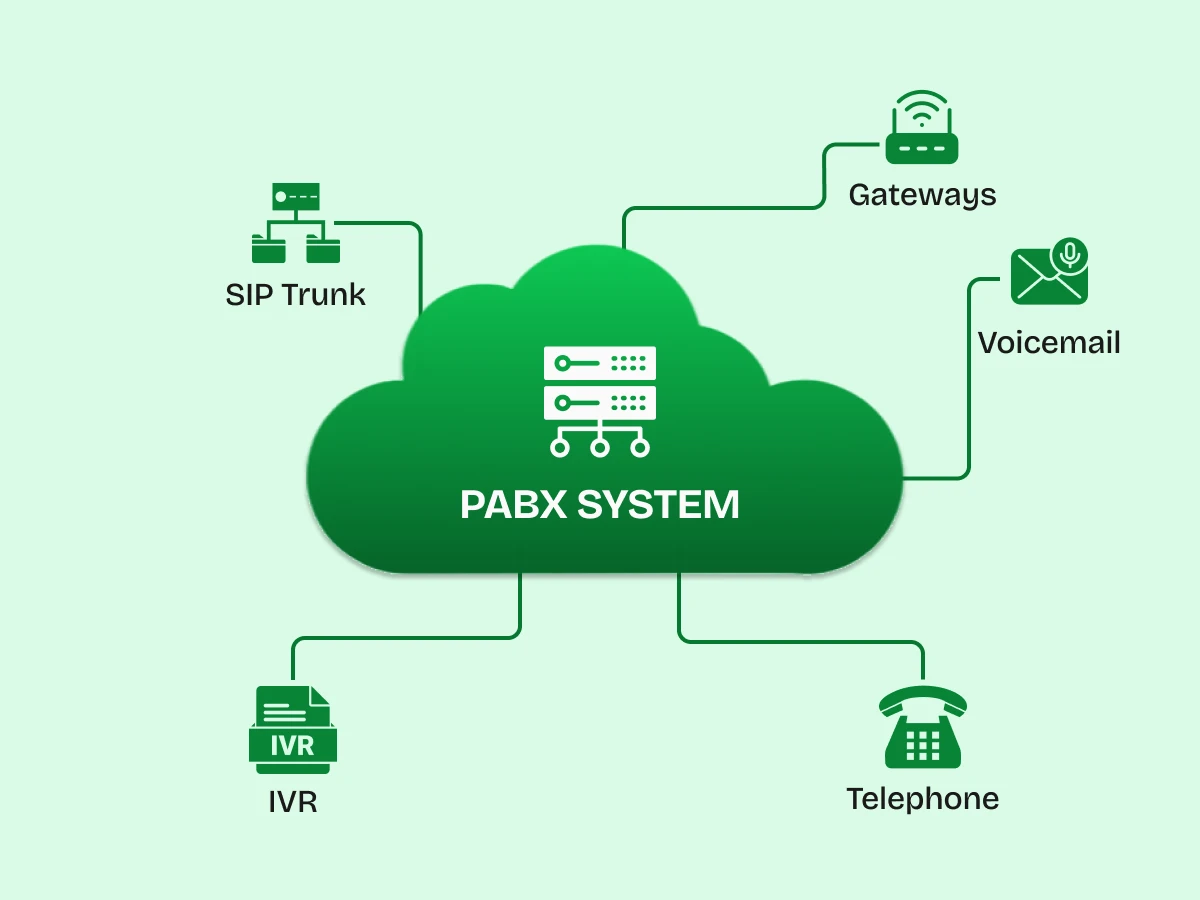
A PABX system (Private Automatic Branch Exchange) represents the backbone of modern business phone systems. Whether you’re running a startup with five employees or managing a multinational corporation, understanding how these telephone systems work can revolutionize your communication strategy.
This detailed guide covers all information about PABX solutions, tracing their evolution from traditional copper wire systems to advanced cloud-based PABX platforms, revolutionizing organizational communication.
To really grasp the value here, we need to strip back the confusion. PABX stands for Private Automatic Branch Exchange. Let’s break that down:
In simple terms, a PABX system is a machine (or a piece of software in the cloud) that connects your internal office phones to each other and to the Public Switched Telephone Network (PSTN).
You will often see the terms PABX vs PBX used as if they are the same thing. In 2026, they basically are.
A Private Branch Exchange PBX referred to the earliest systems where switchboard operators sat in a room and manually operated the connections using patch cords. When technology advanced, and the systems started switching calls electronically without human help, they added the “A” for “Automatic,” becoming Private Automatic Branch Exchange PABX.
Today, almost every system is automatic. So, whether a vendor tries to sell you a PBX system or a PABX system, they are talking about the same automated capabilities.
Consider having 50 staff members. In the absence of a PABX, you would require 50 phone lines from the telephone provider. That is expensive and inefficient because it’s rare that all 50 people are on the phone at the exact same second.
A PABX solution allows you to buy perhaps 10 external lines (trunks) and share them among those 50 people. The system handles the traffic, routing calls to the right desk and queuing them if all lines are busy. It is the ultimate tool for allowing businesses to maximize efficiency.
The journey of the business telephone is actually quite fascinating. It reflects the broader history of technology, moving from heavy mechanics to invisible digital streams.
At first, the manual PBX existed. If you have watched films from the 1950s, you recognize the scene: a space packed with switchboard operators quickly inserting and removing cables to link calls. This was a manual switchboard. It was slow, privacy was non-existent (operators could listen in), and it was incredibly expensive due to labor costs.
As electronics improved, we moved to private automatic branch exchanges that used electromagnetic switches. These were the heavy beige boxes bolted to the wall in the server room. They relied on copper wiring running to every single desk. While they removed the human operator, they were still limited. Call transfer was clunky, and if you wanted to move a desk, you had to physically rewire the connection.
Then came the Digital PABX. This technology converted voice into digital signals, which allowed for clearer audio and more features. This period saw the arrival of Direct Inward Dialing (DID), allowing a caller to reach an employee’s extension without needing to connect via a receptionist. Nonetheless, it still depended largely on hardware and the conventional telephone system.
This is where we are today. The evolution of PABX took a massive leap with the internet. IP PBX (Internet Protocol PBX) arrived, using the same network cables for your computer and your phone.
Eventually, this moved off-site entirely, leading to Cloud-based PABX and Hosted PBX. Now, your “phone system” is just an app on a server farm, and your voice travels as data packets via VoIP technology.
Why is a reliable PABX system important in an era dominated by Zoom and Slack? Because speaking remains the method to solve complicated problems
If you have a campus with three buildings, or even just three floors, calling between departments shouldn’t cost money. A PABX system keeps all internal calls within the local network. Internal and external traffic is separated. You can talk to the warehouse manager for an hour, and it costs the business zero cents because the call never touches the public telephone lines.
With a modern system, you have central management. The IT director is able to view a dashboard that shows precisely who is engaged in calls, the duration of each call, and the locations of any delays. This unified oversight is crucial for maintaining quality standards. You can listen in on call recording files to train new support staff or check call quality metrics to ensure your internet connection is stable.
Old systems were a nightmare to expand. You had to buy new circuit boards and pull new copper wires. With a hosted PBX, adding a new employee is as simple as clicking “Add User” in a web portal and plugging in a handset. The system scales with you.
Let’s get under the hood. How does a PABX system actually handle a call from start to finish?
Step 1: The Connection Phase
It begins with establishing a link to the world.
Step 2: The “Handshake”
When a client calls your business number, the call hits your telephone exchange. The PABX answers immediately.
When an auto attendant is configured, the caller is presented with a menu: “Press 1 for Sales, 2 for Support.” This demonstrates the functionality of the IVR (Interactive Voice Response) system.
Step 3: The Routing Phase
Once the caller selects an option, the PABX looks at its internal directory. It identifies that “Sales” corresponds to a specific “Ring Group” of extensions. It then sends digital signals to those specific internal phones.
Step 4: Connecting the Call
When an employee picks up, the PABX bridges the connection. It creates a dedicated session for that conversation. If the employee needs to escalate the issue, they can use call transferring.
This entire complex dance, routing calls, managing holds, and converting audio to digital packets, happens instantly, managed by the PABX solution.
The difference between a standard phone and a business phone system lies in the advanced features. Here is what modern PABX systems allow you to do:
Auto Attendant:
Auto attendant ensures every call is answered 24/7. You can configure different menus for business hours and holidays. It streamlines call routing so human receptionists aren’t overwhelmed.
Unified Communications & Microsoft Teams:
Contemporary work is team-oriented. Connecting with CRM systems (such as Salesforce or HubSpot) ensures that when a client calls, their account information appears immediately on your display.
Call Recording and Monitoring:
Call recording is crucial for adherence and training purposes. You have the option to record every call or selected lines. Additionally, contact centre supervisors can “barge in”. Whisper during calls to assist agents with challenging discussions.
Follow Me / Find Me:
This feature is a game-changer for remote work. If you don’t answer your desk phone, the PABX system automatically tries your mobile app. If you don’t answer that, it moves to a colleague. It ensures you never miss a lead.
Conference Calling:You have the option to establish a conference call bridge that allows dozens of people to join by dialing in. This serves as an alternative to external conferencing providers.
Voicemail to Email:
Instead of dialing a code to listen to voicemails, the system converts the audio to an MP3 and emails it to you. Some advanced features even transcribe the text for you.
Not all systems are created equal. Depending on your infrastructure, you might choose one of the following:
This is the “heavy metal” of the phone world. It uses a physical box on your premises connected to copper wiring and standard telephone lines.
Best for: Hotels or old buildings where re-cabling is impossible.
Downside: Lacks advanced features; expensive maintenance; no remote working capability.
This setup utilizes Internet Protocol (IP) while retaining the server within your own server room. The equipment is owned by you. It links to phones through the LAN (Local Area Network).
Ideal for: Organizations requiring centralized management of their data and security (e.g., banks).
Downside: High upfront cost; you are responsible for maintenance.
At present, the favored option is for the service provider to host the PABX system in the cloud. You access it via the internet utilizing VoIP technology.
Best for: SMBs, remote teams, and companies wanting low upfront costs.
Downside: Totally dependent on internet stability.
A combination of traditional and modern. It links to signals (ISDN) as well as IP networks.
Best for: Companies transitioning slowly from traditional PBX systems to the cloud.
How to decide on choosing the right PABX? Here is a roadmap to help you choose the right PABX.
Step 1: Audit Your Infrastructure
Do you have high-speed internet? If yes, a cloud-based PABX is ideal. If you are in a rural area with poor data but good copper wires, a traditional or hybrid system might be safer.
Step 2: Count Your Users and Growth
Don’t just count current employees. If you plan to hire 20 more people next year, avoid a system that requires buying physical line cards for every new user. Hosted PBX allows you to add users instantly via a partner portal.
Step 3: Identify Critical Features
Do you run a contact centre? Then you need advanced queuing and call recording. Do you have a sales team on the road? Then you need a mobile app and call forwarding. Make a list of “must-haves” versus “nice-to-haves.”
Step 4: Budget CapEx vs. OpEx
Traditional PBX requires a large upfront investment (Capital Expenditure). Hosted PBX is a monthly subscription (Operating Expenditure). Decide which fits your cash flow better.
Step 5: Integration Check
Check if the PABX solution has integrations with CRM tools you already use. If you use Zoho or Salesforce, seamless integration will save your staff hours of manual data entry.
Let’s look at a hypothetical example to see this in action.
The Company: GreenLeaf Logistics, a supply chain company with a head office, a warehouse, and 10 remote drivers.
The Problem: They were using an old manual-operated style system with limited lines. Customers were getting busy signals. Drivers had to use personal cell phones, meaning the company had no record of client interactions. Internal calls between the warehouse and office were tying up external lines.
The Resolution: They transitioned to a Hosted PABX system utilizing SIP trunking.
The Implementation:
The Results:
To reach an informed conclusion, it is essential to go beyond the promotional materials and grasp the everyday operational aspects of these systems. Similar to any technology, a PABX system offers benefits, yet it also presents new difficulties that contrast with the traditional copper wiring environment. Let’s weigh the good against the bad.
A Polished, Enterprise-Grade Image
When a customer calls a mobile number and gets a generic voicemail, it screams “small operation.” A PABX system instantly upgrades your image. By using an auto attendant (that friendly voice saying, “Press 1 for Sales”), you create a professional front door for your business. It allows you to utilize call routing strategies that ensure customers are directed to the right expert immediately. Even if you are a three-person team working from a garage, features like music-on-hold and customized greetings make you look like a structured, established corporation.
Unbeatable Cost Efficiency
If you look at the math of PABX vs standard individual landlines, the savings are undeniable.
True Mobility and Flexibility
The modern office isn’t a place; it’s wherever you are. One of the strongest selling points of cloud-based PABX is the ability to move your PABX extension outside the office walls. Your office number can ring on your desk phone, your laptop, and your smartphone app simultaneously. You are no longer tethered to the physical telephone network of your building.
Automation and Efficiency
We have moved far beyond the era of the human/manual PBX, where switchboard operators were the bottlenecks of communication. Modern systems automate the flow of traffic. This automation reduces the administrative burden on your staff, allowing businesses to allocate human resources to solving complex customer problems rather than just manually operated call switching.
The Learning Curve (Complexity)
With great power comes great complexity. Modern PABX systems are packed with advanced features, from integration with CRM to multi-party video conferencing. For employees used to simple landlines, this can be overwhelming.
Dependence on Internet and Power
This is the single biggest vulnerability of VoIP PBX and hosted PBX solutions.
Security Vulnerabilities
When you move from a closed telephone exchange to the open internet, you introduce cybersecurity risks. Private telephone networks connected to the web can be targets for hackers.
It’s easy to get lost in the acronyms. Here is a quick cheat sheet:
| Feature | Traditional PBX | PABX | VoIP / IP PBX |
|---|---|---|---|
| Primary Technology | Copper-based telephone wiring | Automated private switching system | Internet Protocol (IP) |
| Voice Signal Type | Analog | Digital | Packet-based data |
| System Management | Complex (requires on-site technician) | Centrally managed system | Simple (web-based admin portal) |
| Cost Model | High upfront hardware investment | Moderate and variable costs | Low upfront cost (cloud subscription) |
| Flexibility | Limited to physical office location | Moderate flexibility | Accessible from anywhere (remote-ready) |
The PABX system has come a long way from the days of switchboard operators pulling plugs in a busy exchange room. It has evolved into a sophisticated, software-driven powerhouse that drives business communications globally.
Whether you are looking to streamline internal calls, improve customer service through auto attendant workflows, or cut costs with VoIP technology, a modern PABX is the answer. It offers the centralized control that business owners crave and the flexibility that modern employees demand.
As private telephone networks continue to merge with the internet, features like Microsoft Teams integration and AI-driven analytics will become standard. If your business is still running on copper wires and legacy telephone exchanges, you are missing out on the agility that allowing businesses to scale requires.
It is time to move away from the manual PBX mindset. Assess your needs, choose the right PABX, and watch how seamless communication transforms your business efficiency.
PABX stands for Private Automatic Branch Exchange. It is a telephone network used within a company that switches calls between local users and allows them to share a certain number of external phone lines.
PBX (Private Branch Exchange) could imply a manual system, while PABX implies an automatic one. However, in today’s market, the terms are used interchangeably to refer to any business phone system.
If you choose a Hybrid PABX or use analog-to-digital converters (gateways), yes. However, to get the full benefit of advanced features and HD call quality, upgrading to IP phones is recommended.
Providers use QoS (Quality of Service) protocols to prioritize voice traffic over other internet data. However, your local internet speed and stability play a huge role.
Yes, if configured correctly. Modern PABX systems use encryption for SIP trunk signaling and voice traffic to prevent eavesdropping.
If you have an on-premise system without a generator, phones go down. If you have a Hosted PBX, the system stays live in the cloud. You can use the mobile app on your cell phone (via 4G/5G) to keep making and receiving calls.
Yes, most modern systems offer integration with CRM platforms like Salesforce, Zoho, and HubSpot, allowing for screen pops and automatic call logging.
SIP trunking is generally cheaper, faster to provision, and offers better flexibility for direct inward dialing and scalability compared to physical telephone lines.
