

How to Choose the Best IP Phone System for Small Business?

Your phone rings at 3 PM, nobody answers, and just like that, you’ve lost another customer. Running a small business is tough enough without losing money to an outdated phone system. You are literally throwing money down the drain between the ridiculous monthly bills, the missed calls, and the equipment that appears to break every other week.
Here’s the thing: an IP phone system can fix all of this. We’re talking about cutting your phone costs in half while getting features that make your small operation sound incredibly professional. You no longer need to go between low cost and quality.
In this blog, we take you through the steps to selecting the best IP phone system for a small business.
When evaluating different business phone system options, certain features are non-negotiable. Here’s what your small business needs:
Your VoIP phone system must deliver crystal-clear HD audio without constant interruptions. Pay attention to the providers that guarantee 99.9% of uptime and have more than one backup data centre.
Get call forwarding, call routing, voicemail transcripts, and an auto attendant as standard features. Add in call recording for training and unlimited calling so you never worry about going over your minutes.
Your phone system should work on desktop IP phones and through a good desktop and mobile app. Your team can take business phone calls anywhere without mixing work with their personal numbers.
An IP phone system sends your calls through the internet instead of old-school traditional phone lines. Your voice gets turned into digital data and travels across your internet connection, kind of like how emails work. That’s the whole idea behind VoIP or business VoIP (Voice over Internet Protocol).
Desktop IP phones look similar to traditional office phones but connect to your network via Ethernet cables. The big win here is that you don’t need all that expensive hardware traditional systems require. Your VoIP phone system uses the internet you already have. You can also use the desktop app or mobile app to turn any device into a business phone.
Here’s what makes this really useful: one VoIP system handles everything like regular calls, video meetings, team chat, and business texting. Features like auto attendants, call queues, and call recording that required expensive hardware add-ons with traditional systems are now software-based and often included in your basic plan.
You don’t need to be a tech expert, but knowing the basics helps. Here’s what happens when you make a call: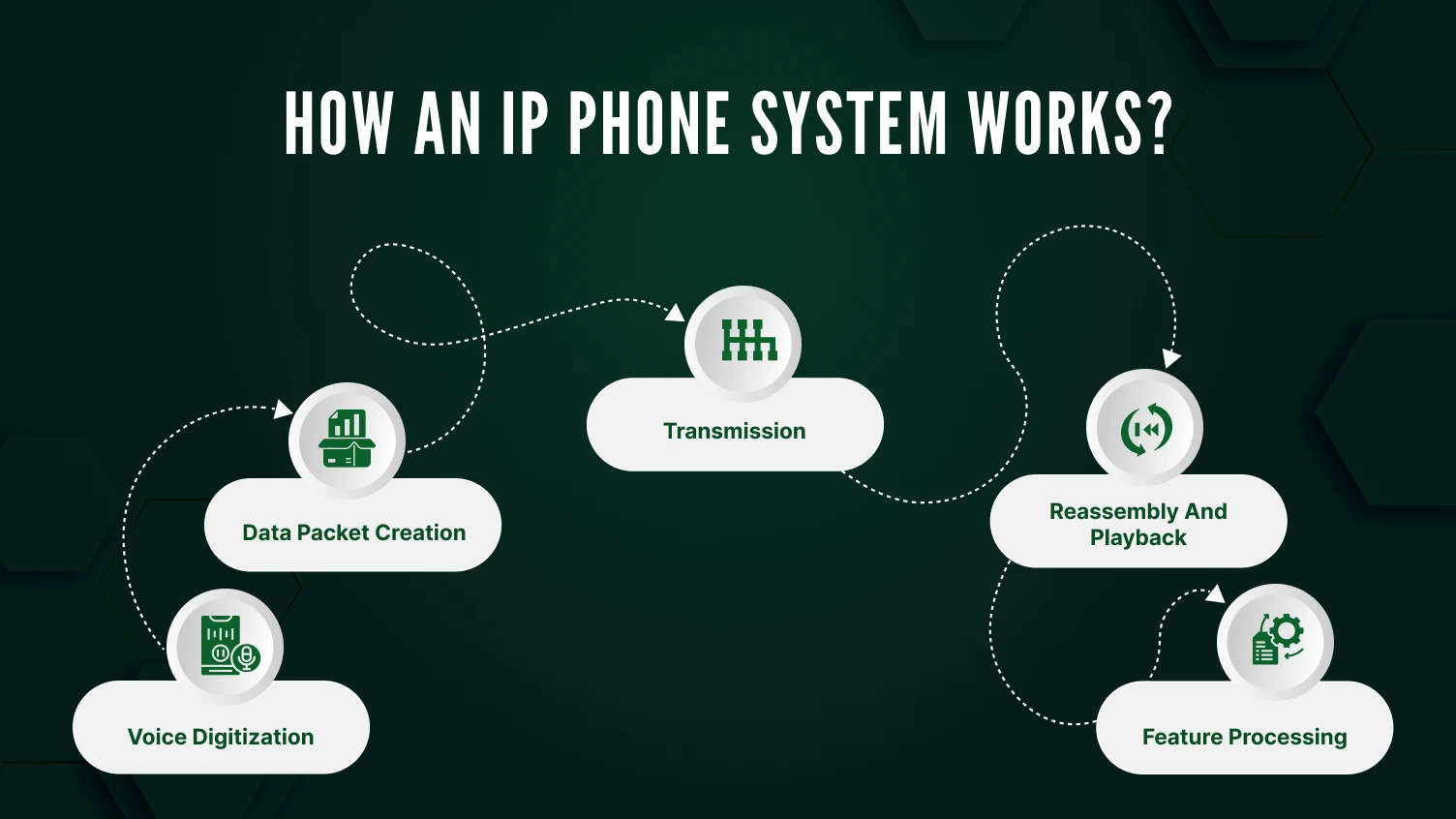
Here’s a quick breakdown of the two main types of IP phone systems you can choose from:
On-premise systems install all hardware and software at your physical location. You purchase phone equipment, servers, and SIP trunks (the virtual phone lines connecting your system to the public telephone network). Your IT team manages everything from installation to maintenance.
You get complete control over your business phone system and data security. Strict compliance requirements usually lead companies to take this path. However, on-premise systems require significant upfront investment and ongoing maintenance costs.
Cloud phone systems host everything at your provider’s data centers. You make a monthly payment per head, and they do all the technical background. You simply connect IP phones or download the desktop and mobile app and start making calls.
This model is perfect for small businesses because it requires minimal phone equipment investment. Adding new people is as easy as clicking a button on a website. Most modern providers like Ooma Office and Zoom Phone use this cloud-based approach.
Picking your business VoIP provider matters more than which phones you buy. Here’s what to focus on:
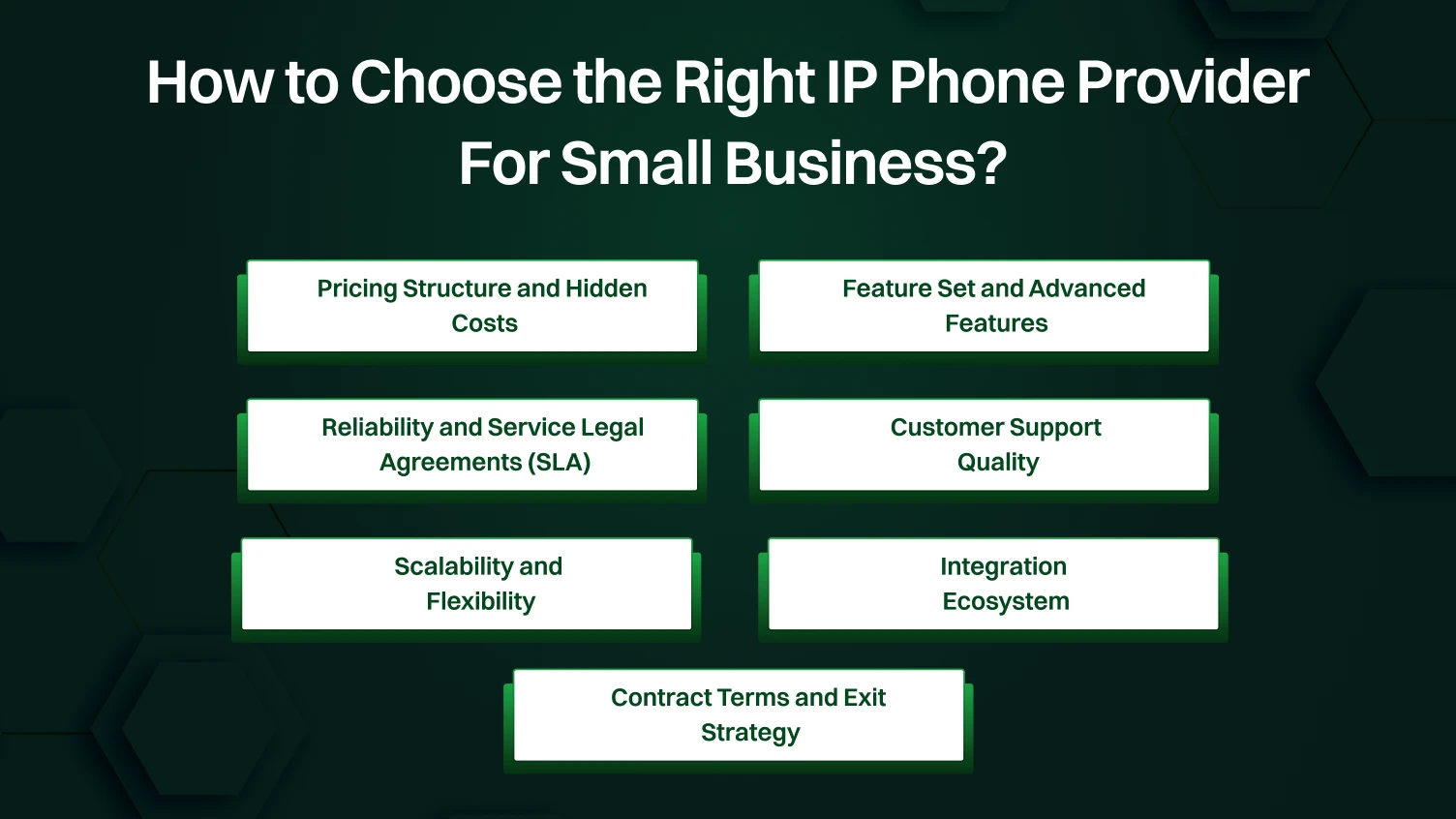
Compare the monthly advertised price but the overall cost of ownership. Check what’s actually included in the plan. For example, is call recording and auto attendant actually available on the basic plan, or do those cost extra? Some providers say unlimited calling, but it only covers certain areas. International calling may result in higher fees.
Enquire about installation charges, cost of desk phone units, and unit charges. The cost of cloud providers ranges from $20 to $45 per person per month. Divide your total cost, which includes phone equipment, setup, and monthly fees, by 3 years to compare options equally.
Know what your business needs first. Need video conferencing? Team collaboration tools? Integration with your contact center software? Check what advanced features, such as call queues, smart call routing, and business texting, are included or cost extra.
Communication tools are also integrated as systems, including Microsoft Teams or Zoom Phone. If you already use these platforms, their VoIP offerings might integrate more smoothly. Look for programmable keys on desktop IP phones that let users customize their workflow.
Your business phone can’t afford downtime. Review the provider’s uptime guarantees and what happens during outages. Do they have backup data centers? How fast do they actually fix stuff? Read independent reviews about actual reliability, not just marketing promises.
Ask specifically about call quality during peak usage times. Some cheap business VoIP providers oversell their networks, causing quality issues when traffic increases. Request references from businesses similar to yours.
Your workflow may be disrupted in case of phone outages, so it is important to have reliable support. Determine support availability: 24/7 or just during business hours? Can you contact sales and technical support through multiple channels like phone, chat, and email?
Test their dedication before they commit. Call with some pre-sales questions and pay attention to how they respond to you. Read customer reviews specifically about support experiences, not just features.
Your business isn’t static. Ensure that you can secure seasonal staff on a temporary basis and not be compelled to sign a one-year contract. Consider the ease with which you can add users, and the lower prices you pay as your team size grows.
Check whether you can mix desktop IP phones with mobile-only users at different price points. Some providers charge the same whether someone needs a desk phone or just the app, while others offer flexible pricing.
Your VoIP phone system must be able to integrate with your existing business software. Essential integrations include your CRM (for screen pops showing customer data during calls), help desk software, and team chat platforms. CRM integrations are time-saving and enhance customer service.
Look for pre-built connections to the popular platforms like Salesforce, HubSpot, and Zendesk. The custom integrations API is important when you use specialized software. Systems with robust integration libraries adapt to your workflow instead of forcing you to change processes.
Check the fines for the length of the contract and cancellation policies. Month-to-month contracts are flexible but tend to be expensive per user. Annual contracts will save you money, but tie you up.
Ask about number portability. In case you switch providers, you must be able to take your existing business phone numbers with you. This process must be simple and well-documented.
Moving to an IP phone system gives you real advantages over traditional phone systems:
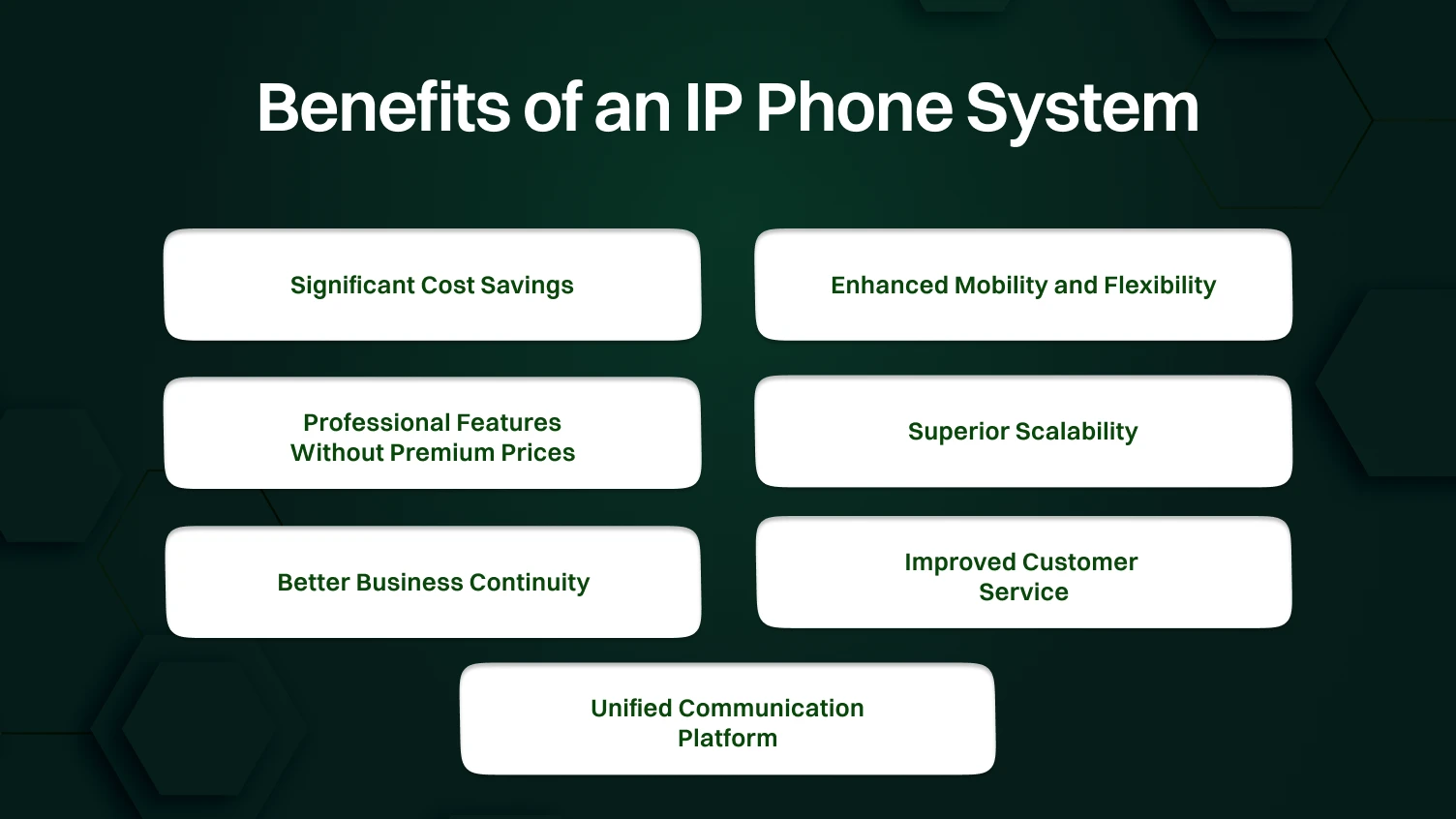
VoIP phone system solutions often save 40-60% compared to traditional business phone services. You no longer have to pay for long-distance charges and costly high maintenance hardware. Unlimited calling plans include features that used to cost hundreds extra every month.
Setup costs way less with cloud phone systems, too. You don’t need a specialized phone technician; your regular IT person or even a tech-savvy employee can handle it. Good quality IP phones start around $100 instead of $300+ for traditional business phones.
The desktop and mobile app turn any device into your business phone. Your team answers office calls from home, the coffee shop, or wherever they happen to be. No more missed calls because someone’s not at their desk.
Call forwarding transfers between devices without any inconvenience. Start a call on your desk phone, switch to your mobile phone when you leave, then finish it on your laptop at home. Your customers get consistent service no matter where your team actually is.
Features that used to require enterprise budgets now come standard. Auto attendant receives and directs calls in a professional way. Call recording is beneficial in training new people. Voicemail transcripts let you read messages instead of listening.
Call queues manage multiple calls during busy times. Advanced call routing finds whoever’s available. Video conferencing replaces those expensive separate services. These call management features make small businesses sound as professional as the big guys.
Adding people is just a few clicks. No technician waiting, no ordering new phone lines, no month-long delays. Hiring seasonal workers? Add them for a couple of months, then remove them when things slow down.
Opening a new location is just as easy. As long as they’ve got internet, people can connect to your VoIP system right away. No setting up new phone contracts or buying more infrastructure.
Traditional phone systems fail when offices lose power or face disasters. Business VoIP systems continue functioning because they’re cloud-based. Calls automatically forward to mobile devices if your office internet goes down. This redundancy keeps your business communications running during emergencies.
Call records and voicemail transcripts are backed up in the cloud, not stored on physical hardware that could be damaged. You won’t lose important customer communications during equipment failures.
CRM integrations display customer information automatically when calls arrive. Your team sees purchase history, support tickets, and notes before answering. This context lets them provide personalized service immediately.
Call routing directs customers to the right department on the first attempt. Call queues manage wait times professionally with hold music and position announcements. Call recording lets you review customer interactions to identify training opportunities.
Modern VoIP system solutions have integrated voice, video conferences, group chat, and business texting within a single platform. Employees do not have to use different applications to use different communication methods. Microsoft Teams and similar solutions create a truly unified communications experience.
This consolidation reduces software costs and training time. Your team learns one interface instead of juggling multiple applications. Information flows between communication channels naturally.
Your internet setup makes or breaks your IP phone system experience. Here’s what to check:
Each simultaneous call requires approximately 100 Kbps (kilobits per second) of bandwidth in both directions. You would require at least 2 Mbps of dedicated voice traffic for a small company with 10 staff, with all staff making calls at the same time. This, however, is the lowest possible.
Add all the other things you do with the internet, email, browsing, file transfers, the works. If you use video conferencing or Teams video, multiply voice bandwidth requirements by three to five times. Unified communications require a safe limit of 5-10 Mbps per employee.
Latency is used to measure the duration of data packets. To achieve good VoIP phone calls, latency must remain below 150 milliseconds. An increase in latency makes the conversation awkward with apparent pauses in the course of a response.
Jitter is the variation of the arrival times of packets. Excessive jitter makes the audio choppy, according to words being cut in and out. The jitter of your network must not exceed 30 milliseconds. The majority of business VoIP providers are providing free readiness tests, which check latency, jitter, and packet loss, all of which contribute to call quality.
Quality of Service (QoS) settings on your network equipment prioritize voice traffic over less time-sensitive data. Without QoS, a large file download may use up bandwidth and result in poor call quality. Setting up QoS will be used to make VoIP phone system traffic a priority.
Most modern routers support QoS, but someone needs to configure it correctly. Identify voice traffic by protocol (SIP) or by the IP addresses of your IP phones and prioritize it. Your IT support or business VoIP provider can help with proper configuration.
The majority of desktop IP phones operate on Power over Ethernet (PoE), providing data and electricity on the same network cable. This makes installation easy, but it needs network switches that are PoE-enabled. Check whether your existing switches support PoE or budget for upgrades.
Unlike traditional phone systems that work during power outages, IP phones need electricity. Invest in uninterruptible power supplies (UPS) for network equipment, including switches, routers, and base stations. This backup power keeps phones working for several hours during outages.
VoIP system calls can be intercepted if your network isn’t secure. Protect yourself with:
Check all these things before you switch. Fixing network problems after everyone’s already frustrated is way harder than doing it right from the start.
Even good VoIP phone system setups run into problems sometimes. Here’s how to fix the usual suspects:
Problem: Calls sound choppy, and words keep cutting out. Your team struggles to understand customers because the audio breaks up constantly. This happens when your network gets overloaded with downloads, video conferencing, or cloud backups running at the same time as calls.
Solution: Turn on QoS settings on your router to prioritize voice calls over other traffic. Test your internet speed when problems occur to see your actual bandwidth. If issues happen at the same time daily, you need faster internet or a dedicated line for VoIP calling.
Problem: You hear your own voice bouncing back during calls. This echo makes conversations difficult and sounds unprofessional to customers. IP conference phones in small rooms with hard surfaces create the worst echo problems.
Solution: Start by turning down the speakerphone volume and verifying that handsets are properly connected. Keep conference phones away from walls and update firmware regularly for better echo cancellation.
Problem: Your desk phone won’t connect or keeps dropping offline randomly. Employees see error messages or phones show “registering” forever. Sometimes phones work fine, then suddenly disconnect, forcing constant restarts.
Solution: Check that Ethernet cables are firmly connected and not damaged. Verify network switches supply enough PoE power because low power causes malfunctions. Review firewall settings to ensure SIP traffic isn’t being blocked by your security system.
Problem: One person hears fine, but the other hears nothing. Your team talks, but customers can’t hear them, or vice versa. This makes calls completely useless and typically means your firewall blocks audio in one direction.
Solution: Work with your business VoIP provider to configure SIP ALG correctly; often, you need to disable it. Update your router firmware because newer versions handle concurrent calls better. Verify your firewall allows audio to flow in both directions.
Problem: Voicemail notifications arrive hours late or never show up. Someone leaves a message at 9 AM, but nobody knows until the afternoon. This happens because VoIP system emails get caught in spam filters.
Solution: Add your phone system’s email addresses to your safe sender list immediately. Check spam folders for blocked notifications. Enable app notifications as a backup so people get alerts even when email fails.
Problem: The desktop and mobile apps won’t connect, no matter what you try. It works on WiFi but fails on cellular data. Your team can’t take calls remotely, defeating the purpose of mobile capability.
Solution: Update the app and verify internet connectivity first. Check firewall rules since many block VoIP traffic by default. If WiFi works but cellular doesn’t, contact your carrier to enable VoIP on your data plan.
Following these practices helps your business phone system actually deliver value:
You can use just the desktop app if you want, but giving quality desktop IP phones to heavy users makes their lives easier. Pick models from solid manufacturers like Yealink T54W or the Ooma 2602W that offer HD audio, color display, and programmable keys for common tasks.
Invest in decent IP conference phones for meeting rooms, where quality units with good echo cancellation and wide microphone range make audio conferencing actually work. Don’t buy ten different phone models because standardizing on two or three makes troubleshooting and training way simpler.
Your phone system only helps when people use it. Run hands-on training covering basics like call forwarding, call transfer, voicemail, and conference calling so everyone feels comfortable.
Create quick guides showing common tasks on both the desk phone and the desktop app, since people have preferences. Run refresher training every few months because lots of employees never discover features like voicemail transcripts, call recording, or smart call routing after the initial session.
Modern VoIP phone system setups provide detailed stats about call volumes, call queue performance, and usage patterns. Check these monthly to spot problems before they blow up.
High abandonment in call queues means you’re understaffed during peak times, while long handle times might mean training gaps. Use this data to optimize your business phone setup by adjusting schedules based on patterns. Call records verify your call routing rules work correctly, and data-driven decisions improve both customer experience and efficiency.
Treat your IP phone system like any IT system needing security attention. Change default passwords on admin interfaces and apply firmware updates quickly, since they often include security patches.
If your industry needs call recording for compliance, verify that recordings capture correctly and are stored securely. Document retention policies and make sure old recordings are deleted on schedule because keeping customer conversations forever creates legal headaches.
Test your disaster plan regularly by simulating internet outages. Unplug your router and verify calls forward to mobile devices as they should.
Document contact center procedures for major outages, including who decides to activate backups and how customers reach you if main numbers die. Written procedures prevent panic during real emergencies. Keep in touch with your business VoIP provider’s support team so that during outages, you have contacts who know your setup.
Your VoIP system probably has features you’re not using yet. Every quarter, review your business VoIP provider’s feature list and find capabilities that could help, like business texting for sales or team collaboration tools to cut email.
Ask employees what phone features frustrate them or what they wish existed. Often, the capability’s already there but not configured. As your business changes, update your phone system with new auto attendant menus reflecting current departments and adjust call routing when roles change.
Choosing the right IP phone system comes down to understanding your needs, being realistic about your budget, and thinking about where your business is headed. Switching from traditional phone systems to modern business VoIP isn’t just about new technology; it’s a real opportunity to change how your team works together and serves customers.
Start by figuring out your must-have features and comparing providers based on total costs, not just monthly bills. Check your network setup before you switch so you don’t end up with performance problems. Pick a business VoIP provider with solid support and integrations matching your current software.
The benefits are real: major cost savings, team mobility through desktop and mobile app access, professional calling features that used to require enterprise budgets, and room to grow without replacing everything. Whether you land on Microsoft Teams, Zoom Phone, Ooma Office, or something else, you’re investing in infrastructure that sets your business up for success. Take your time with this decision and use what’s in this blog to find what actually fits.
VoIP is the technology that makes voice calls work over the internet, while an IP phone is the physical device that uses that technology. You can use VoIP through dedicated IP phones, the desktop app on computers, or mobile apps on your smartphone.
Basic VoIP phone system plans run about $20-25 per user each month, while plans with advanced features cost $30-45 per user. Desk phone hardware costs $100-300 per unit, though many businesses skip physical phones and just use the desktop and mobile app.
Figure about 100 Kbps per active call in each direction, so 10 employees all on calls at once need at least 2 Mbps just for voice. A safer target is 5-10 Mbps per employee to handle VoIP calling, video meetings, and regular internet use without quality problems.
IP phone systems need both power and internet to work, so desk phone units stop working during outages unless you’ve got battery backup. Most business VoIP systems automatically forward calls to mobile devices when the office internet fails, and the desktop and mobile apps keep working on cellular data.
Yes, number portability lets you transfer your existing business phone numbers to your new VoIP system through a process your business VoIP provider handles. Porting usually takes 7-14 business days, and providers handle coordination with your old carrier.
