

How to Fax Over the Internet in 5 Easy Steps

Tired of paper jams and waiting by a bulky fax machine to send important documents? Faxing still matters in legal, healthcare, and finance, but you don’t need outdated hardware anymore. Internet faxing lets you send and receive faxes digitally from any device, anywhere.
You’ll save money by eliminating phone lines, paper, and toner while gaining better security and convenience. Whether you’re a solo professional or run a busy office, online faxing fits into your workflow without the hassle.
This guide shows you how to fax over the internet in 5 simple steps. By the end, you’ll know exactly how to ditch the fax machine for good.
Fax over the internet means sending documents through WiFi or a data connection instead of traditional phone lines. You fax from a computer over the internet using regular email.
Here’s how it works: when you send a fax over the internet, your file gets turned into signals old machines can read, or delivered directly to another online user. You can fax from my computer over the internet, sitting at home, send from your phone during lunch break, or use a tablet at the airport. The answer to “Can you fax over the internet?” is absolutely yes. Why anyone still uses those dinosaur machines is beyond me.
The technology isn’t complicated. Services use internet protocols to handle transmission, converting documents into compatible formats automatically. Traditional fax machines communicate through audio tones over phone lines. Internet fax mimics these tones when needed, or skips that step entirely for digital-to-digital transmission.
Switching to send faxes online solves problems for users of mobile apps. Behind the scenes, the service converts everything so it works with both ancient fax machines and modern digital systems.
You didn’t realize it was costing you. Traditional fax machines need dedicated phone lines, which cost $40-60 monthly right there. Add maintenance contracts, paper costs, toner replacements, and physical office space. One machine costs $200-500 upfront. Then there’s the hidden cost: someone has to physically be there to send and receive documents.
Internet faxing kills all these expenses. No phone lines. No maintenance. No supplies. Your monthly cost drops to $10-30 for basic service, or even free for occasional users. More importantly, you gain flexibility that traditional machines can’t match. Since your files arrive digitally, using a quick pdf share website lets you forward documents to anyone with a simple link instead of printing them out.
Running a remote team? The ability to send and receive faxes through cloud communication infrastructure is massive. Your team in Boston can receive faxes online sent to your Dallas office number. Documents arrive in email inboxes or cloud storage automatically. Everyone with permissions can access them instantly from any location. Try accomplishing that with a physical fax machine sitting in one office.
Security matters too, especially for healthcare, legal, and financial sectors. Modern services offer HIPAA-compliant solutions with legitimate encryption, secure cloud storage, and detailed audit trails. When you fax a document over the internet through quality services, protection exceeds what traditional machines ever provided. No printed pages sitting in output trays. No stored documents in vulnerable machine memory. Everything encrypted, tracked, secured.
Think about legal requirements too. Many industries still mandate fax for certain documents, medical records, legal filings, real estate transactions, and financial agreements. Email doesn’t always cut it legally. But internet fax satisfies these requirements while providing modern convenience and security.
When you fax over the internet, a complex series of events happens in seconds. Here is the step-by-step journey of your document:
When you fax over the internet, a complex series of events happens in seconds. Here is the step-by-step journey of your document:
Wondering “how do I fax over the internet” practically speaking? You don’t need hardware; you just need these three components:
The beauty of modern online faxing is seamless compatibility.
If you have ever sent an email attachment, you already have the skills to send an internet fax.
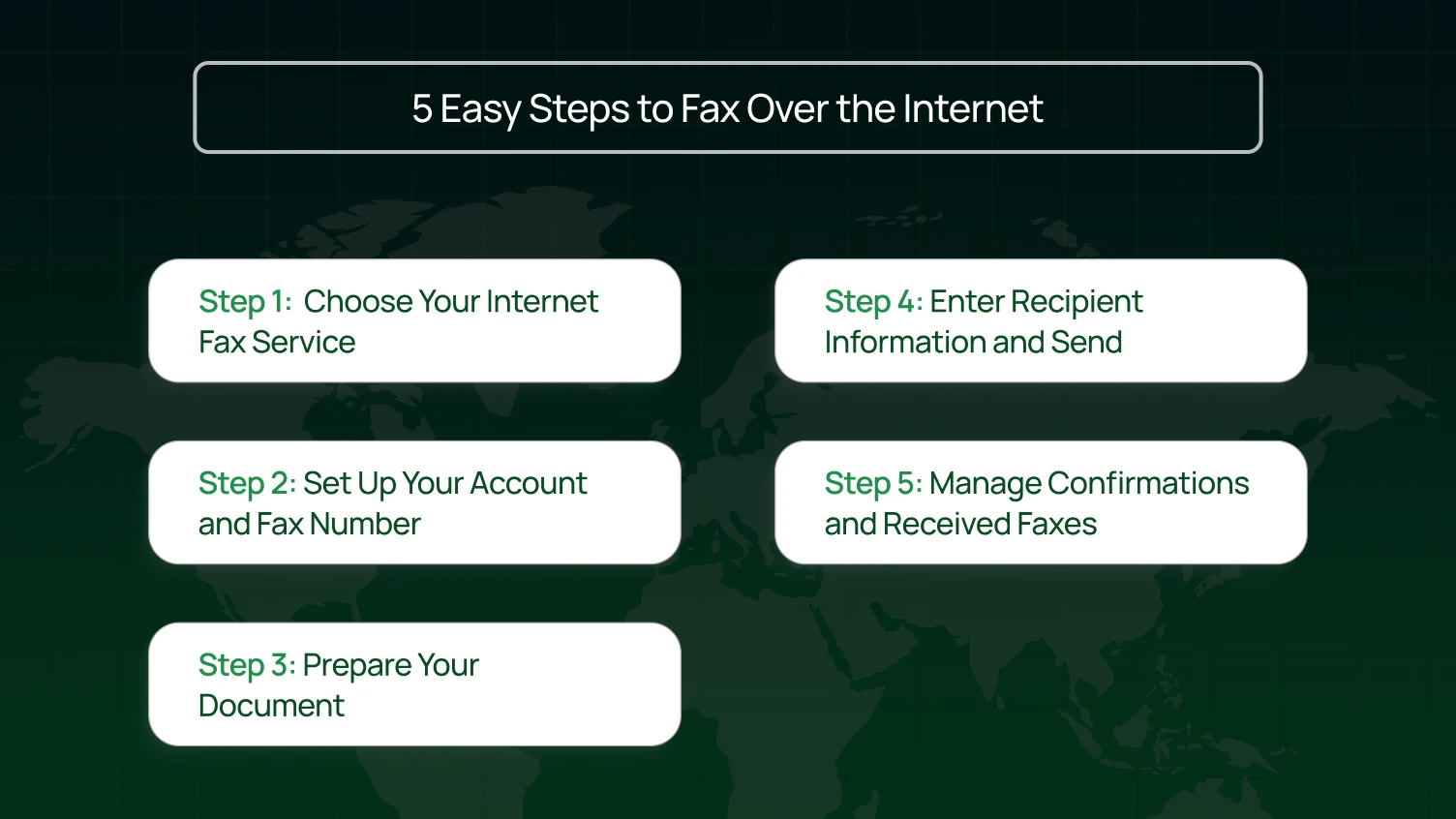
Getting started with internet faxing is straightforward and doesn’t require any special hardware. While interfaces vary slightly between providers, the general workflow is always the same. Follow these five steps to set up your account and send your first document.
Pick a service matching your actual needs. Options range from free basic services to enterprise platforms with fax integrations costing hundreds monthly.
Sending a few personal faxes yearly? Free services work fine. Dozens monthly for business? Get paid options. Healthcare with compliance needs? That’s totally different.
Free services let you send a fax over the internet for free, usually 5-20 pages monthly. Expect service branding, no dedicated number, basic security, and minimal support. Fine for personal stuff, not professional for business.
Paid plans run $10-30 monthly. You get: a dedicated fax number, unlimited receiving, better security, actual support, professional appearance.
Healthcare needs HIPAA compliance, period. Medical billing, insurance, you need certified platforms with encryption, Business Associate Agreements, and audit trails. They cost more because regulatory penalties cost way more.
Many platforms hook into Google Drive, Dropbox fax, or offer fax API for developers. If you can integrate faxing into your existing workflow, like auto-faxing invoices, that’s a huge time saver.
Check real reviews for reliability. Services failing 5% of transmissions create problems. Look for 98%+ success rates and both send and receive capabilities.
Registration takes 10-15 minutes. Enter your email, create a password, and pick a plan. Most platforms give you a dedicated fax number immediately.
Your new number works like traditional ones. Anyone can send a fax over the internet by dialing normally. Difference? You receive faxes digitally, not on paper.
Access incoming faxes from anywhere with internet. Review docs on your phone while traveling. Forward to colleagues in seconds. No more paper filing.
Set notification preferences during setup. Most services email you when you receive faxes online, either attaching the document or providing a secure link.
Most platforms give you a dedicated number immediately. Advanced services even offer AI phone numbers that can handle both voice and fax data intelligently.
Start with your digital file. PDFs work best for consistent formatting. Paper documents? Scan at 200 DPI minimum. Lower looks blurry, higher creates huge files for no reason.
Most services cap files at 10MB-50MB. A standard page at 200 DPI is about 50-100KB so that you can fax documents over the internet in big batches.
Add a fax cover sheet with key info: recipient name and number, your details, page count, and instructions. Most services offer cover sheet templates you can customize.
Regularly send the same forms or contracts? Create templates with standard info already filled in. Then send faxes online in seconds instead of rebuilding each time.
Pull up your service’s send screen,
web portal, email, or app. Enter the fax number with country and area code (usually skip the “1” prefix).
Different ways to send a fax over the internet: Email-to-fax lets you email “[email protected]” with your file attached. Web portals have upload forms. Mobile apps pull from your contacts.
Attach your document; PDFs, Word files, JPGs, and PNGs work. Some platforms combine multiple files into one transmission.
Double-check the number before sending. Wrong digits are the most common failure. Unlike email, wrong fax numbers don’t give clear errors.
Click send, wait for confirmation. Most faxes are complete in minutes. Save delivery confirmations for your records.
When you receive faxes online, set up folders or tags for different document types or clients. This matters when volume increases; nobody wants to dig through hundreds of faxes.
Most services show detailed logs: date, time, sender/recipient, page count, and status. Review these occasionally to spot patterns.
Set up automatic forwarding if available. Incoming faxes are routed to different emails based on the sender or time. The right people see relevant documents immediately.
Back up important faxes to your own storage. Many platforms integrate with Google Drive or Dropbox, automating backups.
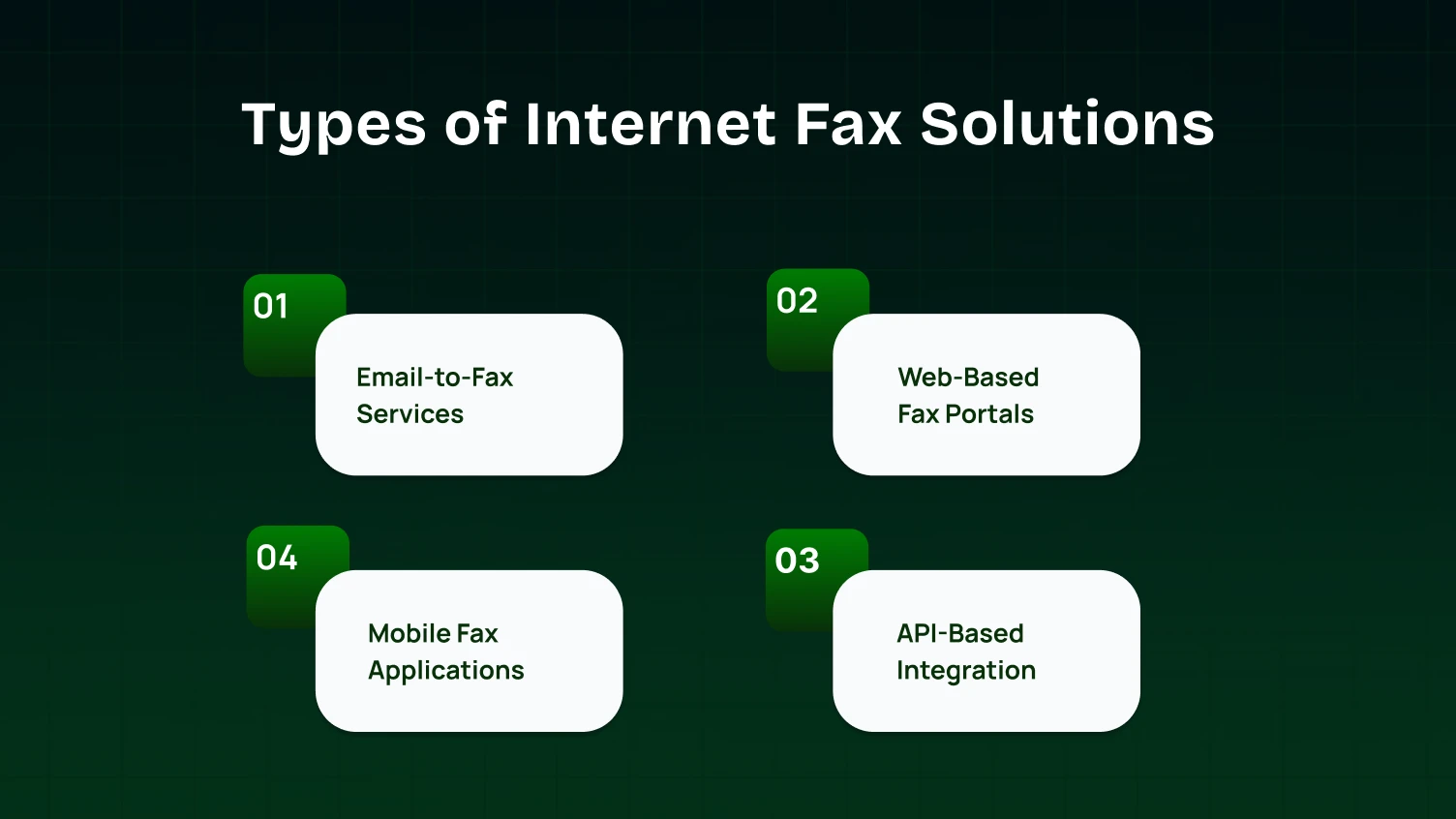
You have options when it comes to how you send and receive faxes. Whether you prefer to stick to your email inbox, use a mobile app while traveling, or automate the whole process with code, there is a specific solution available. Let’s look at the four types.
Email-to-fax is dead simple. They give you an email address where you send documents as attachments, and the platform converts everything automatically. Incoming faxes show up as email attachments.
Perfect if you fax from my pc over the internet and basically live in email already. Zero learning curve. Works with Outlook, Gmail, and any email app you use.
Downside? Limited features. No scheduled sending, no detailed tracking, no fancy management. But for straightforward “just send this document” needs, it gets the job done.
Best for: Occasional personal faxes, very small businesses, anyone who wants simple over sophisticated.
Web portals are full-featured dashboards built for faxing. Log in through your browser and you’ve got sending, receiving, contacts, history, settings, everything in one place. These come with fax cover sheet templates, electronic signatures, batch sending, and scheduled transmission.
Portals shine for sophisticated handling. You can fax a document over the internet while scheduling tomorrow’s batch and reviewing last week’s incoming, all at once. Many include OCR, making documents searchable instead of just static images.
A bit more to learn than email, but modern ones are intuitive. If you handle decent volume or need audit trails, the extra features pay off.
Best for: Small to medium businesses, professional practices, and anyone needing robust features without crazy complexity.
Mobile apps bring faxing to your phone, send and receive faxes from literally anywhere. Most services have iOS and Android apps with camera scanning, contact integration, and push notifications.
The killer feature? Scan a fax over the internet using your phone camera. Snap a photo, the app cleans it up, and sends it immediately. Total game-changer for real estate agents, insurance adjusters, salespeople, and anyone working in the field.
Great for: Quick faxing and urgent reviews. Not ideal for complex multi-page content that requires perfect formatting. Think of apps as a backup to your main setup.
Best for: Field workers, traveling professionals, and quick on-the-go faxing needs.
Fax API solutions give developers programmatic access to faxing. You can integrate faxing straight into your CRM, accounting software, health records, custom applications—whatever you’re running.
A restful API lets your apps send faxes, check status, and grab incoming documents automatically. Faxing just happens based on your business logic; invoices go out when orders are complete, confirmations are sent on schedule, and reports are distributed automatically.
Needs technical setup, but the automation is incredible once it’s running. Perfect for high-volume operations where manual handling gets expensive and error-prone.
Best for: Software companies, enterprises with dev teams, high-volume operations, and custom automated workflows.
Picking the right internet fax solution depends on how often you fax, what industry you’re in, and whether you handle sensitive documents. A freelancer sending occasional contracts has different needs than a medical practice transmitting patient records daily. Here’s how to match your situation with the right service.
Send faxes just a few times a year? Free or pay-per-fax services work best. Email-to-fax options require no new software; send from your regular email account.
Some providers offer 5-10 free pages monthly, enough for mortgage applications or medical forms. Start with a free service. If you regularly hit limits, upgrade to a basic paid plan for $5-10 monthly.
Most small businesses send 50-500 pages monthly. Mid-tier plans ($15-30/month) provide dedicated fax numbers, unlimited receiving, and integration with Google Workspace, Microsoft 365, or QuickBooks.
Web portals let teams access shared fax accounts from anywhere. Look for multiple user accounts and basic reporting to track usage.
A dedicated fax number looks more professional than free services. Custom cover sheets maintain brand consistency and affect client perception.
Sensitive data requires HIPAA-compliant or legally certified solutions. Budget services aren’t worth the risk; a single HIPAA violation costs $100 to $50,000.
Essential features:
Healthcare platforms often integrate with electronic health records and support HL7 standards. Expect $30-50 monthly for individual practitioners, more for larger practices.
Thousands of faxes monthly require enterprise platforms with:
Contact sales directly for custom pricing based on volume and requirements. Verify the platform supports multiple locations, international faxing, and high transmission volumes without future migration needs.
Dr. Sarah Chen’s family practice in suburban Chicago served 3,000 patients across two locations. Her traditional fax setup cost $200 monthly—$80 for phone lines, $50 for supplies, and $70 for maintenance.
The bigger issues were workflow and compliance. Patient records sat unnoticed in output trays for hours, visible to anyone passing by. There was no audit trail for document access, creating potential HIPAA violations.
Dr. Chen switched to a HIPAA-compliant internet fax service. Setup took one afternoon: she got dedicated numbers for each location, trained staff in 30 minutes per person, and canceled the old phone lines.
Monthly costs dropped to $70, a 65% reduction. But the operational changes mattered more.
Incoming faxes now route automatically by keywords and sender. Lab results go to nurses, referral requests to schedulers, and prescription authorizations to pharmacy staff. No more manual sorting.
Staff access faxes using secure remote communication tools when on call. Weekend doctors review lab results from home and contact patients immediately if needed.
The system maintains complete digital records with 7-year retention and detailed audit trails. During their last compliance audit, auditors specifically praised their documentation.
The practice saves 10 staff hours weekly – 520 hours annually, worth roughly $15,000. Time once spent walking to machines, managing paper, and tracking missing transmissions now goes to patient care.
Faster prescription authorizations, quicker referrals, and fewer misplaced documents improved patient satisfaction measurably.
Switching to internet faxing is a significant upgrade from clunky machines, but it isn’t a perfect solution for everyone. While you’ll save money and gain flexibility, you’ll also need to consider trade-offs, such as reliance on the internet and staff training. Here is a look at the pros and cons to help you decide.
Advantages
Disadvantages
| Feature | Free Services | Basic Paid | Professional | Enterprise |
|---|---|---|---|---|
| Monthly Cost | $0 | $10–20 | $25–50 | Custom pricing |
| Pages Included | 5–20 | 100–500 | Unlimited | Unlimited |
| Dedicated Number | No | Yes | Yes | Multiple numbers |
| HIPAA Compliance | No | Sometimes | Yes | Yes |
| API Access | No | No | Limited | Full access |
| Support Level | Email only | Phone + email | Dedicated rep | |
| Best For | Occasional personal use | Small businesses | Healthcare & legal | Large organizations |
Even with digital tools, errors happen. Here is how to solve the most frequent frustrations.
In a world that constantly pushes for greater efficiency, accessibility, and security, fax over the internet stands out as a critical evolution of an enduring communication method. Gone are the days of wrestling with temperamental machines, dedicated phone lines, and piles of paper. By embracing online faxing, individuals and businesses alike can seamlessly integrate fax capabilities into their modern digital workflows, whether they need to fax from a computer over the internet Windows 10, send an urgent document from a smartphone, or manage high-volume financial transactions with robust security.
The myriad benefits, from significant cost savings and environmental advantages to unparalleled convenience and enhanced security features for HIPAA-compliant transmissions, make a compelling case for transitioning to a cloud-based fax solution. With various approaches available, including web portals, email-to-fax, and powerful fax API integrations, there’s a tailored option for every need, allowing you to optimize your fax workflow and truly start faxing smarter.
Ultimately, choosing to fax over the internet isn’t just about updating a single piece of technology; it’s about future-proofing your communication strategy, ensuring that you can meet both traditional and contemporary demands with confidence and ease. It’s time to let go of the limitations of the past and step into the streamlined, secure, and always-on world of internet fax.
Yes, some services offer limited free fax-over-the-internet options for trials or low-volume use. For regular, secure, high-volume needs, paid plans are typically required to ensure reliability for your fax sends and incoming faxes.
No, you don’t need a physical fax machine. The online service handles the transmission to and from traditional fax machines, letting you fax from a computer over the internet.
You get a dedicated fax number. Incoming faxes are converted to digital documents (usually PDFs) and delivered to your email, a secure online portal, or integrated cloud storage like Google Drive or Dropbox Fax.
Yes! Online fax services are web-based, accessible via any browser on any OS, including Windows 10. Many offer email-to-fax or desktop apps/printer drivers, allowing you to fax from a computer over the internet directly from various programs.
Reputable online fax services provide delivery confirmations and audit trails. After a fax is send, you’ll get an email with a confirmation report, including the recipient, pages, and time. This digital proof is crucial for legal and financial transactions and your fax workflow.
Yes, many providers offer fax integrations and a fax API. This allows embedding faxing capabilities directly into your existing workflow, CRM, or custom applications, enabling automated fax workflow, bulk sending, electronic signatures, and the ability to sign documents seamlessly.
