

Why is My VoIP Caller ID Not Showing?

Is your business caller ID showing up as “Unknown” or worse, “Spam Likely”? You’re not alone. VoIP caller ID issues are more common (and more damaging) than most teams realize. Every time your calls go unanswered because of a misconfigured ID or poor reputation score, you’re losing trust, leads, and revenue.
In this guide, we’ll show you exactly why your VoIP caller ID is failing, how to fix it fast, and what the other guides don’t tell you. Whether you’re running a contact center, a sales team, or just trying to look professional when calling clients, this article is your no-fluff solution to getting your caller ID back on track and bulletproofing it for the future.
If you find yourself asking, “What happened to my caller ID?” your VoIP system may be failing to pass caller ID info correctly. This can make outbound calls appear as “Unknown,” a random number, or the wrong name, disrupting business communications.
This problem isn’t isolated. You’ll see it on your office IP phones, on your customers’ mobile devices (a major issue for business caller ID on cell phones), and reflected inaccurately in your call logs. It directly impacts any modern business using a VoIP phone system, from a small office to a large-scale contact center.
The consequences are severe. When your caller ID does not show names properly, it erodes trust and drastically reduces call answer rates. Every failed connection is a missed opportunity, undermining your brand’s reputation and compromising the integrity of your call analytic
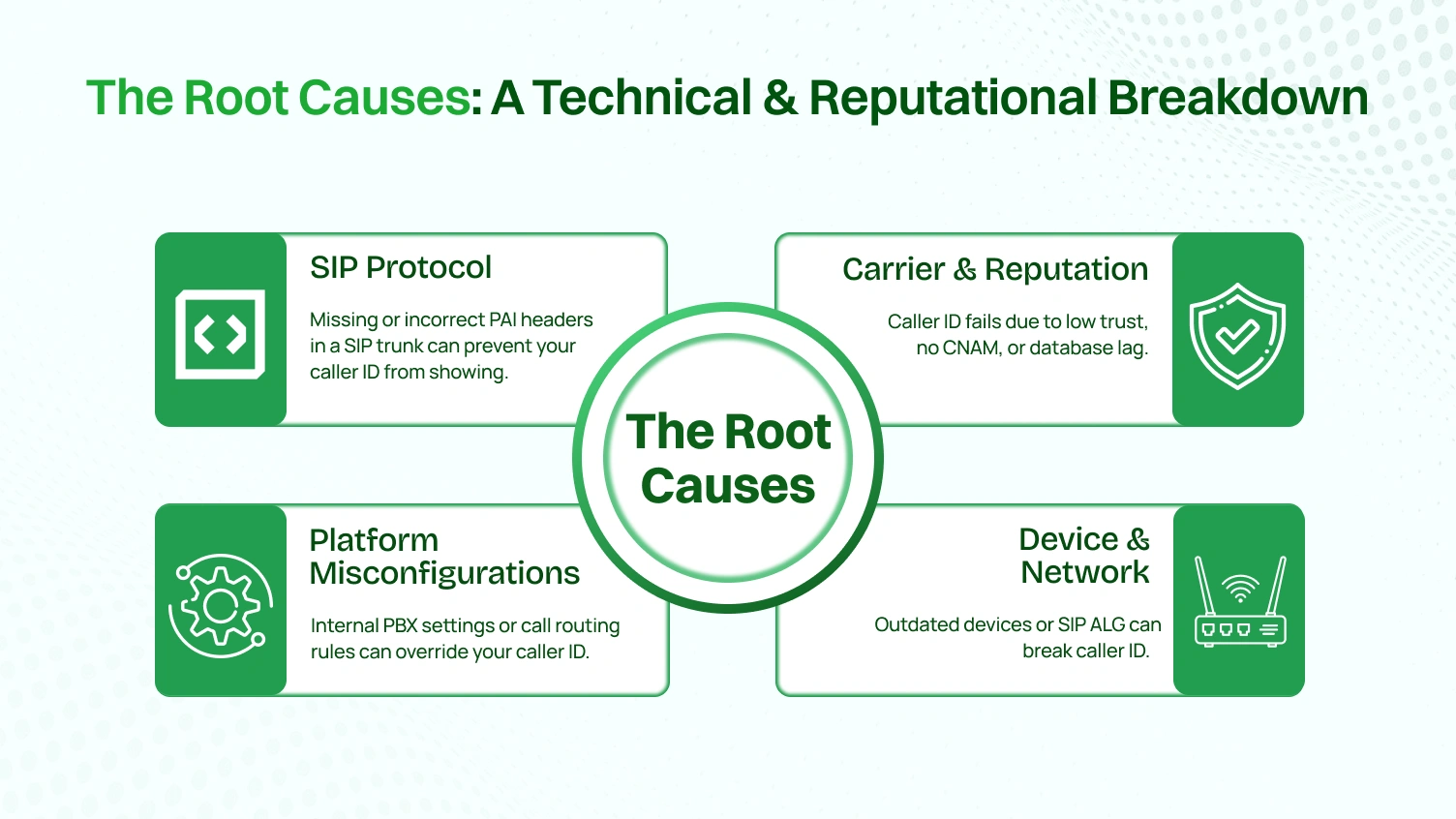
When your VoIP caller ID is not displaying properly, the problem can usually be identified in one of four possible areas of focus. When you get some insight into the cause of the problem, you will know how to solve your caller ID problems once and for all and prevent any incorrect information moving forward.
Session Initiation Protocol (SIP) is the protocol that is the backbone of every VoIP call. SIP uses “headers” that carry data to inform the receiving network about who is calling. If the header data is totally wrong or does not exist, your number will not appear as called due to the incoming call name and number rationale.
The most common cause for this to happen is that the SIP trunk is misconfigured. Your SIP trunk may not send the correct P-Asserted-Identity (PAI) header to the receiving network. The PAI header is the contemporary standard to validate the call ID number. When you do not send the PAI header, the receiving end has no authentic data that can be shown.
Sometimes, the problem is internal. Your central call manager or cloud PBX has settings that can override your desired outbound caller ID. If your organization relies on a cloud based business phone system, reviewing call routing and caller ID settings is essential to ensure outbound calls display the correct business identity.
Finally, your local hardware can be the culprit. Firmware that is not current on your IP phones might not comply with new caller ID standards. Slightly less obvious, your network firewall might have a feature named SIP ALG, which is designed to assist; however, it could also be corrupting the call data packet, stripping the caller ID information before it even leaves your office.
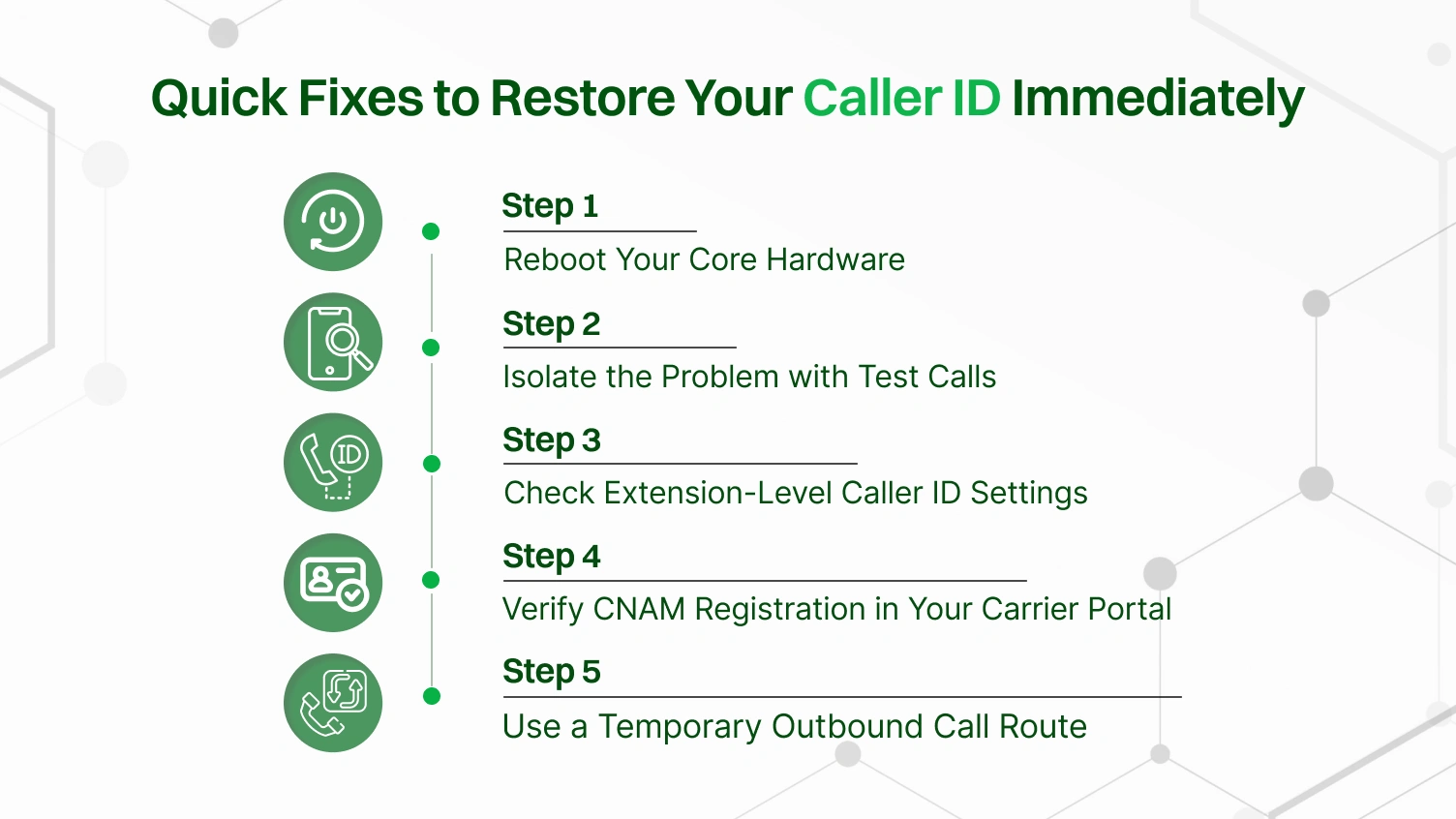
Before diving into complex SIP trunking configurations, these immediate steps can often resolve the issue and get your caller ID displaying correctly again. When your phone system fails at passing the caller ID, start here.
A saying that the oldest trick in the book is often the most effective. Power cycle your IP phones, your network router, and any VoIP adapters. A simple reboot can clear temporary glitches in your phone system that are preventing a successful VoIP call connection and causing incorrect information to be displayed.
The issue might not be with your system, but with how different telephone networks are interpreting your data. Make a test VoIP call to a phone on T-Mobile, another on Verizon, and a traditional landline. If your caller ID works for some but not others, the problem is likely carrier-specific. If it fails for all of them, the issue is with your phone system or provider failing to pass the caller ID information.
Access the admin portal of your phone system, and locate a user or extension. Look for the “Outbound Caller ID” field, and confirm that the correct caller ID name and number are populated.. A misconfiguration here is a common culprit. Review your call logs for recent outbound calls from that extension to see what information your system thought it was sending. This check is crucial for both direct calls and inbound calls that are being forwarded.
Your ability to properly manage your caller ID name depends on its registration. Log in to your VoIP provider’s portal. Most have a tool that lets you check the current CNAM status for your numbers. This confirms whether the information that should be passing the caller id to all telephone networks is correct at the source.
If you need a working caller ID for critical calls right now, create a temporary workaround. In your phone system, you can create a special outbound call route that forces all outgoing calls to use a specific number that you know has a correctly displayed caller id. This buys you time to investigate the root cause without disrupting business.
If these quick fixes don’t work, it’s time to dig deeper. Check your call logs again. If the wrong ID is recorded for all outbound calls across all lines, the issue is systemic. The next step is to contact your SIP trunking provider, as the failure in passing the caller ID is likely happening at their level.
If the “quick fixes” you performed did not fix the issue, it is time to take your troubleshooting to the next level. This step-by-step guide will walk you through diagnosing and fixing problems with caller ID from your provider’s SIP trunking service all the way to your own internal phone system. It is recommended to log into your provider’s portal, see your account overview, and if your provider has a network status page, check that as well to verify that there are no widespread provider outages.
This is the most technical but most critical step. Your SIP trunking service is the bridge between your phone system and the public telephone networks. If the data on that bridge is wrong, everything downstream will be wrong too.
This will show you the raw SIP data. Even if you’re not an expert, you can provide this file to your provider’s support team, proving whether the correct headers are leaving your system or not. It’s the ultimate source of truth.
When your caller ID name is inaccurate or empty, the issue likely starts with the Caller ID Name (CNAM) databases.
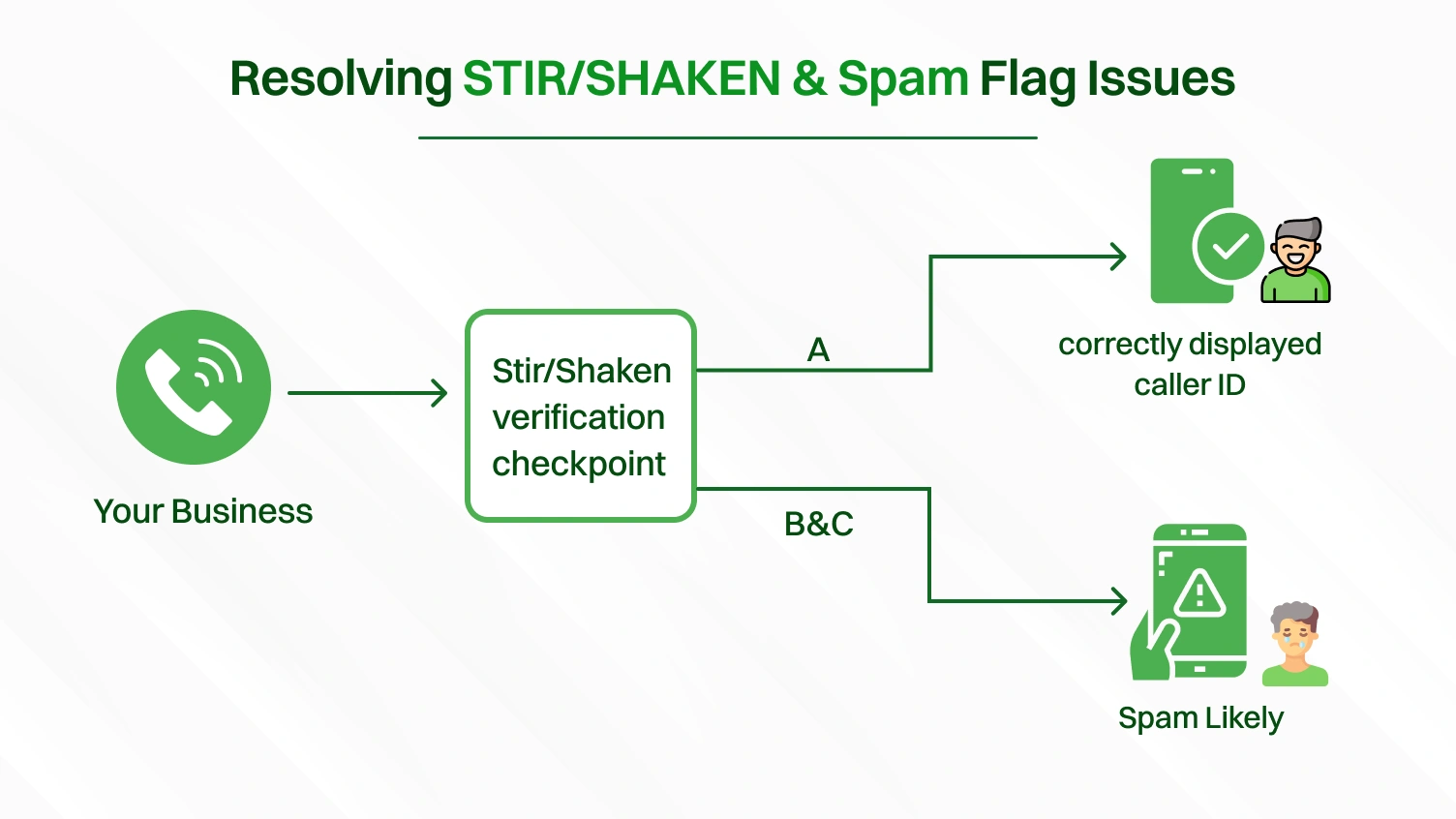
If your calls are being labeled “Spam Likely,” the issue is almost certainly your STIR/SHAKEN reputation.
Last, make sure your internal hardware and software settings aren’t undermining you.
Resilience when correcting a caller ID problem is good, but preventing it in the first place is better. Adopting a preventative mindset towards your telephone system will ultimately save you time and maybe your company’s reputation, especially in a call-center, high-traffic environment.
Before you port numbers to a new provider or deploy new VoIP phones, perform your due diligence. Register your Caller ID Name (CNAM) and confirm with your new provider that your numbers will receive full ‘A’ level STIR/SHAKEN attestation from day one. When setting up your call manager, make this part of your standard deployment checklist.
Create a company-wide policy for how your display name appears. Utilizing a consistent format, such as “CompanyName – Sales,” will make the company look professional, and it will be more manageable. This way, every employee, even when working remotely or if they’re in the office together, will look like a unified brand identity on every VoIP call.
Once a month, have a team member make test calls from various VoIP phones to different carriers. This audit allows you to identify issues ahead of time, before they ever contact your customers. As part of this routine, access your provider’s network status page to see if there are possible updates. Clarification can be reported as missed or a service disruption before it impacts call quality or data sharing. Many providers offer a status page that allows you to subscribe to a real-time RSS (real-time) feed status page so you can track and be instantly notified of service degradation.
Contemporary call manager platforms can frequently be arranged to detect SIP logs and issue alerts for significant error codes. Creating alerts allows you to receive a major jump-start on any issues, potentially even before your users can. Automated monitoring in some capacity is important for any business, particularly a high-volume contact center.
Document which phone numbers are used for specific purposes. For instance, if you have numbers utilized in higher volume outbound marketing campaigns, the numbers will need to be separate from the main or primary number that is used for inbound calls to your office main reception during business hours. This will help protect your main lines from being flagged as spam or tied to what a recipient might feel to be unwanted content, such as overly aggressive telemarketing.
When you have exhausted all standard fixes and your caller ID is still failing, you may be facing a more complex scenario. These situations often require deeper diagnostic tools and a more strategic approach to working with your service provider.
When you’re facing these advanced problems, your best resources are data and community knowledge.
VoIP caller ID issues are effectively resolved through a multi-faceted strategy. This involves correcting technical elements like SIP headers, managing your external CNAM and STIR/SHAKEN reputation, and adjusting internal platform settings. For businesses integrating traditional phone lines, it’s also crucial to check the configuration of any FXO gateway in use. A systematic approach ensures that your outbound calls are consistently and correctly identified, maintaining your organization’s professional image and trustworthiness.
Key Resources:
Caller ID might seem like a small detail, but in the world of VoIP, it plays a big role in trust, reputation, and results. If your calls aren’t showing the correct name or number, you risk being ignored — or worse, blocked.
The good news? These issues are fixable. By properly configuring your VoIP equipment, checking your FXO gateways, verifying CNAM records, and ensuring STIR/SHAKEN compliance, you can take control of how your business appears on every call.
Don’t let technical glitches ruin your outreach. Take charge of your caller ID — and give your business the professional voice it deserves.
Your VoIP caller ID may not be displayed because of a number of factors, such as inaccurate information in CNAM databases, which is relied upon to map numbers with names. The other reasons that may be used are why your VoIP system is misconfigured or a poor score of the VoIP reputation under STIR/SHAKEN anti-spoofing protocols.
VoIP definitely embraces caller ID. On call, the VoIP system forwards data packets that contain the information of the caller. The receiving carrier does a CNAM dip that in a database identifies the name related to the number and displays it on the called person. This occurs just about in a flash.
In the majority of VoIP services, call ID is handled by you as a user over your online user portal or dashboard, where you work on customization. In the case of a traditional POTS line, you would normally have to call your phone company specifically and ask them to enable the caller ID service on your line.
This may occur due to some reasons. The trouble might be with the service of the phone company, or the physical line may be damaged, or the phone number of the incoming call is just unavailable, or the caller ID. At other times, an unformatted call to a legacy network via VoIP systems does not also show on an older POTS line in the right format.
VoIP calls are traceable and recordable, yes. The IP address data and network information allow service providers to trace calls by analyzing the data, and law enforcement can access the information lawfully with authorization of the law. Call recording is also a common feature on many VoIP platforms.
Quick Checklist for Restoring Caller ID on VoIP:
Reboot Your VoIP Equipment
Check Provider Portal Settings
Verify FXO Gateway Configuration (for Legacy POTS Lines)
Confirm CNAM & STIR/SHAKEN Registration
