

XCaaS: Definition, Components, Pros and Cons

Your phone system is becoming outdated faster than you think.
According to Gartner, by 2028, 90% of organizations will rely on cloud office platforms for business communication, up from just 30% in 2025. That’s a massive shift happening right now.
XCaaS (Experience Communications as a Service), introduced by 8×8, is driving this change. It connects your team collaboration tools with customer contact centers on one cloud platform.
No more juggling separate systems. No more frustrated customers repeating themselves. Everything works together, whether your team’s in the office or working remotely.
Ready to explore this comprehensive cloud solution? Let’s go!
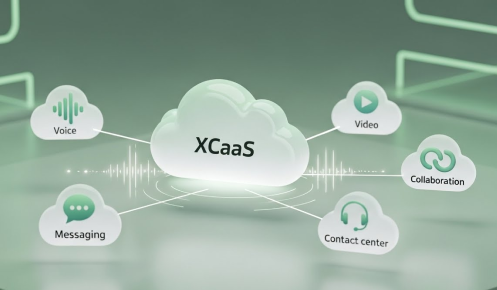
XCaaS (Experience Communications as a Service) is a cloud communications model that unifies UCaaS (Unified Communications as a Service), CCaaS (Contact Center as a Service), and CPaaS (Communications Platform as a Service) on a single platform. It eliminates the gap between internal team collaboration and customer-facing contact center operations — so businesses manage every conversation, channel, and workflow from one place.
Here’s a breakdown of its core components.
This is for your employees talking to each other. Phone calls, video meetings, and team chat all happen in one place.
Your team sees who’s free and who’s busy. Their work number rings on any device they’re using. Office desk phone, laptop at home, or their mobile, it all works the same.
CCaaS runs your contact centers. Customers call, email, chat, or message on social media; your agents handle everything from the same screen.
Calls get routed to the right person automatically. The system looks at who’s available and what they’re good at. Your agents get help from smart tools that speed up responses.
CPaaS is the technical layer underneath. It connects communication features to your business software.
Send appointment reminders by text. Add a call button to your website. Link your phone system with your customer database. CPaaS makes these connections work.
UCaaS handles internal calls. CCaaS manages customer support. CPaaS connects everything and lets you customize. You get all three from one vendor on one platform.
These three components work as one platform to handle all your business communications.
Now that you know what makes up this integrated communication platform, let’s look at what each part does for your business.
Each XCaaS component solves different problems and brings specific advantages to your operations.
Together, these benefits transform how your team works and how customers experience your business.
Understanding the benefits helps, but picking the right solution for your specific situation requires a clear process.
Follow these given steps to find the right communication platform that actually fits your business.
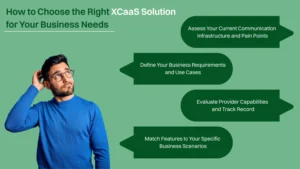
Look at what you’re using now. Write down every phone system, video tool, and chat app your company has. Note which teams use what.
Then find the problems. Sales reps switching between five different systems? Customers explaining their issue three times to three different people? Remote workers can’t access the desk phone? Is IT fixing the same integration bugs every week?
Add up your costs. Hardware, software licenses, maintenance, and IT hours. Don’t forget the hidden stuff, lost sales from dropped calls, and customers who gave up and left. This tells you what you’re really paying now.
Count heads. How many people need phones and video? How many work in contact centers? How many handle customer emails and chats?
Where could automation help? Appointment reminders by text? Call buttons on your website? Figure out the specific tasks you want CPaaS to handle.
Your industry matters. Healthcare needs HIPAA. Finance needs recorded calls. Retail needs extra staff during the holidays. So, plan how many new people you are hiring next year.
Check their uptime promise. You want 99.9% or better. Ask what happens when things break.
Look at the security papers. SOC 2 is the baseline. Healthcare, finance, and retail each have extra rules. Make sure they have the certificates you need.
Read what other customers say. Call their references yourself. Ask real questions about support and switching over. Check if the company’s going to be around in five years.
Try before you buy. Get your team on a trial. See if the single vendor thing actually works. Test contact center capabilities with real calls.
Sales needs calls from the CRM, recordings, and mobile apps. Support needs all channels in one place and customer history. Remote folks need phones that work anywhere and video meetings.
Healthcare wants telehealth and text reminders. Finance wants encrypted calls and compliance reports. Retail wants store calling and order texts.
Check what connects. Your CRM, helpdesk, and everything else. Can your developers use the APIs? If you run Microsoft Teams, does direct routing work right?
Test video conferences with your actual team sizes. Try it on bad wifi. Make sure screen sharing and file sending work during real meetings. Find a cloud platform that matches how you work. Don’t rebuild your whole company around software.
Take your time with each step, and you’ll choose a solution that works for years, not just months.
Before you commit, it is wise to weigh both sides of the solution.
It offers major advantages, but it’s not perfect for every situation. Let’s understand both its pros and cons.
Streamlines Operations & Cost-Effective: It cuts your spending in ways you might not expect. No more buying desk phones, servers, or contact center hardware. Monthly subscriptions replace big upfront costs. You know what you’re paying each month, which makes budgeting easier.
IT teams spend less time fixing things. Updates happen automatically. New features show up without anyone installing anything. Your people focus on business problems instead of maintaining phone systems.
Enhanced Customer and Employee Experience: Customers get help the same way every time. Call, email, chat, they get consistent service across all channels. Agents see the full conversation history, so nobody repeats themselves. Problems get solved faster with unified communications and contact center working together.
Employees work better, too. Video meetings, team chat, and phone calls happen in one place. Remote workers access everything from home just like office workers. Companywide collaboration gets easier when everyone uses the same platform.
Improved Agility and Scalability: Need five new customer service agents next week? Add them in minutes. Opening a new office? Connect them the same day. The cloud platform grows with you.
Busy season coming? Scale up. Slow month? Scale down. You pay for what you actually use. This flexibility matters for businesses with changing needs.
Centralized Management and Security: One dashboard controls everything. Add users, change settings, run reports, all from the same spot. IT admins don’t jump between five different systems anymore.
Security improves with a single-vendor approach. Professional security teams watch your systems 24/7. They catch threats you’d miss. Updates patch vulnerabilities automatically. Most integrated platform providers meet security standards that small IT teams can’t match alone.
Advanced Analytics and Insights: See what’s happening across your whole business. Which agents handle calls best? Where do customers get stuck? What times get busiest? Cross-platform analytics show patterns you couldn’t see before.
Real-time dashboards help managers make quick decisions. Historical data reveals trends. You understand employees and customers better with integrated data from UCaaS and CCaaS solutions together.
People waste less time switching between tools when everything lives in one platform. A video call starts with a single click. Messages go out without opening a separate email client. Sales reps dial customers directly from the CRM without jumping to a different app.
This reduction in context-switching has a compounding effect on team performance. Digital transformation moves faster when communication is seamless. Projects close sooner. Decisions get made in real time instead of waiting for the next scheduled meeting because the meeting, the message, and the follow-up action all happen in the same environment.
Initial Complexity and Learning Curve: Moving to this integrated cloud solution isn’t simple. Switching from old phone systems takes planning. Data migration can get messy. Employees need training on new tools.
Some people resist change. They like their old desk phone. They’re comfortable with how things work now. Getting everyone on board takes time and patience.
Vendor Lock-In and Control Limitations: Once you’re in, getting out gets hard. Your data sits in their system. Your workflows depend on their features. Switching to another provider means rebuilding everything.
You can’t customize as much as you want. The provider controls what features exist. Updates happen on their schedule, not yours. Some businesses need more control than the integrated cloud platform offers.
Potential Integration Issues: Connecting XCaaS with your current software can cause headaches. Your specialized industry apps might not play nice with the new system. Custom integrations cost extra money and time.
Legacy systems create problems. That 10-year-old database? May not connect easily. The integration framework helps, but it’s not magic.
Dependence on Internet Connectivity: No internet means no phones. No video meetings. No customer service. Everything stops when your connection drops.
Poor bandwidth ruins call quality. Video freezes. Voices cut out. Customers hear robots instead of people. You need reliable, fast internet.
Hidden Technology Costs: The monthly price looks good until you see the extras. Premium features cost more. Extra phone numbers cost more. Going over your usage limits costs more.
Training costs money. Implementation help costs money. Integrations cost money. Add it all up, and the total might surprise you. Read contracts carefully and ask about every possible fee upfront.
Weigh these factors against your specific needs to make the right call for your business. Once you’ve decided on the right platform, you need a solid implementation strategy.
Successful integrated solution adoption follows a clear approach from planning to optimization.
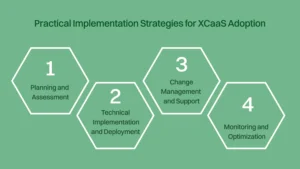
Look at what you have now. What’s broken? What costs too much? Talk to sales, support, IT, and operations. They know the real problems.
Count everything. Employees, remote workers, contact center calls per day, and more. Write the actual numbers down.
Pick targets you can measure. “Better communication” doesn’t work. “Cut missed calls by 30%” or “Answer customers 2 minutes faster”, those you can track.
Decide what success looks like at six months, one year, and three years. Get everyone to agree before you start.
The leadership team needs to care. Show them the money: savings, productivity, and happier customers.
Bring department heads in early. They’ll catch problems you missed. They’ll also sell the change to their teams later.
Test platforms yourself. Don’t just read glossy brochures. Get trials. Have your team use them for real work.
Call references from companies of your size. Ask about failures, not just wins. Check their customer success history.
Map every step from today to launch. Who does what? When it happens, add extra time; projects always run late.
Monthly checkpoints keep things moving. Set up clear decisions so you don’t wait weeks for approvals.
Your internet becomes your phone line. Test bandwidth. Upgrade if you need to. Set rules so voice calls don’t fight with Netflix streams.
Get backup internet. When the main line drops, you still have phones.
Don’t flip every switch on day one. Start with basic calls and contact center work. Add video meetings next. Save fancy CPaaS stuff for later.
Give people what they need right now. The extras can wait.
Moving contacts, call logs, and recordings takes time. Clean your data first. Delete duplicates. Fix errors. Update old stuff.
Test with a small batch before moving everything. Find problems when they’re easy to fix.
Connect it to your CRM and helpdesk one at a time. Get the most important one working perfectly first. Then add more.
Write down how everything connects. You’ll need this when something breaks.
Pick one department to go first. Choose honest people who’ll tell you what actually happens, good and bad.
Run it for two weeks minimum. Long enough to hit real problems. Short enough to fix them before everyone switches.
Go to one office or department at a time. Maybe one per month. Learn as you go. Adjust before the next group starts.
Keep the old phone system running for a while. Safety net until everyone’s comfortable.
Tell people what’s happening and why. Explain what’s in it for them personally, not just company benefits. Be straight about the learning curve.
Update them regularly. Answer questions before they ask. Use email, meetings, break room posters, everywhere.
Sales needs different training from support agents. Managers need different training than both. Teach people what they’ll actually use.
Some learn from videos. Others need hands-on practice. Record everything for people who miss sessions.
Make the help process clear. Who do they call? How fast will someone respond? Put this where everyone can find it.
Pick super users in each department. They handle basic questions. Takes pressure off IT.
Watch call quality, uptime, adoption rates, and contact center numbers. Check daily at first. Move to weekly once things settle.
Set alerts for problems. Don’t wait for complaints about dropped calls.
Survey your team monthly. What works? What’s annoying? What features sit unused and why?
Fix complaints fast. People stay engaged when they see you listening.
Check usage every quarter. Getting close to limits? Need more capacity next quarter? Plan ahead. Don’t scramble during the busy season.
Watch for new features from your vendor. Some might solve problems you’ve been living with.
Review security regularly. Test backups. Check who has access. Make sure fired employees can’t log in anymore.
Stay current on rules. Regulations change. Your setup changes with them.
Getting started with this comprehensive solution needs planning. Rush it, and you fix problems for months. Go step by step, and you build something that actually works.
Follow these phases carefully, and your platform rollout succeeds without the chaos most companies face.
Still unsure if XCaaS fits your current situation? Take this quick assessment.
Answer these questions honestly. Count how many times you pick each option.
Count Your Answers
You’re facing real communication pain points; the integrated cloud solution can fix them. It’s time to modernise your system and simplify everything under one platform.
You’re in a good position but ready for the next step. An integrated cloud platform can unify your tools, boost performance, and future-proof your communication setup.
Start small. Test the cloud solution with one department or workflow. See how unified communication can streamline operations and grow from there.
The goal isn’t perfection, it’s progress. XCaaS helps your business communicate smarter, adapt faster, and stay connected everywhere.
XCaaS closes the gap between internal team communication and customer-facing operations one platform, one dashboard, no silos. For small and mid-sized businesses, the benefit is simple: fewer tools, lower costs, and faster decisions. Plan the rollout carefully, start small, and scale from there.
The shift to cloud communications is already happening. The businesses that move strategically will outpace the ones that wait.
Dialaxy adds virtual phone numbers across 100+ countries, SMS, call recording, and CRM integrations to your XCaaS strategy no hardware required.
XCaaS replaces separate UCaaS, CCaaS, and CPaaS subscriptions with one vendor bill. It also removes hardware costs because everything runs in the cloud. IT maintenance work is reduced since updates and security patches are delivered automatically.
PBX is an on-premise phone system, while UCaaS is a cloud-based platform that provides calling, messaging, video meetings, and collaboration tools through the internet.
Small businesses with 10–50 users usually complete implementation within 4–8 weeks. Larger enterprises with legacy systems and complex migrations may need 3–6 months for a full rollout.
UCaaS stands for Unified Communications as a Service. It provides cloud-based tools for voice calls, messaging, video conferencing, and team collaboration.
VoIP focuses mainly on internet-based calling, while UCaaS includes VoIP along with messaging, video conferencing, and collaboration features.
Yes. Most XCaaS platforms support integrations with tools like Salesforce, HubSpot, and Microsoft Dynamics, along with APIs for custom business software connections.
