

What is Busy Lamp Field in VoIP?

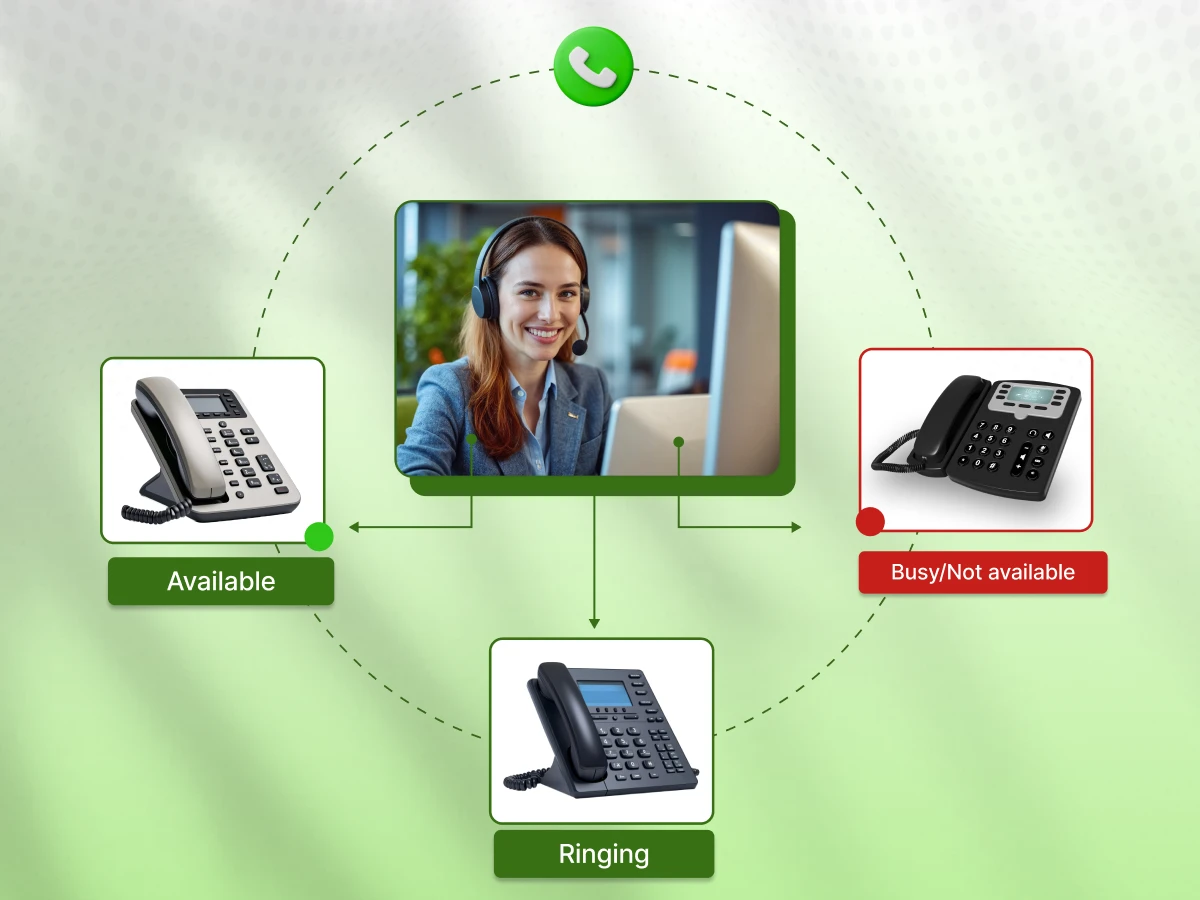
Knowing who is actually free to talk saves time and stops the annoyance of transferring calls to nowhere.
Busy Lamp Field (BLF) is the practical fix for this in modern VoIP setups. A quick look at your desk phone or softphone tells you if team members are free, busy, or on the line.
This simple visibility enhances team collaboration, simplifies call handling, and keeps your customer experiences professional.
Let’s explore in detail the busy lamp field in VoIP.
What is a busy lamp field?
At its core, Busy Lamp Field (BLF) is a feature in a phone system that acts as a real-time presence indicator for specific phone extensions. Think of it as a status board for your colleagues. It lets you know instantly if someone is idle, busy, or has their phone ringing.
By putting this presence information right on your device, BLF, or say, a presence indicator, removes the guesswork. You don’t need to dial a coworker just to check if they can talk. You rely on the status light to make quick decisions.
This is vital for contact centers or a busy reception desk, where efficiency directly improves customer communication.
Therefore, the busy lamp field in VoIP isn’t just about lights; it is about fixing workflows, so your team can respond instantly during key moments in the customer journey.
Knowing what busy lamp field in VoIP is helps us explore how it works on your phones in real-time.
Communication Fundamentals
Oct 6, 2025
Read More
A busy lamp field in VoIP works by connecting your device to other lines and allowing you to monitor their status as it happens.
When you set up a BLF key for a coworker, your phone subscribes to their status through the cloud phone system or PBX. If that line changes state, like going from idle to busy, your device updates immediately.
This process usually relies on SIP trunking to exchange data between the phone and the system. Whether you rely on physical office phones or a hybrid cloud setup, the presence indicator ensures you always know if anyone in the organization is available.
The presence indicator uses colored lights on the BLF keys. While brands differ, the usual patterns are:
These visual cues help teams, such as those in real estate or sales, manage customer interaction without needing a personal assistant to screen availability.
BLF keys do more than just call monitoring; they let you take action:
These capabilities make the presence indicator a core part of contact center solutions, unified communications, and CRM integrations, ensuring data and conversations flow without roadblocks.
Understanding the mechanics makes it easier to see why businesses rely on BLF daily.
Busy lamp field in VoIP changes how companies handle customer stories and internal traffic.
Knowing which extensions are open prevents you from blindly transferring clients to voicemail. This is crucial in high-traffic areas like contact centers, where keeping the customer journey moving is the main goal.
BLF keys remove complex steps. Picking up a ringing line or transferring a VIP requires just one button press. This reduces friction and ensures customer experiences stay positive.
BLF gives you a view of the whole floor. You can see who is working on a call or is free to collaborate. This boosts team collaboration without the need for constant shouting across the room or internal messaging.
Supervisors use a presence indicator for call monitoring to see how the team is engaged. This is especially useful in an AI-powered contact center where availability tracks directly with performance.
BLF isn’t stuck on hardware anymore. Modern softphones and integrations with Microsoft Teams let you see status lights on your screen. This supports remote workers using a partner portal or staff in hybrid cloud environments.
While some advanced configurations might involve additional costs, the basic utility of Busy Lamp Field is usually a cost-effective way to fix communication gaps.
Now that we know the benefits, let’s compare BLF to speed dial to see the differences.
Many teams confuse Busy Lamp Field (BLF) with speed dial, but while both improve call handling, they serve different purposes.
Understanding the differences helps organizations use their desk phones, softphones, or cloud phone systems more effectively for team collaboration and customer communication.
| Feature | Busy Lamp Field (BLF) | Speed Dial |
|---|---|---|
| Primary Function | Monitors the status of phone extensions and shows a presence indicator. | Quickly dials a pre-set number with a single button press. |
| Real-Time Monitoring | Shows if a colleague is free, busy, on hold, or ringing. | Does not show line status; only initiates calls. |
| Use Cases | Ideal for reception desks, contact centers, and teams needing call monitoring. | Best for quickly dialing frequently called clients or internal numbers. |
| Action Options | Allows call pickup, one-touch transfer, or speed dialing when the line is idle. | Only initiates a call; no monitoring or status indication. |
| Integration | Often integrates with unified communications systems, CRM platforms, or hybrid cloud setups for better collaboration. | Limited integration; mainly part of the phone system configuration. |
| Key Visibility | LED lights indicate line status such as busy, idle, or ringing. | Usually no LED status indicator; primarily a dialing button. |
While speed dial simply makes calling faster, BLF keys provide real-time visibility into colleagues’ availability. BLF enhances team collaboration, improves call monitoring, and supports efficient customer communication, whereas speed dial is purely a convenience feature for quick dialing.
For organizations handling multiple lines or relying on desk phones and softphones, BLF offers far more operational value. Understanding these differences helps illustrate how BLF is applied in real-world business scenarios.
BLF is versatile enough to help a small startup or a massive enterprise. From tightening team collaboration to supporting complex contact center solutions, the goal is always the same: ensure calls are answered fast so customer experiences remain positive.
Receptionists act as the traffic controllers for a business. They rely on BLF to know exactly who is available without shouting across the room. Their desk phones or softphones display a clear presence indicator, showing instantly if an employee is talking, idle, or away.
In industries like real estate, this speed is critical. It allows front desk staff to route client calls to the right agent immediately, cutting down wait times and improving the overall customer journey.
The BLF keys also make call pickup or transfer a simple one-touch process, taking the stress out of daily call handling.
In contact centers, supervisors and agents use a presence indicator to monitor the floor in real time. Seeing which lines are active helps teams distribute incoming calls efficiently and stops customers from sitting on hold.
While an AI-powered contact center might use advanced algorithms, the simple visual cue of a BLF light remains vital. It complements CRM tools by ensuring an agent is actually free before a customer interaction begins, which drastically improves customer communication.
Sales teams use BLF to spot colleagues who are free for a quick consultation or a handover. Whether the team runs on physical hardware or a cloud phone system, BLF stops the “let me check if he’s in” delay.
For account managers, this means that if a VIP client calls, they can be transferred instantly to an open line. This responsiveness keeps the customer experience smooth and professional.
Organizations with Multi-Location branches or Remote Office staff benefit hugely from BLF over hybrid cloud connections. Employees using softphones at home can still monitor a colleague’s status at headquarters.
This visibility bridges the physical gap, ensuring team collaboration happens as if everyone were in the same building. It prevents wasted transfers and keeps customer communication seamless, regardless of where the office phones are located.
*A solid network and presence indicators ensure remote or hybrid teams maintain high service levels, contributing to consistent CSAT scores in the 75% to 85% range for well-managed offices.
Busy lamp field in VoIP is also the standard way to handle Call Parking and Shared Lines. The keys light up to show if a call is waiting in a specific “parking slot” to be retrieved.
In high-traffic areas like contact centers, this allows any available agent to spot and grab a holding line. It is a simple way to reduce missed calls and tighten up call handling across the board.
Once you know the use cases, setting up a busy lamp field is straightforward.
Setting up a Busy Lamp Field on your desk phone, softphone, or cloud phone system is actually quite straightforward. Once it is running, you get immediate insight into your colleagues’ presence indicators.
This simple change boosts call handling efficiency and strengthens team collaboration across the whole office. Here is how to get it done.
First, you need to find the IP address of the device. This is the key to unlocking the phone’s web interface. Whether you are checking a physical desk phone or a softphone app, the IP address gets you into the management console.
From there, you can start managing phone extensions and keys.
With the IP address in hand, open your browser and type it in to reach the login screen. You will likely need admin credentials to access the management console. This is the control center where you apply the specific configurations.
Getting this right allows your phone system to save the data needed for accurate real-time monitoring.
Inside the menu, look for a tab labeled DSS Keys or Function Keys. Manufacturers label this differently, so you might see BLF keys or Line Keys instead. This is the spot where you map out the specific phone extensions you want to track.
Linking them correctly ensures your presence indicators actually work, which is vital for effective call monitoring.
Now you can customize the individual keys:
This setup is the engine behind better team collaboration. It keeps customer communication moving and reduces missed connections in busy contact centers.
Don’t forget to hit save or apply. Your device might need a quick reboot for the changes to stick. Once that is done, your desk phone or softphone will display real-time presence indicators, showing you exactly who is free, busy, or away.
Getting BLF up and running is a small task that makes a big difference. With the phone system set up correctly, you get instant visibility. This smooths out team collaboration and directly improves customer experiences.
Whether you rely on desk phones, softphones, or a broader cloud phone system, BLF guarantees better real-time monitoring and sharper call handling for everyone.
Before rolling it out fully, it’s important to understand BLF’s potential limitations.
Busy Lamp Field (BLF) is a game-changer for tracking who is free, but it does have limits. Knowing these quirks ensures your phone system and desk phones actually help team collaboration instead of causing confusion.
Every device has a ceiling on how many BLF keys it can handle. In a small office, you might never notice, but large contact centers can hit these limits quickly. You may run into system soft limits or extension group restrictions.
It is smart to plan exactly how many keys you need per device so you don’t overload the phone system or break the presence indicators.
BLF needs a solid network and SIP trunking to keep those status lights updating instantly. If your internet struggles or bandwidth is tight, presence information might lag. This delay messes with real-time call monitoring.
Also, strict firewalls can block the data, especially in a hybrid cloud setup, so checking your network readiness is a must.
Not every manufacturer speaks the same language. Desk phones, softphones, and cloud phone systems might use different colors or blink patterns. One brand might use steady green for idle, while another flashes amber for hold.
Your team needs to know these differences to read the presence indicators correctly and avoid mixing up line status.
Don’t assume every device is ready to go out of the box. Some phone extensions or specific softphones need extra work to get BLF running.
Syncing keys across hybrid cloud environments might even require a manual reboot. Checking compatibility first saves time and keeps call handling and team collaboration smooth.
BLF is a great tool, provided you know where the boundaries are. Hardware limits, network speed, and device quirks all play a part. With the right setup, you can still get accurate presence indicators, reliable call monitoring, and better customer communication. Knowing these constraints helps decide if BLF is the right fit for your team.
Deciding whether to implement Busy Lamp Field (BLF) depends on your specific workflow. The feature delivers the most value to organizations where team collaboration and high call volumes are everyday realities.
When your office relies on desk phones, softphones, or a shared cloud phone system, BLF acts as a single source of truth. It shows you instantly whether a colleague is available, on a call, or away from their desk.
That visibility speeds up call handling, reduces hold times, and keeps customer communication running smoothly.
For contact centers, reception desks, and sales teams, these tools are often essential. BLF keys enable active call monitoring, one-touch transfers, and the ability to pick up a ringing line for a coworker who’s tied up.
Even in smaller offices, presence indicators remove the guesswork and help maintain a professional experience for callers.
That said, the presence indicator isn’t the right fit for every business. If your staff rarely transfers calls, works independently, or relies on personal speed dial lists, you won’t see much benefit.
It’s also worth keeping in mind that the feature depends on a stable network, and accurate presence data requires reliable SIP trunking to keep the lights updated in real time.
Hence, BLF is best suited to businesses that want tighter internal coordination. It connects employees, supports faster handoffs, and helps ensure customers don’t fall through the cracks.
Busy lamp field in VoIP cuts down on missed calls, makes handoffs faster, and gives your team a clearer picture of who’s available at any given moment, whether you’re using desk phones, softphones, or a cloud system.
If your current setup leaves room for dropped balls and frustrated callers, BLF is worth a serious look.
It is a system of lights on your desk phone or softphone that works as a presence indicator. Specifically, it tells you in real-time if a monitored extension is idle, ringing, or busy, so you don’t have to guess before dialing.
Supervisors use BLF for call monitoring to see agent activity instantly. Agents use BLF keys to pick up ringing lines or make a call without delay, ensuring the customer journey doesn’t stall.
The benefits of using a busy lamp field are that it stops blind transfers and shouting across the office. By knowing who is available, team collaboration tightens up, call handling gets faster, and customer experiences improve because clients aren’t dumped into voicemail.
The limitations of BLF are that physical phones run out of buttons, and the system relies heavily on network speed. If your SIP trunking or internet connection lags, the status lights might delay, meaning the presence information isn’t perfectly live.
