

Call Recording Explained: A Complete Guide for Businesses

A customer just claimed your team promised a full refund. Your agent swears they said no such thing. Who’s right?
Without call recording, it’s their word against yours. One dispute like this can cost thousands in refunds, chargebacks, or legal fees.
But here’s what most businesses miss: call recording for business isn’t just damage control. Companies using it properly train employees faster, close more sales, and spot product problems before they explode. The difference between businesses that record calls and those that don’t? One has proof. The other has problems.
This blog covers everything from setup to compliance. You’ll learn which call recording software works best, how to stay legal, and how to actually use recordings to grow your business.
Learn how to set up automatic call recording systems, choose the right call recording software, and record all incoming and outgoing calls.
Understand consent laws, how to inform callers with recording announcements, and manage recordings stored securely without risking legal issues.
Discover how call transcripts and recorded conversations improve training, boost sales, and turn customer interactions into measurable revenue growth.


Call recording isn’t just about covering your back anymore. Sure, that’s part of it. But businesses using call recording for business are seeing real results that affect their bottom line.
You know what’s better than telling someone they did a bad job? Showing them. Recorded conversations let you point to specific moments where things went right or wrong. No more “I think you should try this” conversations. You can pull up an actual call and say, “Listen to how Sarah handled this angry customer.”
Your new hires can learn from your best performers without sitting next to them for weeks. Create a library of your top business call recordings, and you’ve got a training program that actually works.
Someone says you promised them a full refund? Pull up the call recording. A customer claims your agent was rude? Check the recording. Having phone call recordings isn’t paranoia; it’s smart business.
Some industries legally require you to record phone calls. If you’re in finance, healthcare, or dealing with sensitive customer data, call recordings aren’t optional. They’re mandatory.
Here’s something most businesses miss. Call recordings are a valuable source of feedback from customers. Customers tell you what they dislike about your product, what confuses them, and the things they want you to fix. Listening is all that is required from you.
Track patterns in incoming and outgoing calls. Are multiple customers asking the same question? That’s a sign your website or product needs clearer information.
Call recording is the process of saving audio from a phone conversation that you can play back and analyze at any time later. Simply put, when you record phone calls, the conversation is stored as a digital audio file that is accessible, reviewable, and shareable at your convenience.
However, different call recording methods are not similar in functionality.
Automatic call recording means every call gets recorded without anyone pressing a button. Your phone system handles it. This is what a business phone system offers.
On-demand call recording lets agents select the calls that they want to record. They press a record button when they want to keep a conversation. Some call recorder apps work this way.
Cloud-based call recording stores your files online. You can access them from anywhere with the internet. On-premise recording keeps everything on your local servers.
Your business phone system records incoming calls, outgoing calls, or both. To ensure they do not miss anything important, most companies document every call.
Not every call recording software is built the same. Here’s what actually matters.
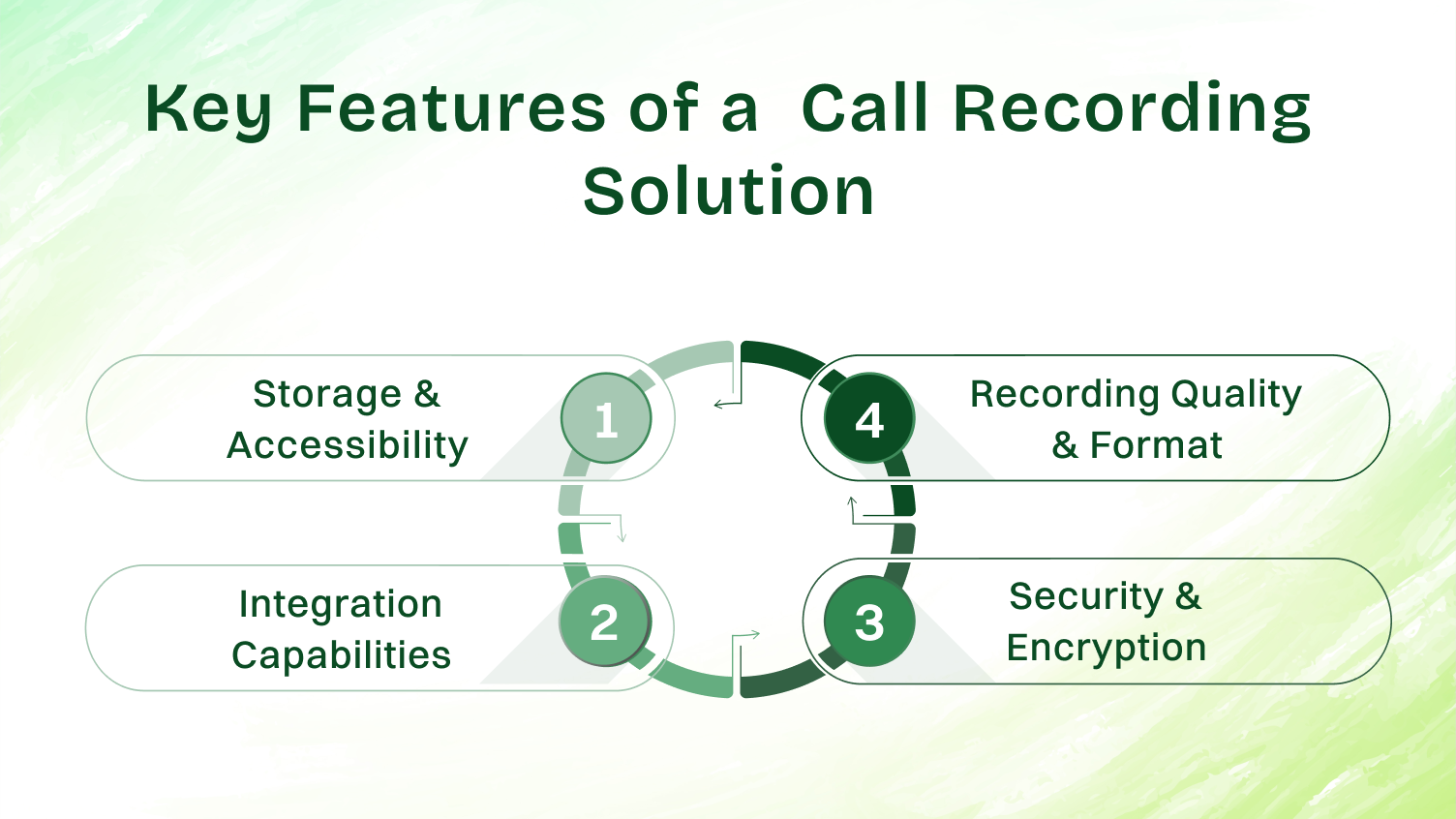
So , where are your recordings actually stored? Cloud storage means you don’t need to buy servers, but you’re trusting someone else with your data. Local storage gives you control but requires maintenance.
Good call recording software lets you search recordings by date, name, phone number, or customer. If you have to listen to 50 calls to find the one you need, your recording system sucks.
Bad audio quality makes call recordings useless. Choose a recording software that stores files in standard formats like MP3 or WAV. Some phone app solutions compress audio and recordings turn out to be of very low quality.
Your call recording feature should connect with your CRM. When a customer calls, you should see their entire call log and previous recorded conversations right there. No switching between screens.
The best business phone system options integrate with tools you already use. Google Drive for storage. Your helpdesk software for tickets. Your analytics tools for reporting.
Business call recording means you’re storing sensitive conversations. Customer credit card numbers. Medical information. Confidential business details. If your recording system gets hacked, you’re in trouble.
Encryption isn’t optional. Your call recording software should encrypt files both in storage and during transfer. Not all call recorder apps do this well.
Let’s get practical. Here’s how to actually record phone calls on different devices.
Android makes this easier than iPhone. Android has a native call recording feature. Here’s how to use it:
Third-Party Apps
If your mobile device doesn’t have built-in recording, download a call recorder app for Android. Popular options include:
There’s no built-in call recording feature on iPhone. No secret settings or hidden menus. Apple simply doesn’t allow it in the standard phone app.
Note: As of iOS 18.1 and later, Apple has introduced limited call recording features in specific regions. Before you begin, check the iOS Feature Availability website to confirm whether call recording is available in your language and region.
To play a recorded call:
If local recording isn’t available in your region, you can consider a few alternatives for an iPhone call recorder.
Third-Party Apps
Apps like TapeACall and Rev Call Recorder work, but they have some flaws. Generally, the apps require that you combine your call with their service.
VoIP Solutions
Switch to a business phone system that runs through an app instead of regular phone calls. Dialaxy or Dialpad are services that offer built-in call recording, available on iPhone and Android.
Now that you know how to record phone calls, let’s look at the benefits of call recording:
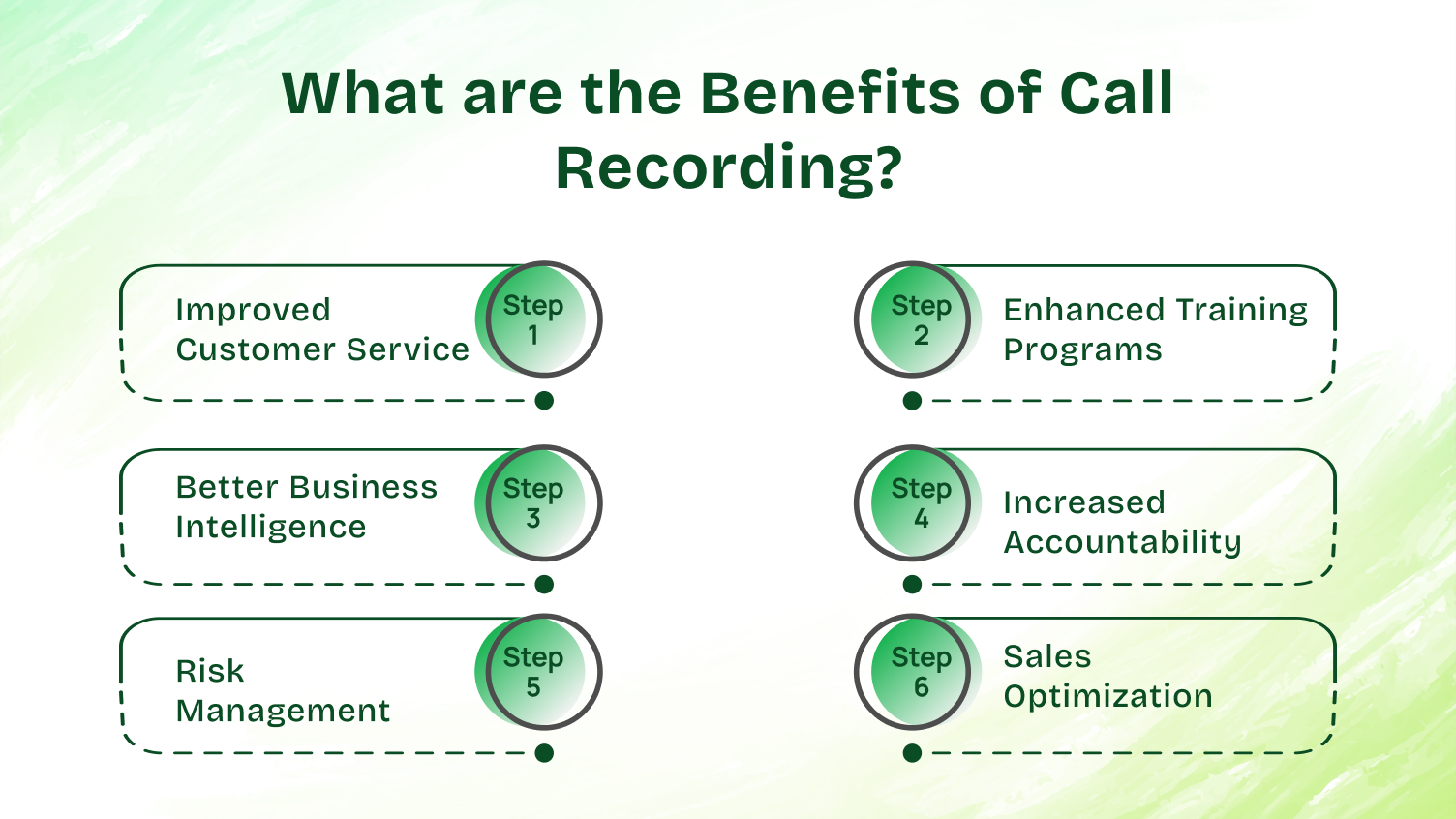
A. Improved Customer Service
Call recordings end customer disputes immediately. Customer says you promised free shipping? Play back the recording. Agent says the customer was abusive? Listen to the actual conversation.
You can also use recorded conversations to personalize follow-ups. “Hey, I listened to your call from Tuesday and wanted to follow up on that billing question you had.” That’s how you build customer relationships.
Stop telling new hires what to do. Show them. Pull up call recordings from your best performers and let trainees listen. They’ll learn faster from real examples than from your employee handbook.
Create a library of good and bad phone conversations. “Here’s how to handle an angry customer. Here’s what not to do when someone asks for a refund.” Your training program just got 10x better.
Your call recordings are full of market research that you didn’t have to pay for. Customers inform you about competitors, price issues, feature requests, and issues that you were unaware of.
Use text transcripts from call recordings to identify trends. If 20 customers mention the same issue, then it is not a coincidence. That’s a business issue you need to solve and address.
Employees work better when they know that their phone conversations are recorded. Not so as to be afraid, but because they maintain their focus. Recording phone calls makes everyone honest about what has been said.
Managers can review call recordings without hovering over employees all day. Check a few random recorded conversations each week, and you’ll know how your team is performing.
Lawsuits happen. Customer complaints escalate. Having call recordings as evidence protects your business. You can prove exactly what was said, when it was said, and who said it.
Insurance companies and lawyers love businesses that record phone calls. It makes their jobs easier when disputes arise.
Your successful sales calls contain patterns. Listen to recordings of deals that closed and deals that didn’t. What did your top performers say differently? When did prospects lose interest?
Call recording turns gut feelings into data. “I think we’re losing deals because of price” becomes “I listened to 50 calls and 35 prospects mentioned price in the first 3 minutes.
Let’s talk about actual call recording software that works. I’m not listing every option. Just the ones worth your time.
Before we dive into specific phone system options, know what matters.
Your business phone system should make call recording easy, not complicated.
Dialaxy focuses on simplicity and affordability for small to medium businesses. Their business phone system makes call recording straightforward without overwhelming you with features you don’t need.
Key Features:
Best for: Small businesses and startups that want reliable call recording for business without the enterprise price tag or complexity.
Pricing starts at around $10 per user per monthly. No need to contact sales for basic plans.
CloudTalk focuses on call recording for business with remote teams. Their phone system works on phones, desktops, or web browsers.
Key Features:
Best for: Small to medium businesses with remote sales teams who need business phone features beyond basic recording.
Pricing starts around $25 per user monthly. You can contact sales for enterprise deals.
RingCentral is the heavyweight of business phone system options. They handle unified communication like calls, video, and SMS, all in one platform.
Key Features:
Best for: Larger companies that need unlimited calling, video conferencing, and team messaging alongside call recording.
They don’t advertise pricing publicly. Expect to contact sales for quotes, but typical plans run $30-50 per user monthly.
Dialpad built its business phone system with AI from the start. Their call recording software includes real-time transcription and AI insights.
What makes it different:
Best For: Tech-savvy businesses that want AI features alongside basic phone call recording functionality.
Pricing starts at $22 per user for basic features. AI features cost more.
Nextiva targets businesses that want reliability over flashy features. Their phone system just works.
Recording features:
Best for: Businesses that prioritize reliability and do not require the latest features.
Standard plans around $23-75 per user monthly, depending on features.
JustCall markets itself to sales teams specifically. Their call recording features reflect that focus.
Sales-focused features:
Best for: Sales teams that require call recording along with outbound dialing tools.
Pricing starts at $39 per user monthly. Sales features cost extra.
Aircall keeps things simple. Their business phone solution doesn’t try to do everything; it just does call recording and basic phone system features well.
What you get:
Best for: Startups and small businesses that want call recordings without complexity.
Starts at $30 per user monthly for basic plans.
Making Your Choice
The “best” call recording software depends on your actual needs. Don’t buy enterprise features if you have 5 employees. Don’t cheap out if you’re handling business call recording for compliance reasons.
Most call recording apps and phone system providers offer free trials. Test before you commit.
Here’s what businesses get nervous about. Call recording compliance isn’t complicated, but it’s the backbone of staying protected. Mess this up and you’re facing lawsuits, fines, and damage to your reputation.
The United States has a patchwork of call recording laws. Federal laws follow one-party consent, but state laws can be stricter.
Here’s the catch: If you’re in a one-party state but calling someone in a two-party state, you need to follow two-party rules. Always use the strictest standard that applies to any participant on the call.
Your recording announcements need to inform callers that the call is being recorded clearly. If people have to guess it, it doesn’t count.
Good examples:
Bad examples:
Play the announcement before the conversation starts. Most business phone system platforms let you record your custom announcement. Match your brand voice while staying compliant.
Different industries have different rules for business call recording.
Create documentation that proves you take compliance seriously. If you ever face a lawsuit or regulatory investigation, good documentation protects you.
Your call recording compliance documentation should include:
Update this documentation when laws change or when you update your recording system.
Setting up call recording is easy. Doing it right requires planning.
This is not optional. Screw up call recording compliance, and you face lawsuits and fines.
One-party vs two-party consent states:
In one-party consent states, only one person needs to know the call is being recorded. That can be you. About 38 US states follow one-party consent.
Two-party consent states require everyone on the call to know about the recording. If you record phone calls without telling people in California, Connecticut, Florida, Illinois, Maryland, Massachusetts, Montana, New Hampshire, Pennsylvania, or Washington, you’re breaking the law.
When in doubt, tell everyone. Use recording announcements that say, “This call may be recorded for quality assurance.”
International regulations:
GDPR in Europe gives people rights over their recorded data. You need consent, you must explain why you’re recording, and people can request deletion.
HIPAA affects healthcare phone conversations. Extra security is required.
PCI DSS matters if you handle credit cards over the phone. You should stop recording when customers give card details, or use systems that automatically mute those sections.
Document everything. Create a call recording policy that explains:
Your employees need to sign an acknowledgment that they understand business call recording policies.
Your team needs to know why you’re recording phone calls. If they think it’s just about catching them messing up, they’ll resent it.
Frame call recording as a tool for improvement and protection. Good agents have nothing to worry about. Recorded conversations protect them when customers lie about what was said.
Train everyone on how your recording system works. Where’s the record button? How do they access recordings? What do they do if a customer asks not to be recorded?
Call recordings pile up fast. If you record all calls and handle 100 incoming and outgoing calls daily, you’re creating 100 files every day. That’s 2,000 recordings per month.
Plan your storage before you need it. Cloud recording software usually handles this automatically. Local recording system setups require planning.
Set up automatic deletion based on your retention policies. Keep recordings for 90 days, 1 year, 7 years – whatever your industry requires. Then delete them. Keeping unnecessary call recordings increases your legal liability.
Not everyone should access all recordings. Your call recording software should support role-based permissions.
The sales manager accesses sales calls. Support managers access support calls. Executives have access to everything if needed. Entry-level employees can’t pull recordings of random phone conversations.
Let’s talk about how businesses mess this up.
“We’ll just record everything and figure out the legal stuff later.”
No. Start with compliance. Add recording announcements. Get consent. Follow your state and country laws. The money you save by skipping this gets wiped out by one lawsuit.
You record all calls, then never look at them again. Or you need a specific recording but can’t find it among thousands of files.
Tag recordings properly. Use your call log system. Add notes about important calls. A recording you can’t find is worthless.
You record calls manually, but forget half the time. Or you record incoming calls but not outgoing calls. Pick a system and stick to it.
Automatic call recording solves this. The recording starts without anyone thinking about it.
Your call recordings sit on a server that anyone can access. Or you email recordings around without encryption. This is how data breaches happen.
Use proper call recording software with encryption. Control access. Monitor who’s downloading files.
The biggest waste? Recording phone calls and then never listening to them. You’re spending money on recording software and getting zero value.
Schedule regular recording reviews. Pull random samples. Listen for patterns. Use call transcripts to analyze trends.
Your mobile device or server runs out of space. Recording stops working. You lose weeks of calls before anyone notices.
Monitor storage usage. Set up alerts. Move old recordings to cheaper archive storage if you need to keep them, but don’t access them often.
Recording systems alone aren’t enough; you need processes and policies to turn recorded conversations into real business value. Here’s how to actually do call recording for business right.
Write down your recording policies.
Cover:
Have employees sign acknowledgment forms. Update policies when laws change.
Your recording announcements should be clear. “This call may be recorded” works. So does “For quality assurance, this call is recorded.”
Play the announcement early. Don’t wait until 5 minutes into the call to mention recording.
Some business phone system options let you customize call recording announcements. Use this to match your brand voice while staying compliant.
Laws change. Your business phone call practices should change with them.
Review your recording policies quarterly. Check if your state has passed new laws. Verify your recording announcements still meet requirements. Make sure employee training is up to date.
If you work with channel partners or have user extensions in multiple states, you need to follow the strictest laws that apply to any of your locations.
Set up tiered storage. Recent recordings that you might need quickly stay in fast, accessible cloud storage. Recordings older than 90 days move to cheaper archive storage.
Automatic call recording systems should handle this automatically. Configure retention rules in your call recording software and let it manage the files.
Delete recordings on schedule. If your policy says you keep business call recordings for 1 year, actually delete them after 1 year. Keeping old phone conversations longer than necessary creates legal liability.
Recording phone calls without reviewing them wastes money. Build a review process:
Your call recording software should make this easy. Good systems let you mark recordings, add notes, and share clips.
Modern business phone system platforms include analytics alongside call recording.
Track:
Call recording plus analytics turns subjective evidence into actual data.
Audit who accesses call recordings monthly. Remove access for employees who have left. Verify that only appropriate people can process data from recordings.
Your recording system should log every access. If someone downloads recordings, you know who and when.
Update your security as needed. If your call recording software offers new encryption options, implement them.
Connect your call recording feature to everything else you use. When someone accesses a customer record in your CRM, they should see the call log with links to recordings.
Business SMS, email history, support tickets, and call recordings should all live together. Context matters when you’re reviewing phone conversations.
Most modern phone app solutions integrate with major business tools; if yours doesn’t, consider switching.
A mid-sized e-commerce company selling outdoor gear employs 25 customer service agents. They handle around 300 daily calls across sales, support, and distributor inquiries.
The Problem:
Customer complaints kept escalating. Customers claimed agents promised things that didn’t happen. Agents claimed customers were confused. Nobody could prove anything.
Training new hires took forever. The training manager kept explaining the same concepts repeatedly. New agents needed weeks to get comfortable with complex product questions.
The Solution:
They switched to a business phone system with built-in automatic call recording. Every incoming and outgoing call is automatically recorded. They configured recording announcements to comply with their state’s two-party consent laws.
Here’s what they actually did:
Step 1: Set up the technical side
They chose a cloud-based call recording software that integrated with their existing CRM. Recordings are stored in the cloud with automatic transcription.
The recording starts automatically when calls connect. Agents don’t touch anything.
Step 2: Establish clear policies
Created a simple call recording policy. Explained why they’re recording (training, quality, customer service improvement). Specified that recordings are kept for 6 months, then automatically deleted.
Every agent signed an acknowledgment form.
Step 3: Built the review process
Team leads review 10 random recordings per agent each week. Takes about 30 minutes per lead.
They created a shared folder of “best call examples”, particularly good recorded conversations that show excellent customer service.
Step 4: Integrated with training
New hire training now includes listening to 20-30 actual call recordings before taking their first business call. They hear how experienced agents handle tough situations, explain complex products, and de-escalate angry customers.
Training time dropped from 3 weeks to 10 days.
The Results:
After 6 months of using call recording for business:
They didn’t just record calls and hope for magic. They:
The call recording gave them data. They used the data to improve.
Call recording is changing fast. Here’s where it’s going.
Converting voice recordings to text transcripts used to be expensive and slow. Now AI does it automatically and accurately.
Modern call recording software transcribes as you talk. You can read along with recorded conversations in real-time. Search for keywords across thousands of recordings instantly.
This matters because reading transcripts is faster than listening to recordings. Find the relevant part, then listen to that section only.
Instead of managers manually reviewing call recordings, AI scores every call automatically. Did the agent follow the script? Did they ask for the sale? Did they resolve the issue?
Recording software with AI can grade thousands of business phone call interactions and flag only the ones that need human review.
AI analyzing your call recordings can predict which customers are about to cancel, which sales prospects will close, and which support issues will escalate.
The patterns in recorded conversations contain signals humans miss. AI finds them.
Already mentioned this, but it’s getting better. You’ll be able to search call recordings by saying “show me all calls where customers mentioned the competitor” or “find recordings where the customer was angry, but the agent resolved it.”
Text transcripts plus AI make this possible. Your call log becomes actually useful instead of just a list of phone numbers and timestamps.
What This Means for Your Business
You don’t need to adopt every new feature immediately. But know where call recording technology is going.
If you’re shopping for call recording software now, pick something that’s adding AI features. You want a phone system that improves over time, not one stuck in 2015.
Most modern business phone providers are adding these features. Ask about their AI roadmap before you commit.
Call recording for business delivers measurable results when implemented with proper planning and legal compliance. Understanding one-party vs. two-party consent laws and using clear recording announcements keeps you compliant while still capturing valuable customer interactions.
Automatic call recording systems and cloud-based call recording software reduce manual effort and boost efficiency. Choosing solutions where recordings are stored securely with encryption and CRM connectivity streamlines workflows while maintaining data security.
AI and automation enhance business call recording further. Real-time text transcripts and automated quality scoring help managers review recorded conversations. Combining regular call reviews with agent coaching using real phone conversations increases team performance and customer satisfaction.
These strategies help businesses grow, stay compliant, and deliver measurable results through better incoming and outgoing call management.
No, most personal phone calls are not recorded by default. Business phone systems often use automatic call recording for customer interactions. But companies must inform callers through recording announcements when this happens.
Yes, starting with iOS 18.1, iPhone now includes a native call recording feature built directly into the Phone app. When you tap the record button during a call, recording starts, and an automated announcement informs callers that the conversation is being recorded for compliance purposes.
Call recordings on iPhone with iOS 18.1 are saved to the Notes app. You can access recordings stored from the recent calls list or within Notes, and export them to Google Drive or cloud storage if needed.
Android saves call recordings to the Internal Storage > Recordings or Call Recordings folder, though the exact location varies by manufacturer. Third-party recorder apps for Android let you choose storage locations, including SD cards or Google Drive, for your recorded files.
In one-party consent states, you can record if you’re part of the conversation without telling others. Two-party consent states like California require everyone on the call to know about the recording, so always inform callers for business call recording to stay legally safe.
Listen for recording announcements at the start of the call or ask the agent directly if your conversation is being recorded. Some phone systems include periodic beep tones during calls, though most modern business phones just announce it once at the beginning.
Call recordings deleted recently can sometimes be recovered from trash folders or the cloud storage backups within 30 days. After permanent deletion or retention period expiration, recordings typically can’t be recovered, which is why proper backup systems matter for important business call recordings.
Yes, call recording is essential for contact centers handling high call volumes across multiple agents. Modern contact center platforms include automatic call recording to ensure quality assurance, compliance, and effective agent training.
Call Recorder ACR is the most popular free option for Android, offering automatic call recording and storage to Google Drive. For iPhone, free options are limited since iOS restricts recording, so most recorder apps for iPhone require paid subscriptions for reliable business call recording.
Google Voice includes a call recording feature for incoming calls only by pressing 4 during the call, and the recording starts with an announcement. Recordings stored in your Google Voice inbox can be downloaded, but this feature doesn’t work for outgoing calls or transferred calls on business accounts.
