

Call Center Automation: Its Benefits, Use Cases & Best Practices

Running a call center without automation is like mailing handwritten letters in the age of smartphones. Isn’t it? No human being will ever choose the slow, frustrating, expensive, and non-charming way.
If you’ve ever been stuck on hold listening to a robotic “Your call is important to us” for 12 minutes, you know the pain. And if you’ve worked in one? Even worse. Endless calls, repetitive questions, agents clicking between seven different tabs, and managers drowning in spreadsheets trying to track performance.
Call center automation comes to your rescue with a transformative approach. A practical way to make things suck a little worse or a lot more. If you are managing a team of five or five hundred, artificial intelligence, workflow automation, and machine learning help to create smarter, faster, and more cost-effective customer interactions.
This blog is all about showing what exactly automation is. You will find the core components of call center automation, how it works, how it benefits your business, your agents, and your customers, and successful implementation.
 In simple terms, a Call center is the use of advanced technology to optimize the daily operations and tasks of the call center or contact center.
Humans used to handle tasks and processes traditionally, so advanced technologies like artificial intelligence (AI), machine learning (ML), robotic process automation (RPA), and software integrations are being introduced to automate routine tasks and processes. Many teams bring in an AI automation partner to set this up.
Call center automation is the implementation of technology in a contact center to automate mundane, rule-based, or data-driven tasks by automation software managed with limited human guidance.
Contact centers are equipped to expand business globally and keep touch points seamless with every customer, wherever they are, thanks to international phone numbers.
It isn’t really about replacing the human element with AI; it’s about minimizing human error. The change has been imperative for the evolution of contact centers that are seeking to meet rising customer demands and cope with increased volumes of calls.
Let’s explain with an example: When a customer calls with a billing issue, route the call to the appropriate department.
An automated system can use natural language processing (NLP) to understand the query, retrieve account details using RPA, and even provide instant AI-driven responses to common questions.
Contact center automation is about making operations smarter, faster, and more cost-effective. Here’s what usually makes up call center automation behind the scenes.
Traditional call centers almost exclusively utilize human agents that take calls and process them manually, which can result in extended wait times, human error, and limited scalability. Inefficiencies experienced when working in manual processes increase operating costs.
Call center automation reduces or removes these dependencies on technology, as it eliminates or reduces manual variety and change by:
Pulling this all together allows humans with extraordinary capabilities with automation to deliver smarter and more effective contact centers built to be agile, even flexibly focused on the customer.
 Now that you understand a bit more about what Call center automation is, let’s take a look at how Call center automation actually works.
When a caller calls into the support number or submits a help ticket, what happens behind the scenes?
Process automation relies on advanced AI features and capabilities that a voice automation tool like Interactive Voice Response (IVR) provides, allowing processes to be automated with minimal effort.
AI systems, workflow automation technology, and back-end systems are built to reduce manual processes at both front-end and back-end custom.
Next, let’s get into what Call center automation looks like and its various steps:
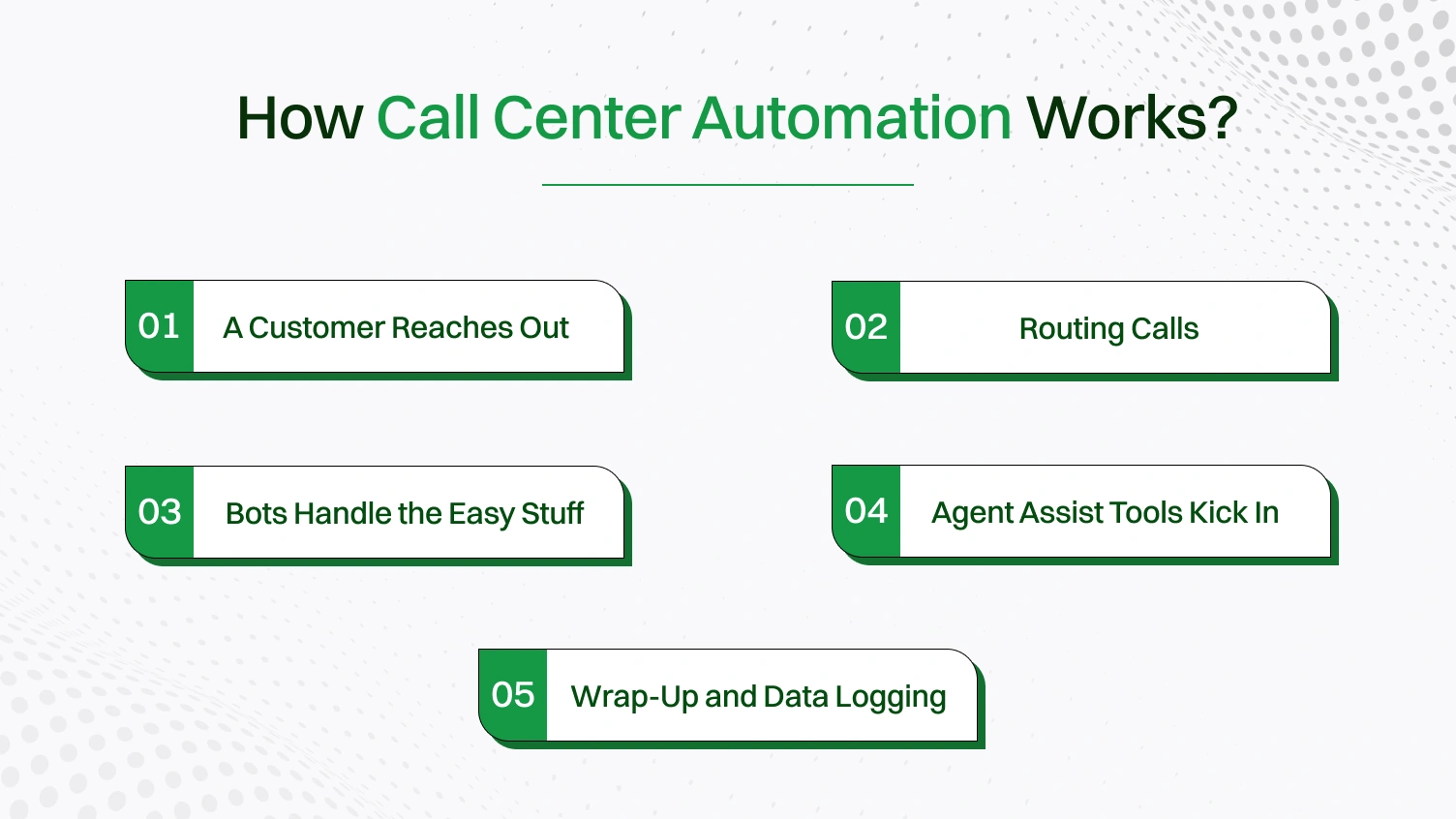
Step 1: A Customer Reaches Out
The process starts when the customer contacts the call center. They can contact the call center via phone, chat, email, or even social media. With the contact center automation, smart tools come to the rescue.
Call the automated software checks Who’s calling (using caller ID or account number), What channel they’re on (phone, chat, WhatsApp, etc.), and What they probably need (based on past interactions, keywords, etc.).
Step 2: Routing Calls
The customer’s intent is identified via the call routing, and the system sends the call to the right person or department.
For example, sending a billing question to the finance team, routing a tech complaint to the support agent, and directing a Spanish-speaking customer to the right language group. This is all without the manual effort. The routing engine just works like this.
Step 3: Bots Handle the Easy Stuff
When customers ask obvious or easy questions, such as “How do I reset my password?” or “Where is my order?” The virtual assistant answers these questions. Conversational AI powers that assistance.
There will be a time when the bot cannot answer the questions. Then, the question passes to the live chat agent. This type of frontline automation helps reduce a significant amount of traffic without human intervention.
Step 4: Agent Assist Tools Kick In
When a customers need a real human interaction, the bot does not just walk in. Those automation bots help call center representatives understand the customer’s history, recommended responses, policy updates, and real-time sentiment analysis.
This agent assist is like a sibling whispering helpful things in your ear. This helps to shorten average handle time, improve the resolution rate, and reduce agent frustration.
Step 5: Wrap-Up and Data Logging
Typically, after speaking to a customer, agents will have to go back through a boring checklist of tasks – typing notes, updating records, and logging documents. Automation tools will automatically transcribe the calls, tag the case with the issue code, update the CRM system with all details about the case, and trigger follow-up emails and tickets.
Additionally, call recording features help capture important conversations, providing valuable insights for improving communication strategies and training agents.
Additionally, numerous key technologies work behind the scenes to facilitate process automation.
1. Artificial Intelligence (AI)
AI powers everything from decision-making to smart routing. For example, it can analyze customer behavior patterns, customize real-time conversations with recommendations, and highlight the next best actions for agents.
2. Natural Language Processing (NLP)
NLP is how technologies “understand” human language, whether it be text or voice. That means chatbots, voicebots, and virtual assistants can now identify intent and meaning from language (text and voice).
3. Speech Recognition & Automatic Speech Recognition (ASR)
Those technologies are turning speech and/or text into data. Work tasks may initiate or be analyzed, such as queueing a call, logging call information, deploying IVR options, and more, especially when paired with a noise cancelling app for windows to ensure clear audio input.
4. Robotic Process Automation (RPA)
Robotic process automation (RPA) bots can be developed to perform back-end processes, such as filling out forms or transferring the contents of customer management systems and databases into relevant systems. Once the client call has concluded, bots can log the follow-up sessions without human intervention.
5. Interactive Voice Response (IVR) Systems
IVRs handle callers and self-service menus to work with issues and connect callers to the appropriate agents. Advanced IVRs handle interactions in a much smarter way by using Natural Language Processing (NLP) and Artificial Intelligence (AI).
6. Predictive Analytics & Machine Learning
Tools can identify industry-driving customer needs or operationalize optimal decision-making, eg, querying how many calls an organization will have every hour or giving suggestions about visiting a high-priority ticket.
Now, you know what made it possible. Let’s see how all the tools and technology are used. Still, how is it possible? It is all possible with the integration. Automation systems hook into:
So when someone asks you a question on how call center automation works, you can answer from the first ring to the final wrap-up. It’s a team effort between bots, software, and human agents. And when it works well, it’s invisible. Customers get answers faster, agents stay sane, and managers finally get reports that aren’t a mess.
A start-up contact center or a global customer support team can use call center automation. The right automation software can help unlock measurable gains across the board, from shorter handle times to higher resolution rates.
Here’s how it benefits everyone involved, from the stressed-out support manager to the customer who just wants to reset their password without losing their mind. Let’s break it down by stakeholder.
Manual input of the data of the same customers over and over again is no longer required. Automation handles all the dull backend processes so they can focus on relationships.
The process is sped up to reduce the automation friction. It is important to make customers feel valued and heard. When you reduce the friction on the customer’s journey,a higher satisfaction score is seen.
| Benefit Category | Top Gains |
|---|---|
| Businesses | Lower costs, higher efficiency, shorter wait times |
| Agents | Less burnout, more productivity, AI support |
| Customers | Faster service, 24/7 help, better experience |
 Till now, we have learned about call center automation and why it is great. The main use of call center automation is to empower both customers and employees with faster service, smarter systems, and fewer headaches without replacing humans.
Versatile applications that eventually reduce time-consuming tasks, improve response times, and enhance employee satisfaction are all offered by automation tools like Inbound customer support, outbound sales, or a hybrid model
Now let’s get into the “show me how it works in the wild” part, which is the use cases, because nothing beats actual examples to prove that this isn’t just some overhyped tech fad.
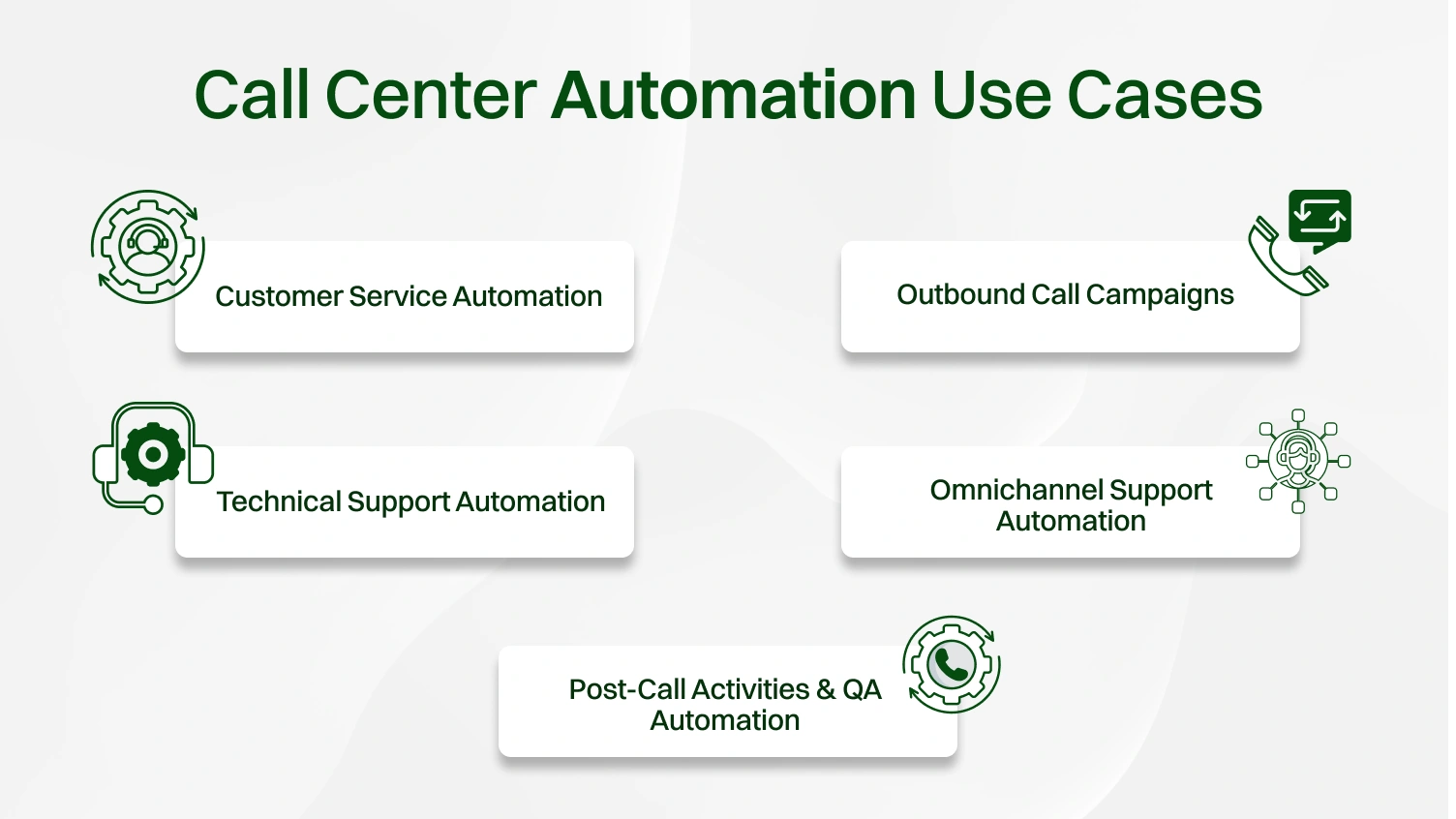
Current contact centers utilize AI agents, chatbots, and IVR systems to handle a variety of repetitive inbound requests, such as account inquiries, password resets, or delivery tracking, without requiring the involvement of an organization representative.
How it helps:
Automation is a powerful method to streamline outbound call centers using predictive dialers, auto-schedulers, or workflows integrated into a customer relationship management (CRM) system.
Use cases:
Impact:
Automated diagnosis tools and automated knowledge bases help to guide customers through a variety of common issues related to diagnosis (e.g., network errors), software installations, passwords, etc.
How it helps:
Consumers today demand seamless experiences across voice, chat, SMS, social media, and email. Generative AI and automation software allow an organization to sync data and send an integrated message across multiple platforms.
Example use cases:
Impact:
Automation also improves what happens after the call, from updating CRMs to evaluating agent performance.
Use cases:
Result:
Let’s be honest: automation doesn’t just “happen.” It’s powered by tech that’s actually doing the heavy lifting, from routing calls to analyzing customer tone mid-sentence. This section is your behind-the-scenes look at the call center software, automation tools, and technologies that make modern contact centers run smoother than ever.
With insights provided by AI and the ability to automate backend processes, these tools enable contact centers to handle increased volume and process customer requests accurately, leading to improved customer satisfaction, enhanced agent performance, and reduced errors.
In the following pages, we will look at all types of products and technologies with their capabilities and what they are best suited for.
Below is a comparison of some of the most widely used platforms in the contact center automation space, including features like AI voice, real-time analytics, and API integrations, all essential for modern operations.
| Tool | Type | Notable Features | Best For |
|---|---|---|---|
| NICE CXone | Cloud contact center | AI voice, real-time analytics, omnichannel routing, and workforce management | Enterprise-grade customer experiences |
| Five9 | Call center software | Predictive dialer, automation tools, speech analytics, CRM integrations | Outbound call centers, sales teams |
| Genesys Cloud CX | Contact center platform | Conversational AI, IVR, API integrations, workflow automation | Large-scale global operations |
| Dialpad AI Contact Center | AI-powered center software | Real-time AI coaching, automatic call summaries, AI voice, automation software | Remote/hybrid teams, agile businesses |
| Talkdesk | Cloud contact center | AI-driven automation, omnichannel support, real-time analytics, API integrations | Scalable enterprises and SMBs |
Contact center automation can deliver a myriad of benefits, yet at the same time, incurs hundreds of challenges. It is crucial to understand the challenges, and addressing them upfront is key to success. Understanding the challenges and addressing them effectively will enable successful implementation and sustained growth.
Let’s take a look at the challenges and how to deal with them properly.
Finding the right balance between technology and human touch is the biggest challenge. Customers may find it frustrating to talk to the automated voices daily, and they may want to talk to real people. Also, relying only on human agents can result in inefficiencies and higher operating costs.
Whenever a new automation tool is introduced, agents will invariably resist. Many agents will worry about job security, and others will feel like they’ll never learn how to use it. Training and change management are going to be critical.
Automating processes usually means working with a great deal of sensitive customer data. This leads to serious security, compliance, and ethical questions.
The contact center automation universe is constantly evolving. It’s changing faster than the hold music loops. From ChatGPT-style agents to hyper-personalization wizardry, today’s automation trends fundamentally change how call centers function and what customers expect.
Here’s a look at what’s actually happening on the ground (and in the cloud) and how you can ride the wave instead of getting buried under it.
Remember when IVRs were basically glorified maze puzzles? Now, thanks to generative AI, we have actual conversations, or at least something eerily close.
AI capabilities continue to evolve, and we’ll see even more intelligent routing, smarter agent assist, and fewer “please repeat that” moments.
No one likes being treated like customer #4,023 in a queue. Predictive analytics is changing that by turning customer data into intelligent decisions before anyone even picks up the phone.
Yes, people still call, but messaging and mobile apps are where the real action is. And voice bots are finally catching up.
The future of call center software is about smart automation, not about replacing agents, but signing up for capabilities agents never had before, and cognitive load reductions.
By embracing these automation technologies, companies can anticipate customer expectations and turn every interaction with a customer into a competitive advantage.
At this point, call center automation and its basis are understood well, right? Bots, workflows, and fewer angry customers are expected. For organizations that have already checked the basics, like an IVR system and canned responses.
It is time to dive into the real automation gold, like advanced tools, deeper integration, and use cases that move beyond the use cases.
This section is for the pros. The tech leads. The CX managers. Those people who already have the knowledge of API’s, real-time orchestration. With the new frontier: deep, strategic automation, RPA, conversational analytics, AI-driven calls, and back-end syncs that cut the fluff and focus on results.
Here are advanced, high-impact applications driving customer success and operational excellence in modern contact centers.
Everybody thinks that AI chats with your customers, but RPA is the reason for tiny but vital actions that quietly automate it.
You can say we are living in the future. AI voice agents handle calls. That does not mean only routing, full-blown voice conversation, which is powered by automatic speech recognition(ASR) and smart NLP.
You can extract real-time insights from contact center automated interactions. You use conversational analytics to extract that data. That core customer data can tell you exactly what they feel, want, and complain about.
In the implementation part, every advanced application works together. A call center that does not feel like a call center is only when an AI agent+RPA+speech analysis work together. The combination makes an instant solution hub.
AI capabilities reduce average handling times by:
Call center automation is transforming business world operations. It helps to increase the resolution rates, enhance agent performance, and boost the satisfaction score.
Many success stories across enterprises and small businesses show the power of center automation solutions in action.
A Fortune 500-level company implemented AI agents, ASR, and conversation analytics to reduce call center chaos and boost performance. Here’s what changed:
Before:
After automating call centers with AI agents, ASR, conversational analytics, and call routing:
A real estate firm automated basic inquiries via a mobile app chatbot with speech recognition.
Wins:
Implemented center automation solutions to manage appointment scheduling and check insurance using AI calls.
Results:
This is because automating a call center is not a simple switch. To implement call center automation with no plan at all is like buying gym equipment and expecting your body to magically transform. If you expect your customer satisfaction to increase, you have to work for it.
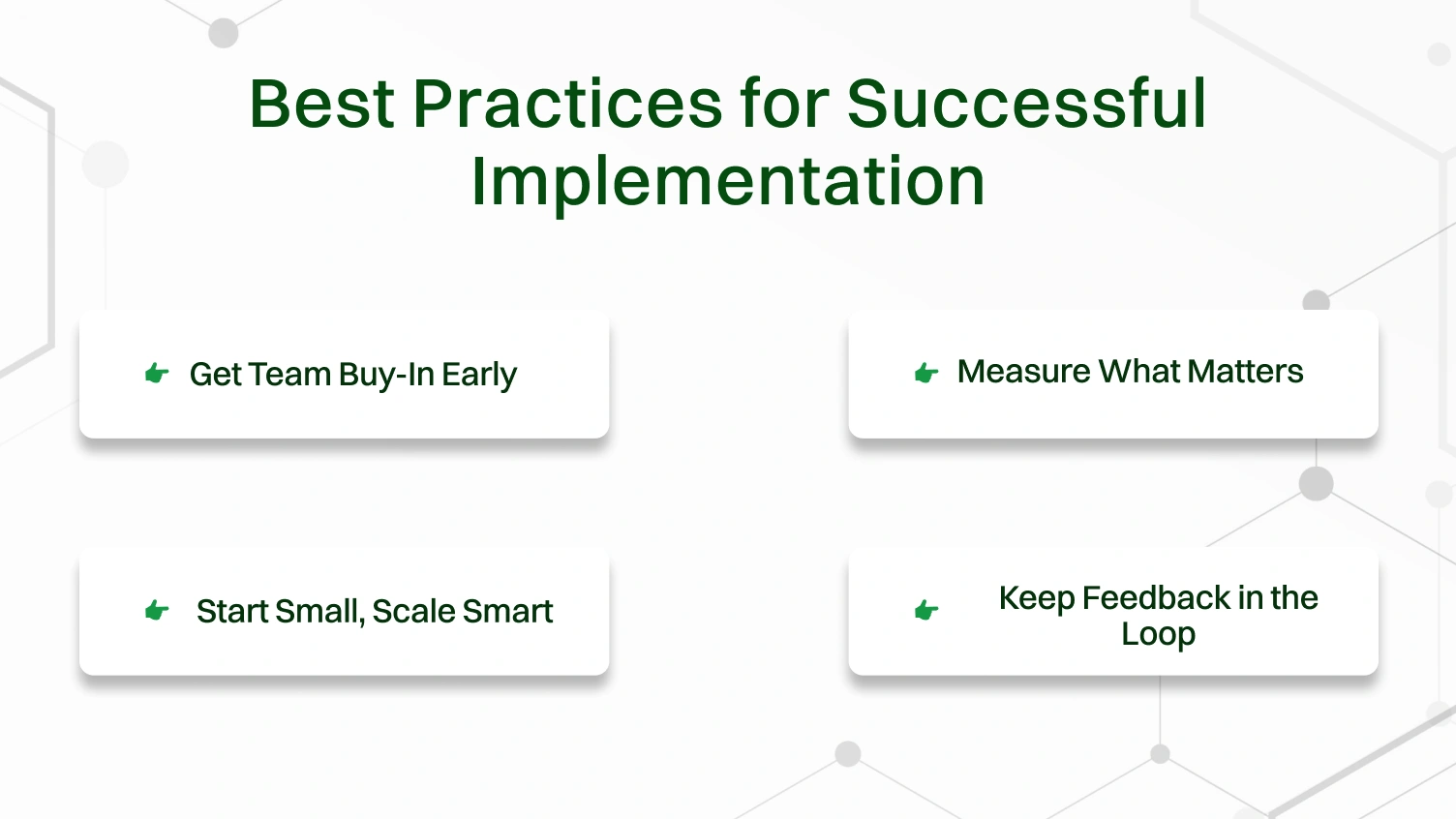
Engage your agents before deploying bots or automation tools. Train them and clearly show how automation eliminates repetitive tasks, not jobs. This approach builds trust, boosts productivity, and reduces resistance.
Don’t rely on gut feelings. Track key metrics like Average Handle Time (AHT), Resolution Rate, and CSAT (Customer Satisfaction Score). These metrics tell you if automation is helping or just adding dashboards.
Begin with a pilot program or a single workflow. Scale gradually based on real results. Successful automation is about sustainability, not speed.
Gather continuous feedback from both customers and agents. If automation isn’t reducing friction or improving outcomes, adjust and iterate. Even the best systems require fine-tuning over time.
Call center automation is no longer a thing of the future; it is here. It is not just smart; it is now an enviable aspect of call center solutions. Call center automation tools and advanced call center software, including AI, automate processes such as automatic speech recognition and generative AI, which enable businesses to reduce average handling times and resolution rates.
When you implement your automation with intention, you create a great workflow with shorter wait times and foster customer satisfaction.
Not only does automation let a contact center manage incoming volumes while providing better resolution rates, but it also allows you to give 24/7 personalized support. Especially when paired with a virtual phone number that ensures accessibility from anywhere in the world.
With clear integration established through automation tooling that seamlessly integrates with current CRMs, IVR systems, and analytics platforms, the workflow process is possible across all three, from secondary to full process enhancement, creating the best conditions for business, agents, and their customers to operate seamlessly.
Incorporating automation into your call center is essential, as it is the only viable way for call centers to create scalable, cost-conscious, and customer-focused contact centers that continually thrive in this arena, especially in a fast-paced, entirely digital environment.
Common applications can be anything from CRM applications (Salesforce, for example), helpdesk platforms (such as Zendesk), IVR systems, RPA platforms (such as UiPath), and general AI solutions (such as Dialpad AI or Google Dialogflow) to manage performance from call routing and management to retain actions after the call concludes.
AI is utilized in contact centers with intelligent routing, human-like sentiment analysis (real-time), virtual assistants, auto-suggestions for agents, and interactive decision-making for agents through predictive analytics to add enhancement, not replace, the agent’s decision-making and overall quality of response.
No. Automation must be seen and developed as a supplement, not a replacement, for humans. Automation comprises the ability to automate repetitive tasks that may allow the agent to concentrate more on progressive narratives, human interactions that are based on empathy, and where the agent is completing interactions based on non-repetitive human interaction,s whereby there is critical thinking and emotional intelligence required.
IVR is based on menu-driven (service considerations) options (“Press 1 for billing…”), conversational AI relates to a free-form speech where, through natural language processing (NLP), it enables a dynamic response that is as human-like as possible.
RPA robots take on countless back-office tasks such as data entry, form completion, record updates, etc., so agents can engage live customers.
There are multiple examples of post-call automation, including AI call transcription, tagging for sentiment, automated CRM updates, automated ticket creation, automated follow-up workflows, etc., all without human involvement.
The biggest barriers include chatbot limitations, poorly integrated legacy systems, ensuring a human touch, data privacy, and compliance.
Automation tools can combine logic across several channels (i.e., voice, email, chat, social) to gain a seamless support experience, provide intelligent inquiry routing, and, more importantly, give customers a real-time context of their inquiry across channels.
Call center automation shows improved efficiency metrics that matter to organizations like Average Handle Time (AHT), First Call Resolution (FCR), Agent Occupancy, Customer Satisfaction (CSAT), and total cost per interaction.
Call center automation reduces wait times by using intelligent call routing to connect customers with the right agent instantly. Routine queries are resolved through virtual agents, freeing up human agents to handle complex issues. This not only improves agent productivity but also creates a smoother experience for customers, boosting overall contact center operations efficiency.
