

How to Set Up Voice Biometrics in Your VoIP System?

Have you ever wondered how companies can check callers on the spot and avoid cases of fraud? The solution is voice biometrics.
Businesses are able to secure the calls of customers, minimize manual verification, and enhance average handling time by utilizing the unique voiceprint of a caller.
In the case of companies that employ VoIP, voice biometric systems might not be easy to implement initially. However, it is easy with the correct actions taken to enroll user voice samples and combine them with virtual agents, interactive voice Response (IVR), and other interactive voice agents.
With the help of this guide, you will learn how to set up voice biometrics authentication techniques in your VoIP system, how to optimize voice recognition systems, and the best practices in security.
In the end, you will be capable of streamlining customer calls, preventing fraud, and improving customer trust.
Common Problems |
Solutions |
|---|---|
| Voice Not Recognized During Enrollment | Check the microphone, reduce background noise, re-enroll users, and run calibration tests to capture unique voiceprints accurately |
| False Rejections During Verification | Review and adjust thresholds, update stored voiceprints, fine-tune microphone sensitivity, and optionally use multifactor authentication |
| Integration Errors with CRM or VoIP Features | Verify API permissions, map voiceprints to accounts correctly, update voice biometric providers, and test voice recognition systems end-to-end before going live |
Voice biometrics changes the nature of securing VoIP systems for businesses. It helps to avoid fraud by checking the unique voiceprint of a caller who is not an impersonator before he or she gets into your team. This minimizes the time spent on manual verification and accelerates the verification process, allowing agents to work on actual problems.
In addition to security, it develops customer trust. When the identity of the callers is secured, they feel confident, and the agents are able to conduct conversations without asking the identity of the callers repeatedly. This contributes to quicker call resolution and improved experience.
Having known the importance, now we will see how voice biometrics can be configured in your system.
Before installing voice biometrics in your VoIP system, ensure proper admin access, secure network connections, high-quality microphones, CRM integration, and compliance measures to guarantee accurate voice authentication and smooth customer calls.
Choose a VoIP system that supports voice biometrics or provides APIs for voice authentication. Your platform should allow integration with voice biometric systems and authentication solutions.
A compatible system ensures that your authentication process is smooth and accurate. This will also let you leverage features like multifactor authentication and real-time voice recognition during calls.
A reliable network connection is a key to correct voice recognition biometrics. Lack of connectivity may create unsuccessful verification or slow authentication, which affects customer confidence.
Make sure that your bandwidth is capable of supporting simultaneous calls and interactive voice Response (IVR) activities. A correct network configuration will also minimize the mistakes made in recording the unique voiceprint of a caller, and your voice biometric authentication will be guaranteed.
High-quality audio hardware is essential for capturing a user’s unique vocal characteristics. Microphones with noise-canceling features reduce background noise, which improves the authentication system’s accuracy.
Using the right hardware prevents mismatches in the voice biometric system and supports passive voice biometrics during normal calls. Always test the device before enrolling users.
You need admin-level access to configure your authentication methods, set security measures, and manage stored voiceprints. Admin privileges let you adjust thresholds for verification accuracy, enable liveness detection, and integrate voice biometric providers if needed.
Without this access, implementing voice authentication becomes inefficient and error-prone.
You have to access your IVR system to take users through voice enrollment and verification. The IVR may request the user to record expressions that form his/her voiceprint, and may also invoke authentication mechanisms on either an inbound or outbound call.
Effective IVR implementation will guarantee that customer calls are smoother and the average handling time is minimized.
Linking voice biometric systems to your CRM or contact center stores users’ voices securely and allows quick identity verification. This setup supports automated fraud prevention and helps your agents verify callers faster.
Integrations also allow your virtual agent or AI agent to access voice recognition data during customer interactions.
Ensure your system encrypts stored voiceprints and follows compliance standards like PCI for sensitive transactions. Protecting your voice biometric authentication data prevents breaches and maintains customer trust.
Incorporating advanced voice security measures reduces fraud and enhances the overall voice biometric system reliability.
Educate your team about the authentication process and voice authentication methods before setup. Training helps agents guide customers through voice enrollment and verification. Clear instructions reduce errors in capturing unique voiceprints and improve operational efficiency during live calls.
When your team is ready, the implementation becomes smoother and more accurate.
Setting up voice biometrics in your VoIP system requires careful planning, from enabling the module, enrolling user voice samples, configuring stored voiceprints, adjusting sensitivity, and testing verification for accurate voice authentication.
Log in to your VoIP system as an administrator. Navigate to the Security or Authentication tab. This is where all voice biometric authentication settings live.
Having full admin access ensures you can control authentication systems and configure them to capture each user’s voice accurately. Proper access reduces errors later in the setup process.
If your provider has a built-in voice biometrics solution, enable it immediately. If not, integrate a third-party plugin or API that supports voice recognition biometrics.
This activates your system’s ability to verify callers automatically and reduces reliance on manual security questions. Integration with voice biometric systems makes your customer calls faster and safer.
Establish a secure database of stored voiceprints that is secure. Make sure that there is encryption and that there are backup routines. Secrecy of this sensitive data ensures customer confidence, and your voice authentication systems are compliant with the requirements, such as PCI payment.
A safe storage environment will ensure that no one gets unauthorized access to your data and will enhance your fraud prevention plan.
Check the microphone input on your system. Low sensitivity can miss details, while high sensitivity may pick up background noise. Run a calibration test to capture unique vocal characteristics clearly.
This ensures voice recognition systems work accurately during live calls and improves the success of passive voice biometrics.
Request the users to repeat brief phrases 3-5 times in silent conditions. The system employs these samples to generate a distinct voiceprint for each user. The correct enrollment will make sure the authentication process is correct and false matches are minimized.
When properly implemented, it enhances the efficiency of operations and allows agents to work on actual customer problems.
Map each user’s voice to their VoIP or CRM profile. This allows instant identity verification during calls without repeated questions. Linking voiceprints ensures your voice biometric systems can identify callers automatically and build customer trust.
It also speeds up average handling time in busy contact centers.
Decide when voice authentication activates. Options include logging in, accessing sensitive data, or before a call. Clear triggers make the authentication process seamless for users and reduce unnecessary interruptions.
Proper triggers improve operational efficiency and strengthen your fraud prevention measures.
Define the accuracy level, usually 90–95%, for verification. Too low may allow false matches, while too high can reject legitimate users. Balancing security measures with convenience ensures your voice biometric system works reliably and doesn’t frustrate callers.
Execute test calls on sample accounts. Ensure that the system identifies the voice of users and provides access within a short time. In case of errors, change the microphone sensitivity or re-enroll the voice.
Testing will help to verify that your voice biometric authentication can work in real-life conditions and increase customer confidence.
Train agents to guide customers through voice enrollment. Provide scripts for explaining voice authentication methods and benefits clearly. Well-informed staff reduce errors during setup and make customer calls smoother. Proper training improves operational efficiency and speeds up verification.
Link your voice biometric system with CRM tools, virtual agents, or AI agents. Integration enables automatic detection of callers and quicker service. Integrating your system will help you work more efficiently, provide customers with a better experience, and improve your fraud prevention plan.
Add voice verification and PINs or SMS codes to provide extra security. This layer helps in preventing spoofing or replay attacks and strengthens your authentication systems.
Multifactor authentication is useful in protecting sensitive transactions such as PCI payments without disrupting the workflow of voice recognition.
Simulate multiple users to evaluate system performance. Check voice recognition systems under high traffic to prevent delays. Regular testing ensures your voice biometric solution handles real-world volumes and maintains enhanced security for every call.
Re-enroll every 6-12 months. Voices may vary with time because of sickness or the surroundings. The process of updating stored voiceprints ensures that the authentication process is correct and that false rejections are minimized.
Your voice biometric systems should be maintained regularly to make them reliable and efficient.
Monitor authentication success rates, mismatches, and overall usage trends. Analytics improve voice biometrics, increase operational efficiency, and reduce average handling time. Regular monitoring of usage also helps improve the fraud prevention process, strengthen customer trust, and ensure availability in the system.
Integrating voice biometrics with Dialaxy’s VoIP features enhances security and efficiency by linking unique voiceprints to customer calls, syncing with virtual agents, AI agents, and IVR for seamless verification.
Integrate voice biometric authentication with virtual agents and AI agents to verify callers automatically. This reduces the need for repetitive security questions and accelerates customer calls.
By using voice recognition systems, your agents can focus on solving real issues rather than verifying identities, improving operational efficiency.
Connect each user’s voice to their profile in Dialaxy’s CRM or contact center. This ensures instant identity verification during calls. Linking stored voiceprints allows your system to recognize returning callers, reducing average handling time and enhancing customer trust.
It also supports seamless handoffs between agents and automated systems.
Using stored voiceprints in combination with Dialaxy’s security features strengthens your voice biometric systems. You can prevent fraud incidents and unauthorized access with multifactor authentication, combining voice recognition with PINs or SMS codes.
This approach protects sensitive information while maintaining a smooth caller experience.
For outbound calling, voice verification systems can trigger verification automatically. Agents are able to verify a caller’s identity (e.g., using voice biometrics) before they discuss confidential information.
This minimizes risk, keeps callers compliant, and applies a voice biometric level of confidence as a level of security.
The Dialaxy dashboard is a place to observe authentication success rates, unsuccessful authentication attempts, and overall system benchmarking.
When you analyze these data points, you will be better equipped to identify areas for threshold adjustments, authentication process changes, or simply as a mechanism to help maintain accuracy in voice biometric systems.
With continuous monitoring, you will be able to ensure reliability and authenticity, and this consistency will keep your customers confident as time goes on.
Using Dialaxy for your voice biometrics is not only a way to secure your system, but it also allows you to increase call handling speed. Because agents don’t spend as much time on verification, your average handling time will reduce for the customer.
This means they will be able to have a smoother and faster experience. This duality of security and efficiency provides for productive operational efficiency and greater long-term loyalty.
Troubleshooting common voice biometrics setup issues involves identifying enrollment errors, false rejections, and integration problems, then applying solutions like adjusting thresholds, updating stored voiceprints, and ensuring network connections are stable.
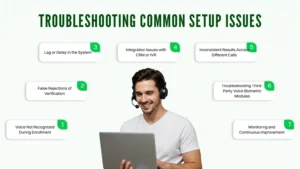
If the system does not properly capture a user’s voice, confirm the microphone input quality and audio-level settings. Background noise can cause complications to voice biometric authentication, and having a quiet environment can alleviate this.
Register users again and acknowledge the registration, and/or a calibration test that captures the user’s unique voice signatures more properly will ensure they have a better registration.
There are times when an honest user is denied access. Assess authentication thresholds; if they are too strict, false rejections are prevalent.
If necessary, ensure that the voice signatures stored on the device are current and carefully review to determine if the passive voice biometric recognition works properly. If necessary, change the sensitivity of feedback if the software offers these options.
When the response time to recognize voice does not immediately transfer voice through to text, there is considerable latency or delay, which is probably indicative of an issue with a network or connection with the server.
Remedying this will include checking wires and connections, and ensuring that your ISP connection is solid, along with verifying that you or the vendor has the hardware to run voice recognition in real time. An unusable voice recognition system will greatly affect the trust of customers in the service experience and lead to poorer performance.
If your voice biometric authentication system is not working in coordination with your CRM or IVR, check that the APIs are connected and have the proper permissions. Also, make sure you have configured the mapping of the user’s voice to their accounts.
Connections like this enable a seamless call experience with customers in association with verifying identity.
Voice verification may vary due to background noise, phone quality, or user voice changes. Use multifactor authentication for high-security calls and schedule periodic re-enrollment. Maintaining accurate stored voiceprints improves reliability over time.
If using external voice biometric providers, ensure the plugin or API is updated. Check authentication process logs for errors and consult vendor documentation for configuration tips. Keeping third-party tools aligned with your VoIP system reduces fraud incidents and enhances operational efficiency.
Regularly review analytics for failed matches, enrollment errors, and system delays. This helps identify recurring issues in your voice biometric systems and fine-tune settings. Continuous monitoring ensures consistent voice authentication methods and protects customer trust.
Optimizing voice biometrics keeps authentication methods accurate and reliable by regularly re-enrolling users, monitoring analytics, updating software, maintaining high-quality audio, training agents, and fine-tuning voice recognition systems for consistent customer call verification.
Voices can change over time due to health issues, ambient noise, or aging. Schedule to re-recruit every 6 – 12 months to refresh voice data. Having an updated voice biometric system ensures correct identity validation with fewer false rejects.
Refer to your VoIP dashboard to check success rates, unsuccessful matches, and usage trends. Analytics will help create boundaries for your voice biometric authentication system, as well as operational efficiency and recognition.
Be certain that microphones and headsets are not only able to record, but also record voice samples that capture unique vocal features. Inherent noise should be limited, and the sensitivity of microphones should be frequently tested. Clear audio will enable your voice recognition systems to maintain their reliability.
Make certain you are regularly updating your voice biometric service providers, and must also check and update plugins, sources, and your VoIP platform. Regular software updates and robust security measures will minimize risks of a data breach and fraud detection.
Train team members on voice authentication procedures, troubleshooting, and other best practices. Well-informed staff will walk users through the process of gaining enrollment certification quickly, which assists with user trust and gives agents positive time savings.
Use voice verification in connection with PINs or SMS codes for sensitive transactions. The consideration of multifactor authentication provides additional protection for sensitive transactions while verifying that the voice biometric systems are strong against spoofing attempts or fraud.
Create the highest volume of calls possible for your voice recognition with stress tests. Sufficiently test whether the specialized hardware and network connections can support the highest load associated with peak traffic.
Frequent testing assures the reliability of your system and the efficiency of authentication.
Identify the best phrases for users to enroll in the biometric system. Optimize the phrases for clarity and uniqueness. The right phrases will better differentiate unique voice patterns, improving accuracy with both passive voice biometrics and voice recognition biometrics.
Ensuring security in voice biometrics for VoIP systems requires encrypting stored voiceprints, enabling liveness detection, using multifactor authentication, monitoring logs, updating software, and training agents to protect against fraud incidents.
Always use an encrypted format for storing voiceprints. This protects sensitive user voice data from unauthorized access and ensures your voice biometric authentication will meet privacy standards, including PCI payment. Encryption is simple, but it decreases the chances of fraud occurring significantly.
Use voice verification steps along with a PIN, password, or SMS code. Multiple factors have a great way to increase the steps for authentication, while preventing an attack from bypassing the voice biometric systems.
VoIP platforms, voice biometric providers, and any integration plugins must be updated regularly. This includes installing updates and security patches promptly. Doing so reduces the chances of fraud incidents occurring and improves the reliability of the whole system to capture reliable data.
Regular monitoring of the authentication system logs to look for unusual activity, failed verification attempts, or repeated login attempts is important. Monitoring all the analytics helps to ensure that potential threats are identified and dealt with in their infancy, while maintaining the trust of your clients.
Limit access to the admin levels of access to only portions of trusted staff. By restricting access to the admin level for sensitive settings, you can ensure that the authentication method or stored voiceprints are not tampered with in any way.
By controlling this feature, you have provided another step for center security, knowing that any access or tampering of access will be investigated and lead to reduced provider trustworthiness when some is flagged on multiple attempts to log into an admin level.
Ensure that network connections for voice biometrics systems are safe and stable. Do not use public or unsecured Wi-Fi networks when recording or verifying voice data. Network security is critical to prevent voice interception or fraudulent events during customer interactions.
Educate agents and customers on safe handling of sensitive data. Educating users on voice authentication methods and voice biometric systems can minimize human error and help protect sensitive data.
Enable liveness detection in your voice biometric system to avoid possible spoofing of a recorded voice. This feature will help make sure the caller is live and provide an additional layer of protection from fraud attempts.
Voice biometrics uses a caller’s unique voiceprint to verify their identity. It reduces manual checks, prevents fraud incidents, speeds up average handling time, and builds customer trust during customer calls.
Users record short phrases 3–5 times in a quiet environment. The system captures unique vocal characteristics to create stored voiceprints. Proper enrollment ensures accurate voice recognition systems and smooth voice authentication methods.
Yes. Platforms like Dialaxy allow integration with virtual agents, AI agents, and interactive voice response (IVR). Linking voice biometric systems with CRM profiles ensures instant identity verification and smoother customer calls.
Check authentication thresholds and ensure stored voiceprints are up-to-date. Adjust microphone sensitivity, reduce background noise, and consider multifactor authentication to prevent legitimate users from being rejected.
Schedule regular re-enrollment, monitor analytics, update software, and train agents on authentication processes. Maintaining voice recognition systems and stored voiceprints ensures reliable voice biometric authentication and prevents fraud incidents.
