

Call Reporting: What Is It, Common Issues, & How to Fix It

Call reporting and analytics play a crucial role in business success. They help you understand call center performance and customer interactions. But sometimes, these reports have errors or inconsistencies, and knowing how to fix call reporting and analytics issues is essential for accuracy.
Fixing these issues improves decision-making and boosts efficiency.
Let’s start by understanding what call reporting and analytics really mean. This will set the foundation before diving into the problems and their solutions.

Call reporting refers to gathering data about calls made and received by a business. It tracks call volume, duration, wait times, and more. This data appears in various reporting forms, such as quarterly call report forms.
Analytics takes it a step further. It analyzes call report data to reveal trends and patterns. Insights help improve customer service, manage resources, and increase sales. For example, analyzing performance reports can show if calls routed to certain agents resolve faster.
Call data reporting and analytics often involve complex systems. These may include VoIP phones, CRMs, and business intelligence tools. Proper integration between these ensures smooth consolidated reporting. Without it, reports may have gaps or errors.
Therefore, call reporting and analytics track how a contact center handles calls. They provide vital insights that help businesses optimize performance and protect their financial system integrity.
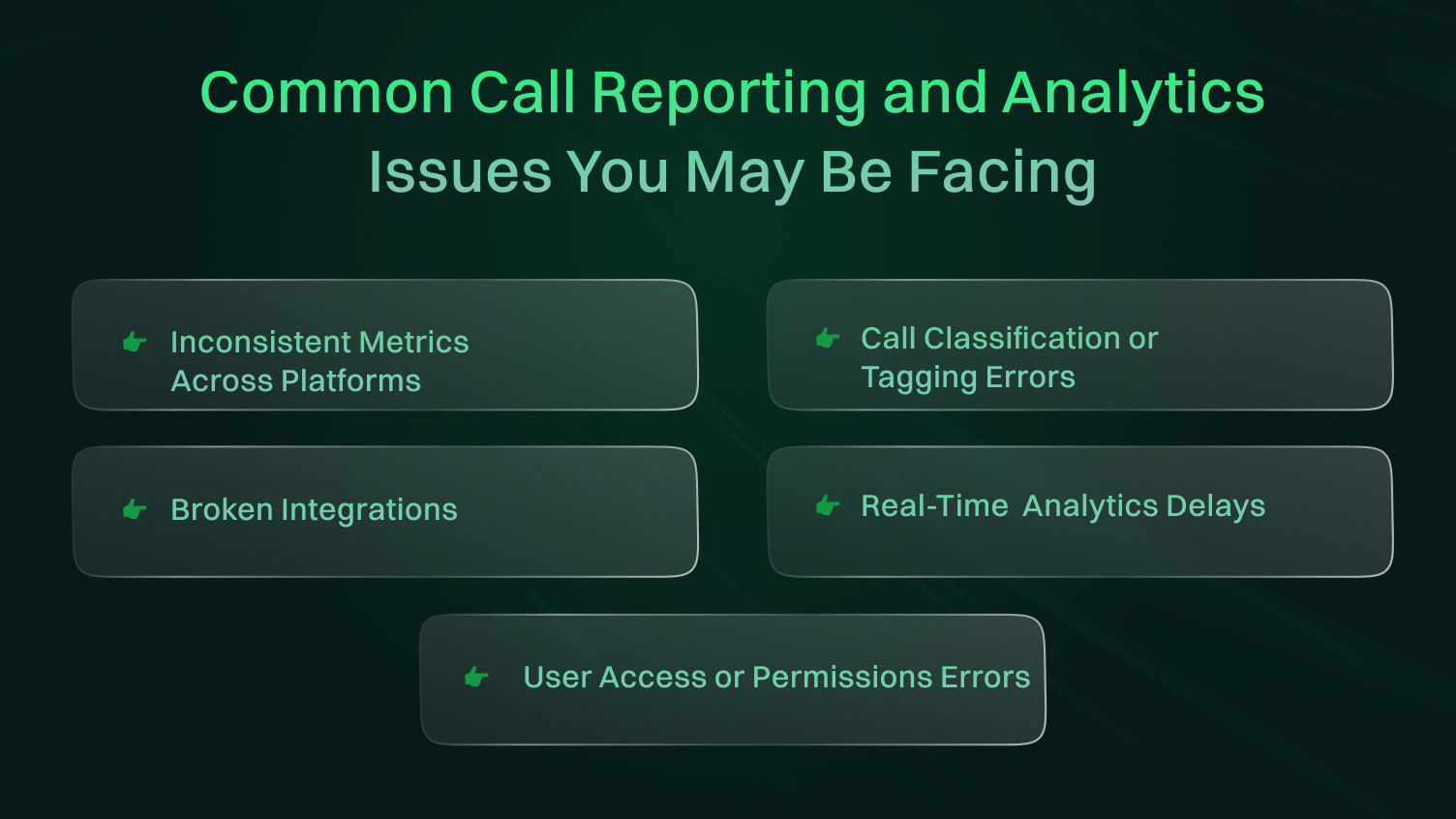
Call reporting errors and analytics problems come from many sources. Some are technical, others human. Most can be fixed once they’re identified.
Now, we will divide the causes into two groups: reporting errors and analytics issues. Both affect how useful your reports become. Let’s begin with the root causes behind reporting errors.
Even with good systems in place, call data reporting can still go wrong. These errors often stem from setup or technology issues. Let’s explore the most common ones.
Many call reporting problems start with a poor tracking setup. It could be something as simple as unlinked call channels. Or maybe tracking codes were applied incorrectly during setup.
Without a proper configuration, your reporting forms may miss key call details. That leads to incomplete or misleading call report data. If tracking isn’t uniform across platforms, your performance reports won’t align either.
Before looking elsewhere, always check that tracking tools are installed and mapped properly. Start here to prevent messy institution reports later.
Your phone system can also limit how much data gets reported. Older systems or basic VoIP platforms might lack deep reporting features.
For example, they may fail to record call-transfer and calls that have passed through certain lines. This may cause a lapse in figures in your consolidated reporting dashboard. The most modern contact center solutions provide us with extensive details in reporting.
However, with the outdated technology, there will be less understanding and more future troubleshooting.
Bugs in reporting tools or mismatched software versions cause trouble. Sometimes integrations break silently after system updates.
Even a recently updated CRM can trigger errors if the VoIP system isn’t compatible. If the reporting tool fails to fetch logs correctly, your quarterly call report forms may be inaccurate.
Data drops and duplicate logs are common results of such conflicts. You might see unusual patterns or totals that don’t match call center reality.
In many companies, some parts of call reporting involve human input. That could mean agents tagging calls or adding notes.
When this step isn’t standardized, it creates inconsistencies. Typos, skipped entries, or outdated formats all affect the final call report instruction. Manual tagging mistakes also harm any downstream analytics or quarter call summaries. As your team grows, the risk increases.
Glitches in internet connectivity or outdated hardware can disrupt data capture. A slow network can delay logs syncing with the central system.
If phones disconnect midway, the call might not even reach the system. That creates misleading reporting outputs. VoIP relies on a stable internet to deliver complete call records.
These were the common reasons behind reporting errors. Fixing them lays a strong base for clear, reliable call reporting. But that’s only one part of the picture.
Next, let’s talk about the deeper issues that often affect analytics quality and accuracy.
Reporting errors affects what you see. But analytics issues affect how you understand it. They make insights unreliable or misleading. These issues often go unnoticed until business decisions suffer.
Let’s look at what usually causes them.
When data comes from multiple sources but doesn’t merge properly, confusion follows. Some calls may be logged in your CRM, others in your VoIP system. Without a centralized flow, your analytics won’t show the complete picture.
For example, call report data might sit in separate platforms, leading to fragmented analysis. Without syncing, key trends or spikes can go unnoticed. This affects regulatory reporting, where transparency is expected.
Analytics tools rely on consistent labels. If “missed call” means one thing in your CRM and something else in VoIP, expect trouble. Inconsistent definitions confuse your performance reports and harm comparisons.
You may think abandoned calls have dropped, when really, the label just changed. Even worse, your quarter call data might show positive results, while your company’s reports tell another story.
Outdated APIs or platform updates can quietly break integrations. Let’s say your VoIP tool was recently updated. If your analytics dashboard didn’t update, expect incomplete records. This mismatch causes delays in trends reporting or inaccurate metrics like average handle time.
Over time, broken links corrupt your consolidated reporting, making your planning and performance forecasting unreliable.
Lack of process causes issues, too. Teams may handle calls differently. Some tag calls manually, while others let automation do it. This consistency affects how data shows up in your analytics.
Your call report instruction might say one thing, but the field entries say another. Without a standard method, analytics trends drift from reality. This confusion spreads across teams and even affects reporting to federal agencies.
Manual data handling takes time. It also brings errors. When teams pull call logs, clean them, and enter them by hand, mistakes happen. Even simple slip-ups affect high-level metrics. Your economic data may show flawed insights if it’s based on manual totals.
This hurts larger operations tied to the nation’s financial oversight. Heavy reliance on spreadsheets or CSVs puts stress on reporting accuracy.
Therefore, analytics problems might not show up right away, but their effects grow over time. Fixing them builds a stronger foundation for smarter business decisions.
You have seen the root causes. Now let’s connect those to the real issues you probably deal with every day.
Most of these are signs that something deeper, like a tracking setup or data flow, isn’t right. Fixing the source clears the way forward.
You check your CRM. The numbers look good. But then you open your VoIP tool. It tells a different story. This happens when the systems define terms differently or pull data from unaligned sources. It goes back to inconsistent data definitions and a lack of centralized flow.
Your performance reports may say one thing, while your quarterly call report forms reflect another. These mismatches shake confidence in your metrics.
One call gets tagged as “support”. The same type of call yesterday was tagged “general inquiry”. This inconsistency confuses analytics.
It ties back to manual input errors and the lack of a standard operating procedure. When agents choose tags freely, trends start to distort. Over time, this affects how your call report data looks to stakeholders and even federal agencies.
Your VoIP platform stops syncing with your BI (Business Intelligence) dashboard. No alert, no warning. You only notice days later. This often traces back to outdated integrations or software that was recently updated. Even small API changes can break important data paths.
When that happens, calls routed through your system might not appear in dashboards or contact center records. That breaks trust in reporting.
You want live insights, but the dashboard lags by minutes or by hours. Either way, it’s no longer “real-time”. This usually happens when your system lacks proper syncing or suffers from network and hardware issues.
It can also relate to manual data handling that slows things down. Without live updates, you lose the power to act fast. Your reports become reactive instead of proactive.
Some agents can’t access the report they need, while some see more than they should. This points to role mismanagement. This issue may stem from improper setup and missing access protocols in your call report instructions. When roles aren’t clearly defined, mistakes follow.
It also becomes a risk when consumer financial protection matters are involved. Too much access, or too little, causes friction.
These issues show what happens when the deeper problems aren’t fixed. They surface as daily frustrations but stem from structural cracks.
Let’s move forward now and learn how to actually fix these problems from the ground up.
Solving reporting and analytics issues doesn’t need to feel overwhelming. Start by addressing them step-by-step. Many of these solutions directly fix the root causes and the issues we covered earlier.
Each action you take restores accuracy and builds confidence in your systems.
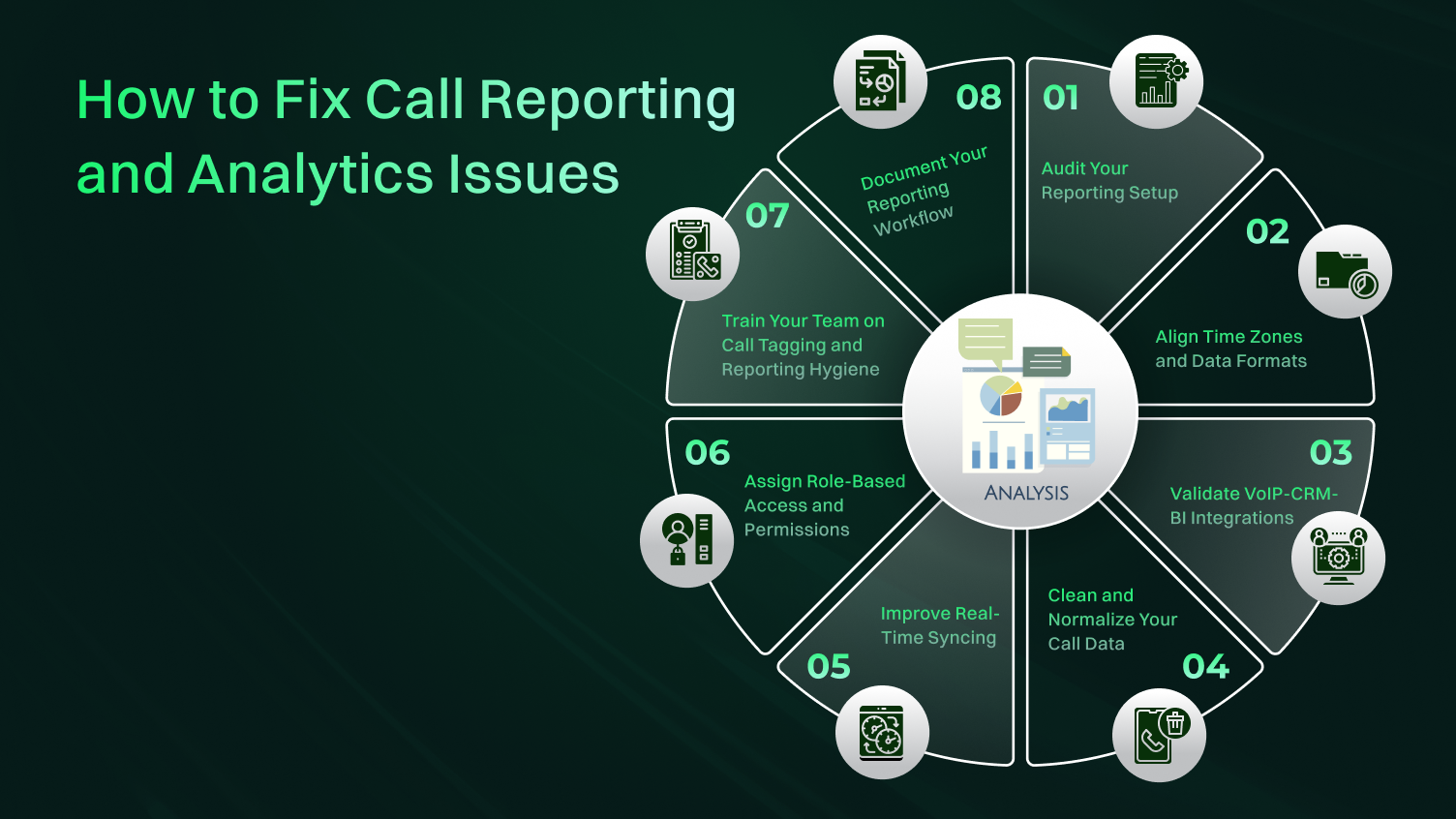
Before anything else, audit your reporting framework. This helps you spot where things are broken or poorly configured.
Check if the tools are linked correctly and pulling the right data. A small mistake in setup leads to massive reporting confusion. If your reporting forms seem off, there’s likely a tracking or system mismatch.
Look at call logs, tagging processes, and platform connections. Verify how data flows from your VoIP to your CRM and BI tool. This ensures smooth consolidated reporting and supports stronger decision-making.
Helpful tools:
Auditing regularly helps keep your reporting strong and reliable. It’s the base for all future fixes.
Time mismatches are subtle but dangerous. Your analytics might show a call at 2 PM in one system and 4 PM in another. This leads to confusion in trend analysis and breaks report accuracy.
Such errors often come from poor setup or mismatched default settings. If time zones differ across systems, call report data becomes misleading.
Also, be sure data formats match. A “yes/no” field in one tool might show as “1/10” in another. Even this difference causes breakdowns in your quarter call reports.
Helpful tools:
Once time and formats align, your reports feel cohesive and easy to read. It’s a simple fix with a major impact.
This is exactly where a lot of systems quietly break down. We all know that integrations fail far more often than people think, especially after updates to a tool have recently happened.
Validate each integration point. Confirm that your VoIP platform sends data into your CRM. Then confirm that your CRM passes it into your analytics system.
Look for missing calls, empty fields, or tag mismatches. If your quarterly call report forms look thin or incomplete, this may be why.
Helpful tools:
Regular testing ensures calls move across platforms without data loss. Solid integrations mean stronger analytics and better access to consumer resources.
Even if your tools work fine, bad data can still ruin insights. Cleaning your call logs fixes that.
So, remove duplicates, standardize tags, and fix mismatched labels. This step connects to issues like manual input errors and inconsistent definitions.
Dirty data affects your performance reports and makes analytics unreliable. It also creates confusion for teams trying to interpret patterns. Normalize your fields. Use a uniform format for call type, source, and duration. Consistent records lead to clear insights.
Run data cleaning tasks weekly. This habit keeps your analytics fresh and accurate.
Delay in the reports means a delay in the decisions. Real-time time-syncing ensures that your data is up to date and never reflects yesterday (or the previous day at that). Delay usually goes back to network and hardware problems or damaged integrations. Unless tools can communicate in real time, you are not going to have fresh reports.
Be sure to make your VoIP, CRM, and analytics tools feed into each other automatically and periodically. The scheduled syncs are useful, but real-time updates are best suited to make fast decisions.
Helpful tools:
Live syncing also boosts trust in your system and improves visibility across teams. When data moves fast, action follows too.
Mistakes occur when everyone has equal access. Reports are overwritten. Sensitive data is shared at will. This issue relates to the user access mistakes and a poor configuration in your call report directions. Exploit the information based on the roles.
The sales leaders might require performance trends, whereas the support agents may only require individual call logs. Hence, personalize your dashboards and access.
Helpful tools:
Proper access control ensures clean, protected, and reliable reporting. It also supports consumer financial protection by keeping data secure.
People make or break data quality. If tagging isn’t clear, reports get messy. Analytics becomes confusing. This issue stems from manual data handling and inconsistent tagging practices. So, training the agents solves both.
Make sure agents know how to tag calls the right way. Use easy-to-understand templates and explain what each tag means. Create cheat sheets and reference guides. Better tagging leads to stronger analytics and fewer errors in your reports.
Hence, ongoing training is the key. Even a quick refresh session every month helps lock in consistency.
If your reporting process lives in someone’s head, that’s risky. It should be documented clearly from end to end. Start with how a call enters the system. Then, map out each tool it passes through. End with how it appears in reports.
This prevents confusion, especially when your teams grow. It also addresses the issue of a lack of standard operating procedure. Clear workflow documentation supports everything. A simple guide ensures your data stays consistent, even if team members change.
Once your system runs smoothly, keep it that way with regular checkups. Don’t wait for problems to appear. Schedule weekly or monthly audits. Look for gaps, outliers, or mismatches. Compare actual call logs with what appears in your quarter call summaries.
Spot-check tagging and validate integration logs. Review any areas that receive frequent manual updates. These checks improve long-term accuracy and reduce your dependency on guesswork. Even one hour a month makes a big difference.
Bonus Tip: Run Routine Data Quality Checks for Ongoing Accuracy
Once your system runs smoothly, keep it that way with regular checkups. Don’t wait for problems to appear. Schedule weekly or monthly audits. Look for gaps, outliers, or mismatches. Compare actual call logs with what appears in your quarter call summaries. Spot-check tagging and validate integration logs. Review any areas that receive frequent manual updates. These checks improve long-term accuracy and reduce your dependency on guesswork. Even one hour a month makes a big difference.
These steps turn a messy reporting system into a reliable foundation.
| Problem | Quick Fix |
|---|---|
| Missing call data | Check API sync, timezone alignment, and data filters. |
| Tagging errors | Revisit tagging rules, retrain the team, automate tags. |
| Real-time delays | Verify API speed, reduce report load, and contact support. |
| Integration failures | Re-authenticate tools, review logs, update tokens. |
| Access/permission issues | Reassign roles, check user access levels. |
| Duplicate logs | Apply deduplication filters, normalize phone formats. |
| Discrepant metrics | Align platform definitions and filters. |
| CRM is not logging calls | Test webhooks, verify mapping, reconnect integrations. |
Sometimes, these quick fixes can save your day, but other times, outside help may be necessary. So, let’s explore when to bring in your provider.
Some days, no matter how much you optimize your setup, issues still pop up. This is when outside help becomes necessary.
Your VoIP analytics or provider can solve problems that sit beyond your control. But knowing when to reach out and what to ask makes all the difference.
You’ve followed all the fixes. But some problems keep returning. That’s a strong sign it’s time to reach out for support.
Frequent calls routed incorrectly or missed entirely point to deeper platform-level bugs. Missing logs after the system updates suggest API problems. Delayed syncs that don’t respond to internal settings often need backend support.
Another red flag? Discrepancies in high-level metrics like call volume or abandonment in your performance reports, especially when they don’t match your VoIP logs.
Also, if your call report shows incorrect data across reporting periods, that usually means a provider-level sync or format issue. When these patterns show up, reach out without any delay. Reliable providers like Dialaxy can diagnose what you can’t see from your side.
When talking to your provider, be clear and specific. Ask if their APIs support your current tools fully.
Request logs or documentation about known sync issues or downtime. Ask for performance details backed by their service level agreement (SLA). These contracts often reveal what’s guaranteed and what’s not.
Ask for help in reviewing your call report data flows and whether the tool supports industry standards. This is especially crucial if your reports must follow regulatory reporting rules.
The more you know, the better you’ll handle future reporting needs with less friction.
When internal improvements reach their limit, your provider becomes a key partner. They often resolve problems hidden beneath the surface.
Now, let’s explore which metrics matter most in call reporting and analytics.
To improve outcomes, you need to measure the right metrics. The indicators below help you track performance, identify gaps, and refine processes.
These basic metrics reveal how busy your team is and how well they manage that load. High abandonment rates or long wait times point to capacity or routing issues. Tracking these consistently offers clarity on daily operations and overall service quality.
First call resolution shows how often issues are solved in one call, which is an important quality marker. Call attribution connects calls to sources like ads, campaigns, or landing pages. When tracked properly, these metrics help improve efficiency and marketing strategy.
Phone, web, and chat are various platforms that need different treatment approaches. Monitoring of the channel-based metrics will give you an insight into channels that perform better and those channels that customers like to communicate with.
This helps in resource distribution and the personalization of customer experience with touch points.
So, what can be used to bring lasting change?
Fixing issues is only half the job. Building habits and systems that keep your reporting accurate in the long run is the real goal.
Create consistent definitions for terms like missed calls or support queries. Apply them across all the systems. This reduces confusion and keeps your reports aligned. Regular audits ensure these standards are followed and maintained over time.
Manual data processing is associated with inconsistencies. Automate as much as you can. Allow systems to tag calls on the basis of triggers or the workflow. It minimizes the possibility of human error and adds strength to your data between the reporting tools.
Set fixed times, weekly or monthly, to review data accuracy. These audits help you catch errors before they snowball. Compare logged calls across systems and verify tag usage. Minor adjustments during these checks can prevent major reporting issues.
Check if your systems are still working together after any update. Platforms often change APIs or data structures. Monitoring version compatibility helps keep your reporting tools in sync. Broken connections are easier to catch early this way.
Keep your reporting process written and accessible. Train new hires using this guide. Review it during team changes or tool upgrades. When everyone follows the same process, your data stays clean, and our reports remain trusted.
Call reporting is evolving quickly. New technologies and customer expectations continue to shape how data is collected, processed, and used.
Real-time dashboards are no longer optional. Businesses now expect live insights to adjust operations instantly. This shift improves responsiveness and enhances team productivity. Platforms offering delay-free reporting are becoming the preferred choice across industries.
AI tools are helping businesses automate call classification. These tools recognize speech patterns and assign tags with minimal input. This reduces manual workload while improving accuracy. As AI improves, call tagging is expected to become faster and even more precise.
Tighter integration between your calling systems, CRM, and business intelligence tools leads to better data flow. This means fewer reporting errors and more complete insights. These connections are becoming a must-have for data-driven decision-making.
Instead of just reporting past activity, businesses are now predicting future trends. Predictive analytics uses past data to forecast call volume, staffing needs, or issue types. This helps teams plan ahead and manage resources more effectively.
Stricter data handling is required by the new laws and customer demands. Reporting tools are now focusing more on encryption, access based on roles, and consent tracking. Such modifications not only provide safety to your business but also enhance customer management and regulatory compliance.
Keeping up with these trends is a way of keeping you up to date with the game.
Fixing call reporting and analytics issues doesn’t require a complete revamp. It starts with identifying weak spots, improving systems, and training your team.
When your data is clean and your tools sync smoothly, insights become more accurate and useful. The real goal is consistency because reliable reporting helps you make smarter decisions every day.
For reliable call reporting and seamless analytics, sign up with Dialaxy today!
Missing calls usually come from broken integrations or tracking gaps. It’s often due to updates, unlinked sources, or access restrictions. A full audit helps identify what’s being left out and why.
A monthly audit works well for most businesses. For high-volume teams, bi-weekly checks help catch issues early and avoid long-term data drift.
To track marketing calls, use call tracking tools that integrate with your CRM or analytics platforms. Tag calls by source automatically to see which campaigns drive results.
You can, but only if the system supports consistent syncing. Confirm that your platform updates instantly and check for delays after updates.
This usually means mismatched time zones, tagging rules, or syncing delays. Align data sources and confirm that definitions are the same across platforms.
To reconcile data between my CRM and VoIP provider, start by matching data ranges, call IDs, and tags. Then, check for missing fields or broken sync points. Use tools that offer unified dashboards.
