

Philippines Phone Code: Meaning, Benefits, and Dialing Steps

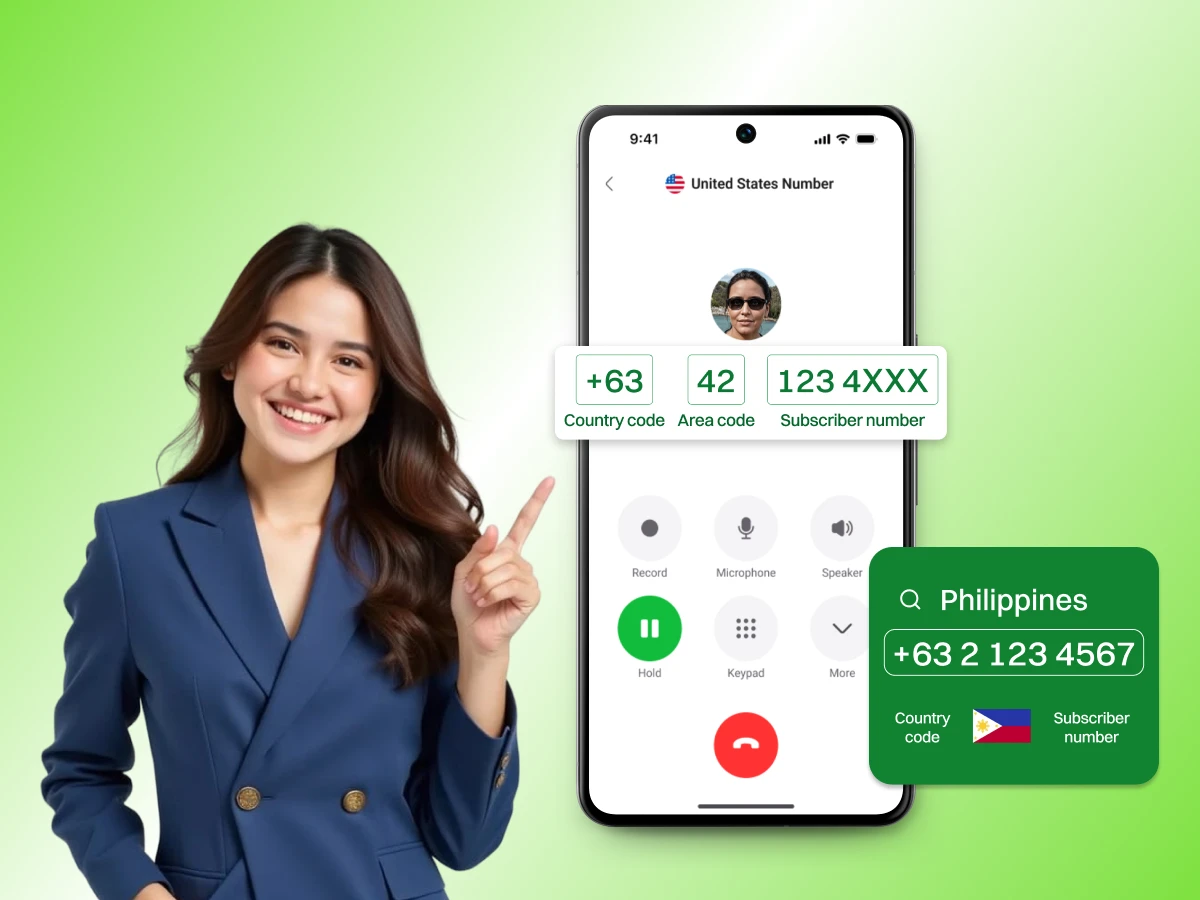
Calling a different country can feel like a puzzle. You have to find the right codes and put them in the right order.
If you want to call someone in the Philippines, you need the Philippines phone code.
This guide makes that process very easy for you. We will explain what the codes mean and how to use them. You will learn about landline numbers and mobile prefixes.
We also share tips for businesses that want to reach the Philippines. Let’s get started with the basics.
A phone code is like a digital zip code for a country. The Philippines’ code number 63 tells the world’s phone networks where to send your call. Every country has a unique code. Otherwise, your phone call wouldn’t have any idea which country you are calling. This marks the beginning of a connection.
You will see this code written as +63. The plus sign is a placeholder for the international exit code. You can usually simply type the plus sign using a mobile phone. You may need to dial a specific number sequence at the start if you have a landline. This Philippines country code is essential for anyone calling from the US, UK, or anywhere else.
The International Telecommunication Union (ITU) manages these codes. They gave the number 63 to the Philippines decades ago.
Since then, it has been the standard for all inbound calls. Whether you are calling a big office in Makati City or a small home in Cebu City, you start with 63. It is the key to the entire Philippine telecommunication system.
A Philippine phone number has a specific structure. It is not just a random string of digits. Each part of the number tells the phone network something important. It identifies the country, the region, and finally the specific person or business. By mastering this structure, you can prevent dialing mistakes.
If you see a Philippine phone number format, you’ll notice it has three segments.
The area code for landlines provides information on the location of the person. The prefix indicates the mobile network of the mobile, such as Globe or Smart for mobiles.
There have been some changes in recent years. For example, the 8-digit phone number system in the Philippines started in 2019. This was done to accommodate additional users.
Before that, the Metro Manila area only had seven digits. Keeping up with these changes is important for a successful call.
This table shows how a typical call to a Manila landline is built.
| Component | What it Represents | Example |
|---|---|---|
| Exit Code | Signals an international call | 011 (for US) |
| Country Code | Identifies the Philippines | 63 |
| Area Code | Identifies a specific city | 2 (for Manila) |
| Local Phone Number | The specific home or office number | 8123 4567 |
This is the most frequent error made by people. In the Philippines, a “0” is used at the beginning of a number for local calls. For instance, a local number of a Philippines resident may be 0917-123-4567. Or they might say their landline is 02-8123-4567.
The first zero must be dropped when calling from outside the country. The zero is for calls within the Philippines only. The phone call will not go through if the number is dialed as +63 0917. You must dial +63 917. It’s applicable to all cities and all mobile operators. Keep in mind, you have to drop the zero to make the connection.
The approach to a call varies according to your position. Each country has its very own “exit code”. This code notifies your local carrier about an outbound call. After you dial the exit code, the other steps are similar in most cases. All you need is the correct sequence of numbers.
“How to dial the Philippines from the US?” is a question many people ask because of the close business relations.
Example for US Landline: 011 + 63 + 2 + 8XXX XXXX.
For US Mobile: +63 + 9XX XXX XXXX.
Your exit code is 00 if calling from the UK.
Example for UK Landline: 00 + 63 + 2 + 8XXX XXXX.
Example for UK Mobile: +63 + 9XX XXX XXXX
The international exit code for Australia is 0011.
Example for an Australian landline: 0011 + 63 + 2 + 8XXX XXXX.
Example for an Australian Mobile: +63 + 9XX XXX XXXX.
00 is used as an exit code in most countries, but not all. Here are some popular locations & their formats below.
| Country | Exit Code | Full Format | Example |
|---|---|---|---|
| Canada | 011 | 011 + 63 + Area + Local | 011 63 2 8XXX XXXX |
| Singapore | 001 | 001 + 63 + Area + Local | 001 63 32 XXX XXXX |
| UAE | 00 | 00 + 63 + Area + Local | 00 63 82 XXX XXXX |
| Japan | 010 | 010 + 63 + Area + Local | 010 63 2 8XXX XXXX |
| Hong Kong | 001 | 001 + 63 + Area + Local | 001 63 917 XXX XXXX |
| New Zealand | 00 | 00 + 63 + Area + Local | 00 63 32 XXX XXXX |
The Philippines consists of thousands of islands. For ease of administration, the telephone network is divided into areas by area code. For landline calls, you need to know the code for the city you are calling. These codes are usually one or two digits long.
Mobile numbers are different. They don’t use city codes. Instead, they use three-digit prefixes. These prefixes tell you which company provides the service. Since many people in the Philippines have multiple SIM cards, these prefixes are very common in daily talk.
Here are the most common area codes for major cities and regions in the Philippines.
| Area Code | Region | Major City |
|---|---|---|
| 2 | Metro Manila | Makati City, Quezon City |
| 32 | Visayas | Cebu City |
| 82 | Mindanao | Davao City |
| 33 | Visayas | Iloilo City |
| 35 | Visayas | Dumaguete City |
| 88 | Mindanao | Cagayan de Oro |
| 74 | Northern Luzon | Baguio City |
| 45 | Central Luzon | Angeles City/Pampanga |
| 34 | Visayas | Bacolod City |
| 52 | Southern Luzon | Legazpi City |
When you dial a Philippine phone number for a mobile device, you use a prefix. These prefixes always start with 9. Common ones include 917, 918, and 922. The major players in this area are Globe, Smart, and Sun Cellular.
If someone tells you their number is 0917-555-1234, you dial +63 917 555 1234. There are many prefixes, so always ask for the full number.
It is easy to get a number wrong when dialing halfway around the world. A small mistake will result in a failure of the call to connect. Don’t panic if the call doesn’t go. Once you know what to look for, the majority of issues are easy to rectify.
This is the most frequent error. If you include the 0 from the local format after the 63, the call will fail. Always start the subscriber part with the digit after the zero.
Using 00 in the US or 011 in the UK will not work. You must use the code that belongs to the country you are calling from. Check with your local provider if you are unsure.
If you are calling a landline in Makati City, you need the area code 2. If you use 32 by mistake, you will end up calling someone in Cebu City. Double-check the location of the person you are calling.
Since Manila moved to an 8-digit phone number format, many old records are wrong. If you only have seven digits for a Manila landline, the call will not work. You usually need an updated 8-digit format number.
Check the number of digits. A mobile call should have 10 digits after the 63. A Manila landline should have 9 digits (1 for the area code and 8 for the local number).
The Philippines is in the PHT time zone (UTC+8). If you call from New York at 10 AM, it is 10 PM in Manila. The person might have their phone turned off. Always verify the current time before you dial.
If your landline call keeps failing, try using an app like Skype or a business tool. These services often format the numbers for you. You just pick “Philippines” from a menu, and the app adds the 63 automatically.
Sometimes the problem is not your dialing. The infrastructure in some islands can be affected by the weather. If you have the right format but hear a fast busy signal, try again in an hour.
The Philippines is a massive hub for outsourcing and business communication. Companies all over the world work with teams there. Having a clear understanding of the Philippines phone code system helps your business run better. It makes your company look professional and accessible.
If you work with clients in the Philippines, you want them to trust you. A local number that Philippine residents recognize can help. When people see a +63 number, they feel more comfortable answering.
It shows you have a real commitment to their region. This is especially important for sales and support teams.
International calls can be very expensive. If your customers in the Philippines have to call a US or UK number, they might avoid it. By using a local Philippine number, you remove that cost barrier.
Your clients can reach you for the price of a local call. This leads to better customer service and happier clients.
Modern business does not require you to be in one place. You can manage a team in Cebu City while you are in London. Using virtual phone numbers allows you to route calls anywhere in the world.
You get the benefit of a local presence without the high cost of a physical office. This flexibility is a major advantage in today’s global economy.
Setting up a phone line in another country used to be very hard. You had to visit a local office and sign many papers. Today, technology makes it much faster. You can get a Philippine number for your business in just a few steps. This allows you to start taking calls from Manila or Davao City almost immediately.
Traditional numbers are tied to a physical wire in a building. If you want a Manila number, you usually need an office in Manila.
Virtual numbers are different. They use the internet to connect calls. This means you can have a Manila number even if your office is in another country. Virtual numbers are also easier to scale as your team grows.
Step 1: Select a provider:
Look for a provider that offers high-quality international numbers. Dialaxy is one of the great choices if you want a virtual phone number for Philippines. They provide virtual numbers that work just like local ones. Always choose a company that has good reviews and reliable uptime.
Step 2: Choose number type:
Decide if you want a landline or a mobile number. If you are doing customer support, a landline area code like 2 (Manila) is often best. If you are doing SMS marketing, a mobile prefix is a better choice.
Step 3: Verification:
Most providers will ask for some basic information about your business. This is a standard security step. It usually takes a very short time to complete. Once you provide the details, you are almost ready.
Step 4: Activation:
Once the verification is complete, your new Philippine phone number is activated. Setting up call forwarding is now possible. This means that if a person calls the +63 number, the local phone in your home country will ring. You can begin promoting your local business immediately.
Knowing the Philippines phone code is the first step to communication success. The format is important for both business and personal calls.
Don’t forget to dial the +63 country code and elide the initial 0. Having a list of the area codes for cities such as Manila and Cebu City will save you time.
For businesses, acquiring a local number from a provider such as Dialaxy is a wise choice. It builds trust and saves money.
Get a Philippines virtual phone number from Dialaxy today and connect with customers more easily.
To type a +63 number, write the plus sign followed by 63. Then add the area code or mobile prefix without the initial zero, followed by the subscriber number.
There is no 3-digit country code for the Philippines. The country code is 63. After your international exit code, you need these two digits to connect to the country.
The country code is +63. Many people assume it is +639 because most Philippine mobile numbers start with 9, but the 9 is actually the mobile prefix.
From a US phone, dial 011 followed by 63, then enter the area code and local number. On a smartphone, you can use the + symbol instead of 011.
The +63 is the international country code for the Philippines. It directs the global telephone network to route your call to the country.
