

A Complete Guide to Outbound IVR for Modern Businesses

Quick Overview:
Outbound IVR proactively automates calls for timely reminders, updates, and data collection, boosting efficiency while requiring strict compliance and customer-centric design.
The modern business environment is high-speed, and customer interaction is a primary concern; you cannot afford to wait for your customers to call. In business, operations operate proactively, communicating in a timely, relevant, and automated manner. The Outbound IVR is required here.
It gives your old-fashioned call center the shape of a proactive sales, customer satisfaction, and operational efficiency engine. Outbound IVR drives modern customer care. It allows for quick customer targeting, turning potential leads into clients.
This is a general guide to the power of Outbound IVR, its underlying mechanics, and valuable hints on successful implementation. Get to know how to change your outreach strategy and achieve considerable business growth and increase customer loyalty.
Outbound Interactive Voice Response (IVR) is an automated telephone service that calls out customers in a given list. Once the connection is established, the system sends a predetermined message and provides the recipient with options for interactivity.
The system lets the person answer using their phone keys or voice. It is more than just a broadcast, as it allows two-way communication to collect information, verify actions, or connect the person to a human agent quickly.
Simple Example:
A clinic uses outbound IVR to call patients 24 hours before their appointment and ask them to confirm by pressing “1” or reschedule by pressing “2.” No human needs to make those calls manually.
Common Reasons for Outbound IVR Calls:
This automated tool enables businesses to consistently and personally stay in touch with many people, ensuring operations run smoothly and efficiently.
Outbound IVR also automates the majority of the call, which guarantees effective and consistent customer contact. Here is the process of how an outbound IVR works in your system.
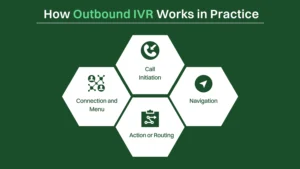
The Outbound IVR program automatically calls phone numbers from a pre-programmed list, which may be obtained from a CRM (Customer Relationship Management) system. It is normally automatic or predictive dialing, which enables the system to dial multiple people at once to maximize efficiency.
After the system successfully connects to a live person, the IVR plays a pre-recorded message. An interactive menu listing options typically accompanies this message. Some of the functionalities that businesses present with the help of this menu include:
For example, a healthcare IVR may alert a patient to an upcoming appointment. The interactive opportunities might be: Press 1 to confirm, or Press 2 to talk to staff.
Once the main greeting is heard, the individual who receives the call can interact with the menu. They can navigate with their keypad (DTMF tones) or easy voice commands, and the system supports speech recognition.
Depending on the selection of the recipient, the Outbound IVR carries out a specific action or triggers routing:
Outbound Interactive Voice Response (IVR) systems offer significant advantages and transform how businesses respond to communications. This is a strategic tool that provides substantial benefits to contemporary contact centers.
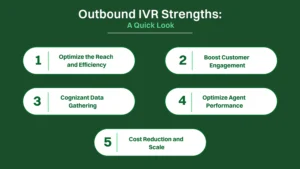
An outbound IVR system operates with an auto-dialer, and when outbound call volume is high, a predictive dialer is usually used. This automation helps companies launch numerous IVR calls efficiently and effectively, and increase overall functional capacity during large-scale campaigning.
The system provides the essential automated delivery of information and a voice-interactive, personalized experience, including appointment reminders. This initiative will help enhance customer behaviour, enabling them to be served faster and have a more convenient experience.
The outbound IVR system effectively collects customer input through the IVR menu or voice response. This information gathering is crucial to directing outreach, guiding business, and connecting live agents to more adequately prepared interventions.
The automated phone system frees live agents to handle complex issues, while routine calls are handled automatically based on criteria. Features such as agent assist and intelligent routing ensure efficient call routing, enhancing agent productivity and reducing burnout in the outbound call center.
Automating reminders and self-service options, including secure payment, dramatically reduces the need for human staff. This helps businesses deploy a consistent AI voice agent for various tasks, creating outstanding customer experiences at scale while effectively reducing costs.
Although the Outbound IVR has numerous advantages over the outbound IVR, its automated approach poses challenges that require proactive business management. Let’s look at its limitations, though it has several positive traits.
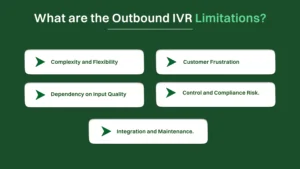
The outbound IVR system works adequately with simple automated notifications and appointment reminders, which are routine tasks. Nonetheless, it is crippled by complex or bizarre customer issues, meaning it cannot fully replicate the versatility of skilled live agents.
Some customers strongly prefer dealing with human personnel rather than the voice response system. Repetitive, poorly structured, or disorienting IVR menus may frustrate customers and lead to the breakdown of customer relationships, even when the system makes the right call.
The interactive voice response depends on the clarity of the prerecorded messages and the menu design. When the system fails to capture customer input properly due to technical issues or background noise, the outbound IVR solution will be less valuable in general.
Since the system will automatically make calls to consumers, businesses are responsible for adhering to the regulations governing outbound communication. The practice of bad campaign management may result in heavy fines with ease, and thus, careful supervision of the phone system is essential.
Implementing an advanced outbound IVR system requires a complex integration with the existing contact center solutions and CRM systems. Such sophisticated functions as conversational AI require specialized expertise and ongoing technical support, both of which are incredibly costly and complex.
The main strength of the Outbound Interactive Voice Response (IVR) process lies in the tools that can proactively connect with customers; conversely, the challenge posed by the automated process affects execution and customer acceptance.
The proactive IVR handles all mundane notification tasks and data acquisition, effectively addressing all service requirements. The result is that specialized live agents can fully focus on complex customer interactions, leveraging their expertise to deliver services.
Automating large traffic calls and ensuring efficient, stable, and continuous 24/7 service significantly reduces overall operational costs. It eliminates the need to recruit a large staff at costly contact centers. It presents a highly cost-effective communication outreach solution.
Self-service can succeed when there is an effective interactive voice menu that guides customers through processes such as secure payments or basic information updates. These keep simple transactions out of queues and ensure a smooth flow at the contact center.
In actively providing necessary and relevant information, such as appointment or transaction notices, the company demonstrates clear care and interest. These appropriate and valuable pieces of information actively contribute towards increased consumer engagement.
Customers highly value the convenience of having their minor issues or informational needs resolved swiftly via the interactive voice menu. This automated speed successfully circumvents the long hold times often associated with traditional human-initiated outbound calls.
Customer frustration mounts rapidly when the IVR’s conversational AI or voice agent fails to interpret complex speech or non-menu responses accurately. This breakdown in communication can quickly damage the phone system’s reputation and user acceptance.
Businesses face stringent requirements to manage every calling campaign in accordance with constantly evolving telemarketing and privacy laws. Rigorous campaign management is essential to avoid severe fines, especially when deploying high-volume auto- or predictive dialers.
Mistimed or unwelcome automated IVR calls are instantly perceived as intrusive “robo-calls.” This adverse reaction damages customer experience, threatening brand loyalty and souring interactions. Furthermore, the leads may not turn into potential clients due to the experience.
To effectively implement an Outbound IVR solution, careful planning and a consumer-focused approach are essential to ensure success and a positive consumer reaction. By following these best practices, consumer irritation and inefficient resource use can be avoided.
You must define the objective of any campaign you begin in terms of the measurable goal of the IVR. It can be appointment confirmation, taking payments, or conducting a survey. Defining clear objectives makes the process smoother from scripting to timing.
Overlooked: Resources are wasted on vague, aimless marketing campaigns with low conversion rates, resulting in a negative return on investment.
Implemented: Provides measurable calls and data, resulting in high ROI because all interactions are mapped to an identified business need.
Steer clear of the “one-size-fits-all” approach by segmenting your customer list. Customers can be segmented based on factors such as purchases or services delivered, resulting in more relevant communication and a greater chance of a positive customer reaction to the call content.
Neglected: Customers receive irrelevant messages, leading to negative sentiment, quick irritation, and perilously high opt-out rates.
Implemented: It enables achieving greater relevance and personalization, leading to increased customer engagement and enhanced compliance with request calls.
Focus on simplicity, clarity, and conciseness in every outbound message. Scripts need to convey the most essential information in a few seconds without sounding robotic or overly long. It is always important to offer the caller a natural transition to human help by pressing a key.
Neglected: frustrated callers end the call early due to ambiguity or long menus.
Implemented: Increases completion rates by enabling consumers to easily understand what needs to be done, ensuring smooth, swift completion of self-service tasks.
The success of an IVR campaign depends primarily on calling consumers at the most receptive times. It is essential to analyze data to identify the optimal times when your target market responds most effectively, as follow-up calls can irritate consumers and lead to opt-outs.
Overlooked: It generates feelings of privacy invasion and irritation towards customers because calls are missed or made at inconvenient times.
If Implemented: Ensures maximum success in contacting target consumers at their most available times, thereby increasing response and conversion rates.
Allow customers total control over their engagement. It is essential to ensure that there is an easily accessible feature to opt out of automated calls. Additionally, the ability to request a return call or transfer to an operator instantly can significantly optimize the customer experience.
If Not Managed: The organization can face significant government compliance penalties and consumer ire related to unwelcome “robo-calling.”
Implemented: Enhances overall consumer satisfaction and helps meet regulatory compliance requirements, resulting in consumer goodwill.
An IVR solution cannot simply be implemented and left alone. It needs to be actively monitored for key performance factors such as response rates, points of abandonment, and completion rates. Use A/B testing on scripts and deployment times to continuously optimize the process.
Neglected: Campaign performance will continue to stagnate and underperform because issues such as ambiguities in the prompt will go unresolved.
If Implemented: It enables continuous optimization, improving the IVR system’s efficiency, engagement rates, and conversion rates.
To ensure that all legal and security requirements are strictly adhered to, there can be no compromise on the following: obtaining prior consent to make calls, taking every precaution to protect all client information, and strictly following all privacy and telemarketing rules.
Neglected: It poses immense danger with respect to direct legal action, heavy fines, and permanent damage to reputation because of violations of privacy or illegal calling patterns.
If Implemented: It effectively addresses both risk and cost concerns while upholding consumer trust and the company’s legal viability.
Inbound IVR is a responsive system that handles customer-initiated calls to provide faster service. Its significant value-add is providing adequate self-help support or routing callers to the appropriate expert, which ultimately enhances overall contact center efficiency and service delivery.
Outbound IVR is a proactive system where the company calls the customer to share essential details or ask them to take a specific step. This method is used for updates and reminders, helping businesses reach customers easily and boost their service results. Let’s have a look at the comparison table.
| Feature | Inbound IVR | Outbound IVR |
|---|---|---|
| Call Origin | Incoming. The customer calls the business (e.g., dialing a support number). | Outgoing. The business calls the customer (e.g., using an auto-dialer). |
| Initiated By | Customer (A reactive engagement). | Business (A proactive engagement). |
| Primary Goal | Service and Routing. To quickly identify caller intent, offer self-service options, or efficiently direct the call to the appropriate live agent or department. | Information and Action. To disseminate time-sensitive information, prompt a specific action, or gather data. |
| Customer Intent | High. The customer actively sought out the interaction to resolve an issue or get information. | Variable. The customer may not be expecting the call; the intent is to persuade or inform. |
| Typical Use Cases | Customer service, bill payment processing, account balance inquiries, technical support routing, and frequently asked questions (FAQs). | Appointment confirmations/reminders, fraud and security alerts, payment collection notices, customer surveys, and delivery notifications. |
| Key Metric Focus | First Call Resolution (FCR), Average Handle Time (AHT), Containment Rate, and Customer Satisfaction (CSAT) scores. | Contact Rate, Call Completion Rate, Conversion Rate (e.g., payment made), and Opt-Out Rate. |
| Operational Time | Often required 24/7 to handle customer-initiated contact anytime. | Strategic timing is required, usually limited to legal calling hours (e.g., 8 AM to 9 PM) to avoid fines. |
| Technology Focus | Complex routing logic, Natural Language Understanding (NLU) for open-ended queries, integration with CRM/database for immediate data lookup. | High-volume dialing capacity (auto- and predictive dialers), stringent compliance checks, and integration with campaign management tools. |
| Perception Risk | Low Frustration Risk (if well-designed), as the customer chose to call; frustration centers on poor menu design or the inability to reach an agent. | High Intrusiveness Risk, as the call is often unsolicited, requires careful consent management to avoid being perceived as unwanted “robo-calling.” |
To design a successful automated calling strategy, you must first know how customers feel when they get an automated call from your business.
Automated calls create certain feelings. Your strategy should build on the good feelings and fix the bad ones:
Automated calls work well for simple tasks, but sometimes, only a human will do:
The way you set up the Outbound IVR directly influences whether a customer listens and follows through:
Outbound IVR proactively connects businesses with customers using automated calls for reminders, surveys, and alerts. It boosts efficiency and sales, but requires careful implementation, concise scripting, and compliance management to avoid customer frustration.
Inbound IVR is reactive, handling customer-initiated calls for service or routing. Outbound IVR is proactive, with the business calling the customer for time-sensitive information or action.
A simple use is sending automated appointment reminders, allowing customers to press a key (DTMF) to quickly confirm or reschedule, significantly reducing staff effort and missed appointments.
Key risks include customer frustration from poorly designed, repetitive calls and the significant threat of legal penalties for non-compliance with telemarketing and privacy regulations.
A Predictive Dialer automatically dials large volumes of contacts, passing only answered calls to the IVR or an agent, significantly boosting overall call completion efficiency.
DTMF (Dual-Tone Multi-Frequency) refers to the keypad tones customers use to navigate the IVR menu, allowing them to make selections without speech recognition.
