

Boost Engagement: The Easy Guide to SMS Links on Your Site


Quick Overview:
SMS links let users text your business instantly through a single tap. Using HTML SMS links, SMS URLs, or ClickToText links, you can boost engagement, mobile accessibility, and customer response rates.
Modern businesses are switching to SMS links to boost engagement and simplify communication. This small yet powerful tool helps visitors connect instantly. Many brands are already adapting it to match rising mobile expectations.
But why are so much of businesses resorting to SMS links? Why are they more effective in comparison to conventional forms or chat boxes? The solution lies in their speediness, ease, and capability to satisfy today’s fast-moving consumer.
We will cover everything you need to know in this guide. You will find out what an SMS link is, how to implement it, how to optimize it for conversions, and how to monitor actual engagement. All these sections will help you establish stronger, faster customer relationships.
The SMS link is a simple, easy-to-use tool that lets visitors send a business a text message with a single tap. Once a person clicks on it, their phone’s messaging application opens automatically. The business number and a prepared message are shown, and they can be sent immediately.
How it works across devices:
For example:
A customer visits your website and taps a “Text Us for a Quote” button. Their messaging app opens automatically with your business number and this pre-filled message:
“Hi, I’d like to learn more about your services.”
Now that you understand what an SMS link is, let’s explore why it plays such an essential role in boosting customer engagement.
Modern marketing has been supported by mobile communication. Texting is one of the quickest and most intimate ways to contact customers, because people spend more time on their phones than ever. This change has brought businesses to utilize SMS links to reach mobile users instantly.
Investigations indicate that the level of SMS message openness exceeds 90 percent, compared with approximately 20 percent for emails. This implies that customers would be much more inclined to read and react to texts. SMS links can transform non-communicating visitors into active leads in a few seconds.
SMS links facilitate hassle-free customer interaction by eliminating intermediary steps, such as filling out forms or waiting for email responses. One tap lets users initiate a real conversation, enhancing engagement, trust, and response rates.
Understanding its impact is one thing. Next, let’s see how to set up an SMS link on your own website step by step.
It is not as difficult to add an SMS link to your site. The precise procedure may vary by site builder or CMS, but the basics remain unchanged. Simple moves let visitors send a message to your business with a single tap.
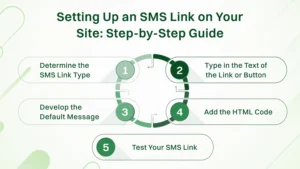
Determine the best use of a text link or a clickable button in your page setup. These two options offer the same engagement advantages, and in some cases, CSS changes may be required based on the site design.
It is either aesthetics, page structure, or the prominence to which you desire the link to appear.
The content must be readable and to the point. Phrases like:
They are best because they inform visitors what will happen when they are clicked. To be less aggressive, you can say:
This will encourage communication without leaving your audience feeling pressured, while still allowing them to contact you in the future.
Numerous smartphones have pre-filled messages. When a visitor clicks on your SMS link, the messaging application opens with your business phone number and a pre-written message already typed and linked to the landing page or the offer. Make it short, relevant, and related to the landing page or the offer.
Sample pre-filled messages:
You are now ready to embed your message and link text to your website. You will need to include a small HTML strip.
Generic HTML template:
<a href=”sms:[phone number]?&body=[default message]”>[link text]</a>
How to implement:
In the case of buttons, you can either wrap the identical link in a styled button element or use an SMS link generator in case you do not want to write code manually.
Test the link on various devices before it goes live. Tap the button or the link on your page on your smartphone and make sure:
Once your SMS link is ready, the next question is where it can make the most significant difference on your site.
By incorporating SMS links at appropriate places on your site, communication would be easier and faster. The strategic positioning will enhance interaction, prompt action, and convert casual visitors into leads, resulting in better sales and customer support outcomes.
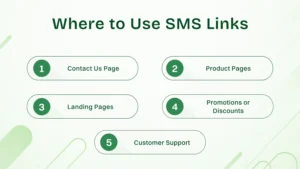
It is ideal for quick inquiries and immediate customer communication without filling out forms or waiting for email responses. Putting sms link on the contact us page can offer benefits such as:
How to execute:
Add a visible “Text Us Now” button above the contact form. Ensure it’s easy to spot on both desktop and mobile for instant access.
Example:
A consulting firm uses “Text for Quick Inquiry”, letting visitors send questions instantly instead of waiting for an email reply.
It is helpful for quickly answering product-related questions like pricing, stock availability, or specifications. Placing sms link for product pages can offer benefits such as:
How to execute:
Place the SMS link near the product description or “Add to Cart” button to give users an easy way to reach out without leaving the page.
Example:
An online store adds a “Text to Check Availability” option, letting customers confirm stock instantly.
It is effective for capturing leads and engaging users who prefer texting over forms. The landing pages sms link can offer benefits such as:
How to execute:
Include an SMS CTA alongside or instead of forms, encouraging visitors to text for more information, offers, or resources.
Example:
A marketing campaign page includes “Text to Get Your Free Guide”, converting visitors who prefer texting over filling forms.
SMs link is perfect for driving instant responses during special offers or campaigns. It can offer benefits such as:
How to execute:
Place SMS links in banners, pop-ups, or promotional sections with compelling CTAs to encourage immediate action.
Example:
A retail site features “Text for Discount Code”, delivering instant coupon codes to shoppers.
It is ideal for providing faster resolutions without waiting on phone or email queues. Adding sms link to the customer support page can give benefits such as:
How to execute:
Add SMS links in FAQ or support pages and highlight quick response times to motivate users to reach out via text.
Example:
A tech company adds “Text Support for Help”, allowing users to contact support teams immediately.
Placing SMS links strategically is key, but knowing the benefits they bring to your business takes it a step further.
The inclusion of SMS links to your site is not just convenient; it also changes the way your business communicates with its customers. Such connections will bridge the gap between curiosity and action, allowing users to contact one another at the appropriate time.
SMS links let your customers contact your business right away. It does not require going through forms, opening emails, or even waiting to reply. They can initiate immediate, in-real-time communication with a single tap—it is perfect when the interaction should be quick.
Fast communication implies faster decision-making. Customers will do more when they can text to receive a quote, check availability, or find assistance. A smooth process can easily increase conversion rates compared to email- or chat-based systems.
Most communication channels are less personal and friendly compared to texting. SMS links facilitate conversation between people in an informal, two-way manner, fostering trust and making your brand more human-like rather than robotic. This human factor may lead to repeat business and customer loyalty.
The vast majority of smartphones use SMS. Tourists do not need any extra apps or logins —just a tap. This availability ensures that the communication channel you use is accessible across devices and demographics, increasing the likelihood that your engagement strategy will be heard.
SMS links do not require costly software, unlike live chat tools or call center systems. Not only are they simple to install with basic HTML and immediately effective, but they also save time and operational expenses.
Most users surf the internet on their phones; hence, SMS links align with natural user behavior. They are mobile-first and fit very well in this era, as you can reach customers where they spend most of their time on their smartphones.
Concisely, SMS connectors provide a channel that is more fluent, faster, and more personal for connecting your site to your audience – resulting in greater engagement, response rates, and conversion demand.
While the benefits are clear, maximizing their full potential requires following some proven best practices.
It is not the end just because you added an SMS link to your site. You must follow a couple of best practices to get the most out of it. These will help your visitors have a seamless experience, and your business will bring real value to each message. How about what practices you will be required to change:
The default text must always be short and appropriate for the page it is on. As an illustration, when the connection is in a “Request a Quote” page, the pre-created message might be as follows:
Hello, I would like to receive a quote for your [service].
Do not ask long intros or general questions. Make it concise so that visitors can send messages immediately without having to rewrite anything.
Place your SMS links in the most convenient areas, such as close to calls to action, at the end of service descriptions, or in the contacts section. The goal is to ensure that the “Text Us” option is visible whenever users are willing to interact.
A majority of the visitors who access SMS links are mobile users. Test the appearance and functionality of your links across different screens. Make sure the buttons are not too small to tap and should not cover the rest of the contents.
When using a text link instead of a button, ensure it is visible and spaced adequately to avoid unintended clicks.
Do not connect SMS buttons with personal numbers. Use a business text number or a VoIP-enabled SMS number. This makes communications business-like, structured, and less complicated. These texts can also be forwarded to your virtual contact center or CRM tool for tracking and response.
Track the number of people utilizing your SMS link using UTM parameters or integrated analytics. It will allow you to track engagement levels, identify the most popular pages with text, and enhance performance in the long run.
Example metric to track:
Including a text link implies a quick response from users. Provided that your team will not be able to monitor messages in real time, configure automated SMS responses, or connect your number to a virtual telephone system, allowing your messages to be forwarded most efficiently.
Let the customers know how their messages will be utilized. A small note next to the SMS button can be added if necessary, indicating that messages can be saved for later access, whether for service or follow-up purposes. Always adhere to local messaging and data protection legislation.
Even with best practices in place, it’s easy to make small mistakes that can limit your results. Here’s how to avoid them.
Setting up SMS links is easy, but many businesses make subtle mistakes that weaken user experience and reduce conversion potential. Below are the most frequent issues and detailed tips to help you avoid them effectively.
How to Avoid:
How to Avoid:
How to Avoid:
How to Avoid:
How to Avoid:
How to Avoid:
“Thanks for texting us! Our team will reply shortly during business hours.”
How to Avoid:
SMS links are shaping the next phase of customer interaction. They provide instant, mobile-first communication without requiring forms or chat windows. With rising smartphone dependency, businesses can achieve higher engagement rates and faster conversions with this simple tool.
Their real strength lies in convenience and personalization. Users prefer tapping once to text rather than filling in details or waiting for emails. As mobile traffic continues to dominate, SMS links will likely become an essential bridge between browsing interest and direct business contact.
HTML SMS links are clickable text or buttons that let visitors send your business a message instantly. When someone clicks the link, their texting app opens automatically with your business number and a pre-filled message. It simplifies communication and eliminates the need for forms or manual typing.
An SMS URL uses the “sms:” protocol to open a messaging window on the user’s phone. You can create one using this HTML format:
<a href=”sms:+1234567890?&body=Hi, I’d like to know more about your services.”>Text Us</a>
Replace the number and message with your details. This HTML SMS link will open directly in the texting app, allowing instant contact.
A ClickToText link is another name for an SMS URL that opens texting instantly. It’s best placed on Contact Us, Product, or Landing pages to encourage engagement. For example, “Text Us for a Quote” can help convert browsing visitors into qualified leads faster than traditional forms.
Yes. You can convert any HTML SMS link or SMS URL into a QR code that launches the texting app when scanned. This method is perfect for print materials, posters, or product packaging, allowing customers to text your business without having to enter your number manually.
Most modern smartphones support ClickToText links and SMS. On mobile, they open directly in the default texting app. However, on desktop browsers, they may prompt the user to continue the action on a connected phone. Always test across iOS, Android, and major browsers to ensure compatibility.
You can monitor engagement by adding UTM parameters to your SMS URLs or tracking clicks through website analytics. This helps you measure how many visitors tap your ClickToText, send a text, or convert into leads. These insights can guide placement, design, and message optimization.
