

What is Click to Call and How Does It Benefit Your Business

Sick and tired of losing sales before your sales force even places the phone call? Click to call fixes that. A single click and your customer is communicating with a real person- fast, easy, and efficient.
Call centers, sales teams, and businesses that use voice calls must have this feature. It can also be used with Chrome extensions, CRM systems, and even Google Maps to make the connection easier than ever.
In this guide, we will discuss what click-to-call is, its functionality, and why it can increase customer experience and conversion rates. Willing to convert clicks into conversations? Let’s dive in.
3 Things You’ll Walk Away With
A single click links your sales team or call center agents with the prospect, bypassing the delays and frustrations. That is why click to call is no longer a necessary step but a requirement for businesses that prefer faster voice calls, an increased number of conversions, and satisfied customers.
Advertisements or emails? or posts on social media? Slow and passive. Under click to call, your customers get in touch with a real agent immediately. This makes it easier to be engaged and respond quicker. Interest will not last–seize it now, it is hot.
Manual dialing is so 2010. Click to call also helps to save time, as the agents are connected automatically. Your salespeople are now using more time to talk and less time to punch numbers. Less headaches, more calls, more leads.
Rapid relationships develop trust. Agents are able to respond to questions, provide solutions, and make follow-ups effectively. Call centers with click-to-call attract more loyalty and fewer dissatisfied customers.
The conversation is initiated by clicking on a button, and it is easier to reach new prospects. Outbound calls are made quicker and more structured. Leads are not lost due to the failure of someone to dial.
Follow up on made, answered, and converted calls. Take advantage of call recording and CRM data to enhance scripts, workflow, and trainer of agents. Numbers tell the real story.
Combines with Chrome extensions, mobile, Google Maps, and Business phone systems. Automation does not eradicate the human being; it sharpens and makes him quicker.
All these arguments demonstrate that click to call is not just a feature, but a tool that makes your business grow.
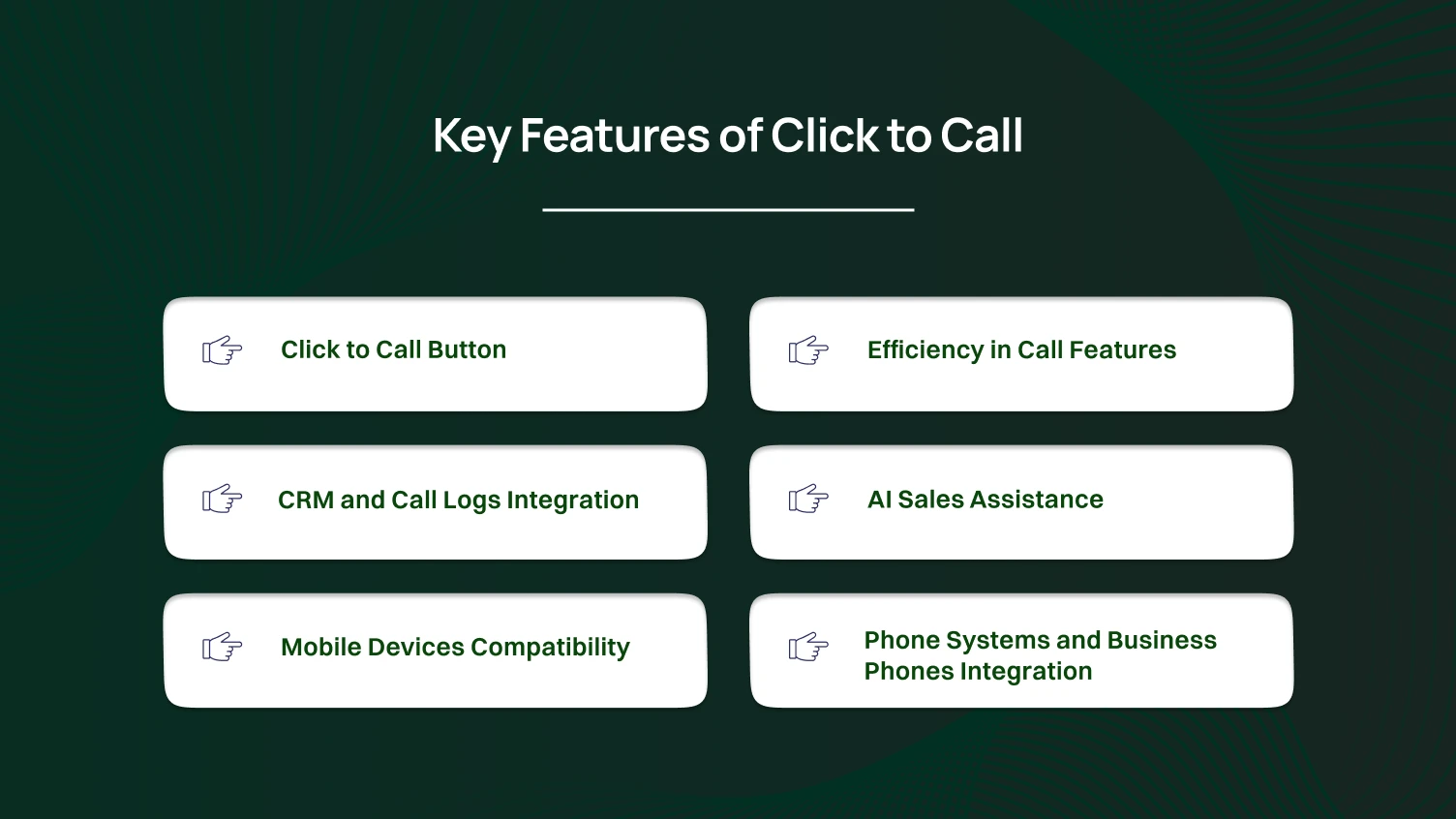
It becomes easier to understand the features, which is why it is a must-have to understand why click to call is a necessitate. We should unravel the major tools that can be provided by your phone system and business phone setup.
Your app or website has a one-button dialog box that allows your customer to place a phone call immediately. None of that dialing, no copying numbers.
This is the only feature that can help you save your team hours each week.
All outgoing calls are monitored. Call logs include information such as time, duration, and result. The agents are aware of the names of the people they spoke with, the discussions they had, and their further plans.
There is the ability of agents to make phone calls wherever they are. You use your business telephone on smartphones, tablets, or desktops. Flexibility implies that it makes more outbound calls without having to wait on the office line.
Call transfer, hold, voicemail, and conference are included. Agents are able to manage various conversations and do not lose leads.
Smart call functionalities eliminate frustrations and make customers cheerful.
AI sales tools direct agents in calls. They are able to propose responses or present customer information, or emphasize follow-ups in a dialog box.
This enhances the personalized outbound calls and conversion rates.
Compatible with your existing phone infrastructure and system. No new equipment is required on your part, as agents are compatible with your existing system.
Fewer tech headaches will mean more calls are made.
All these characteristics allow click to call to be more than a button; it is a complete system of faster voice calls, easier tracking, and a better customer experience.
Faster Customer Engagement
Stop waiting till prospects pick up. Your call center agents or sales team get connected immediately when you click on the clicktocall button. None of the manual dialing, no time-lags. Customers receive quick responses, and the customer experience at your company improves.
The prompt reaction will result in faster decision-making and more satisfied customers.
Increased Conversions
Any call that is not made is a lost sale. Click to call transforms clicks into real conversations. Your team can make outbound calls efficiently, whether through a phone system or even through mobile devices. AI agent assist can be used to propose responses and stay on track with calls.
The more calls, the more conversions; it is just simple math.
Better Sales Team Productivity
Allow your team to talk, not to dial. Bypass dialing and the preoccupation with time. The features of calls, such as hold, transfer, or conference call, are smooth. Call logs and call recordings are used to monitor performance.
Structured information and intelligent applications = an improved and quicker sales force.
Better Customer Insights
Each outbound call produces data. Follow up on the caller, length of conversation, and discussion. Record communications through text chat, dialog boxes, or integrations of communication platforms.
Informed data = deeper thinking and follow-ups.
Bringing together technology and seamless integration with adjacent departments
Create on your mobile devices, desktops, or your business phone system. Connect to CRM, AI agent, or any of your communication platforms. Even drop prerecorded messages as required.
Your group obtains additional tools without attempting to become familiar with a dozen new systems.
Improved Customer Service
Customers receive quick and personal services. Click-to-call button ensures that they get in touch with you. The interactions are natural and professional, combined with the call features, AI agents, and text chat.
Satisfied clients = repeat clients.
Click to call is not just a feature when used correctly; it is an entire system of making calls faster, easier to track, and more effective relationships.
Instant Access to Support
Customers do not want to wait to hold the phone or leave a message. Their call by a single click to the clicktocall button will immediately connect them to your sales team or call center. No frustration, no manually dialing.
Faster phone calls = more satisfied and less impatient customers.
Personalized Communication
Calls do not consist only of generic messages. Agents are able to customize conversations with AI agents, call logs, and call features. The integration of text chat even makes the interactions relevant and human. The customers are heard, understood, and valued.
Flexible Contact Options
Customers can be able to reach any place using mobile devices, business phone and communication platforms. They can be connected to the right person in a short time by clicking a button on a site or application. Comfort enhances gratification and devotion.
Precise, Systematic Communications
Dialog boxes and call recording enable the customers to receive the same information in a precise manner. There are no questions or misunderstandings asked in a loop. Even the prerecorded messages can direct them at the right time. Effective communication will give your company a serious look.
Faster Problem Resolution
Outbound calls or incoming connections are immediate, and this lowers wait time. Problems are solved within a short time, follow-ups are not a problem, and the customers walk away contented. Existing satisfied customers become regular customers.
How can we talk now of how to make it actually work to your advantage? Installing it correctly will result in smarter CRM integration, quicker responsiveness of your customer support team, and improved outcomes of each call. It is not rocket science, though a few clever moves are required.
To be honest, why bother having a click-to-call system that is not integrated with your CRM? Register all the telephone calls, leads, and notes. When your customer support does not need to scroll through random tabs to get the information they need, you will be repaid later.
Phone calling is a thing of the past. You can have more people reached by your agents without their heads (and fingers) falling away with a power dialer. Add it with click-to-call technology that will accelerate all outbound calls, and follow-ups will be nearly effortless.
Of course, it is some good technology, but people should be aware of how to use it. Learn the fundamentals with your staff members- call tracking, drop prerecorded messages, and so on. The less uncomfortable they are, the more comfortable the customer experience is.
CRM integration gives your customer support team real-time alerts, which means that the customer support team can respond quicker. Add click-to-call technology, and you have a responsive and reliable team that will not miss leads and calls.
One button. One click. One happy customer. That’s how it should feel. No complicated shapes or never-ending dialogue boxes, only human contacts supported by intelligent technology.
With your click-to-call system, in full harmony with CRM, power dialers, and your support team, you are not only answering the phone, you are also designing a smarter, more intelligent, and friendlier customer experience.
Implementation of click-to-call is not very hard, but the correct implementation is the key. These are the steps to ensure that your click-to-call feature is operational and your customer experience is positively impacted (rather than frustrating everybody).
Begin with the selection of a trusted communication platform, which facilitates the use of click-to-call. Ensure that it is connected to your CRM and that it logs the incoming calls effectively. This will allow your team to react more quickly, and all the customer information will be in a single place.
Don’t skip this part. Install your basic functions- such as call routing, caller ID, and analytics. These characteristics ensure that calls do not vanish into oblivion. Also, they enable your agents to know who is calling and why.
Install the clicktocall button on your website or on a landing page, or within a chat widget. Do not cover it; make it noticeable without screaming. An incoming or outbound call should be connected to the corresponding agent by a single click.
Having a fancy button will be useless when your team is not prepared. They should be trained regarding the click-to-call option, processing incoming calls, and updating the records in the CRM. Your customer service team must be familiar with how to make a chat worthwhile in a short period of time.
Monitor call information, response time, and user activities. Use that data to make adjustments to the performance of your click-to-call technology. Continuous improvement implies the creation of smoother customer paths and positive business results.
You can’t just add a clicktocall function and hope it works. You need to track what’s happening behind the scenes. These metrics show if your core functionalities are actually helping your customer journey or just sitting there looking useful.
Check how many call routes actually connect to a real person. If your agents keep landing in voicemail, something’s off. Maybe the landing pages need a stronger call to action, or your timing is wrong.
Fast responses = happy customers. If calls from your click-to-call system take too long to answer, you’re losing trust and maybe sales. Measure how quickly your team responds to incoming calls and outbound calls alike.
Your CRM (or any CRM you use) should automatically log each call, note, and outcome. If data isn’t syncing, your clicktocall function is only doing half the job. Clean data helps your customer support team access relevant information instantly.
This one’s simple. Track how many calls lead to actual results, sales, sign-ups, or scheduled demos. High conversions mean your core functionalities are on point, and your team’s delivering value at every step.
Data tells part of the story. The rest comes from your customers. Ask how easy it was to reach you, how helpful the call was, and how the experience felt overall. Small insights here can reshape your customer journey completely.
Even the best clicktocall function can fail if used incorrectly. Avoid these pitfalls, or you’ll frustrate customers and waste your team’s time.
Suppose your click-to-call button hides somewhere deep in a website or app. Good luck getting anyone to use it. Make it visible and clickable. Customers should be able to call directly in one or two steps, not play hide-and-seek.
Some businesses use third-party plugins that don’t sync with CRM. Result? Calls go unlogged, relevant information is lost, and your team ends up scrambling. Integration matters; don’t skip it.
If agents only use the web browser without connecting to CRM or call logs, they miss context. Every outbound call should show prior notes, preferences, and key details. Otherwise, calls feel robotic.
Letting calls go to the wrong agent is a fast way to annoy customers. Use proper call routes to connect them to the right person immediately. One misrouted call can ruin a customer journey.
Tracking metrics like call duration, response time, or conversions is essential. If you ignore the table of contents of your call data, you won’t know what’s working or broken.
Avoid these mistakes to ensure your click-to-call system isn’t just a shiny button on a website or app. It becomes a tool that lets customers call directly, gives your team relevant information, and keeps everything synced with CRM.
Optimizing your clicktocall function isn’t just a nice-to-have; it’s essential. Follow these best practices to turn every call into a meaningful part of your customer journey.
Follow these best practices, and your click-to-call system will become more than a button. It will be a seamless tool that guides your customers through the table of contents of their customer journey, whether they’re on an app or a browser.
The way businesses handle click-to-call is changing fast. If you ignore trends, your customer journey might start feeling outdated.
The future of click to call isn’t about flashy tech. It’s about seamless third-party integration, smooth app or browser experiences, and smarter call routing that improves every step of the customer journey.
Click to call is more than a button; it’s a powerful tool that connects customers directly to your team, improves the customer journey, and makes outbound calls faster and smarter. Proper setup and core functionalities ensure every call counts.
Integration with CRM, call routes, and even third-party tools keeps all relevant information in one place. Customers enjoy seamless experiences across app or browser, while your team stays organized and efficient.
By following best practices and tracking performance, businesses can boost conversions, strengthen relationships, and deliver a smoother customer experience. Think of click to call as a shortcut in the table of contents for every customer interaction, quick, easy, and effective.
A clicktocall function lets customers connect directly with your team with one click. It works on an app or a browser and saves time compared to manually dialing.
It provides instant access, smoother communication, and faster responses. Customers get relevant information immediately, improving their overall customer experience.
Yes. Integration with Zoho CRM logs every incoming call, tracks outcomes, and stores call logs. Your customer support team can access all necessary info in one place.
Not always. Third-party tools can add features, but the core functionalities of your system often handle calls, routing, and click-to-call technology without extra apps.
It speeds up outbound calls, improves lead follow-ups, and reduces time spent manually dialing. Combined with call features and smart call routes, it increases conversions.
Place it prominently on landing pages, websites, or in your app or browser interface. Customers should be able to call directly in one click without hunting for the button.
Yes. Systems record call logs, track response times, and measure conversion rates. Think of it as a table of contents for every interaction, clear, organized, and easy to analyze.
