

What Is Call Queuing? Meaning, Benefits, and How It Works

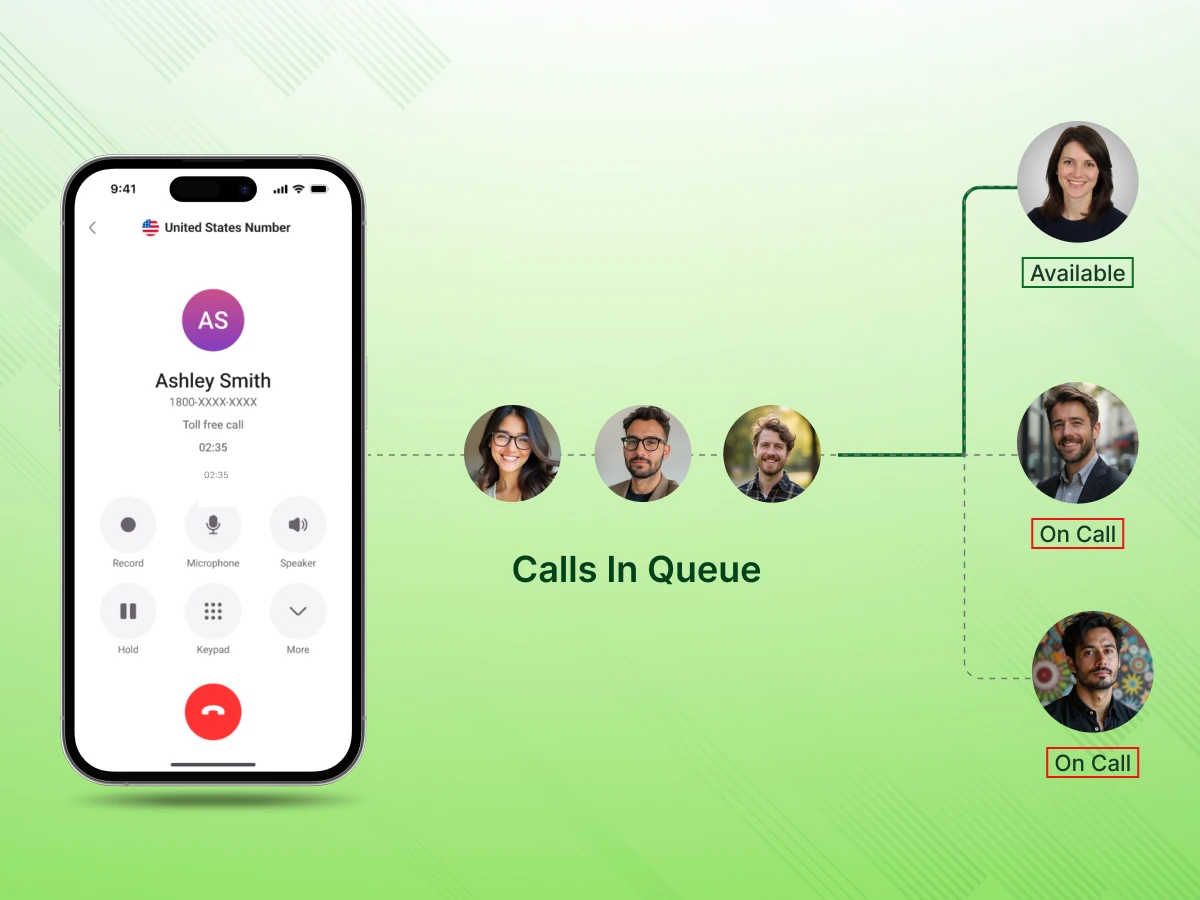
Do your customers get frustrated during long waits? Managing multiple calls at once is challenging. Call queuing helps arrange calls in a line so each customer is served in sequence. It brings clarity to busy call operations.
Without proper systems, callers feel ignored. Agents get stressed trying to handle everything. Calls may be lost or delayed. This leads to poor service experiences.
A structured queue makes a difference. Agents handle calls efficiently one by one. Callers are informed and engaged. Everyone experiences smoother communication.
The blog will guide you through the meaning and benefits of call queuing. You will learn how it works step by step. By the end, you will understand how to manage calls well.
Clear Understanding of Call Queuing: Discover how arranging customer calls minimizes wait time and enhances services for callers.
Practical Steps and Tools: Find out how call management efficiency is achieved through proper routing, agent availability, and queue setup.
Better Customer Experience and Insights: Learn how tracking metrics and adjusting rules increases satisfaction and enhances customer relationships.
Call queuing is a smart system that organizes your incoming calls by placing them in a line until an agent becomes available. It acts as a bridge between the moment a person dials and when your team is ready. This ensures that every caller waits in an organized way instead of being lost. It allows businesses to handle a high call volume without ever overwhelming their office staff.
When a caller is in the queue, they are typically informed about their position or provided with hold messages or music. This keeps the caller engaged and reassured that their call will be answered. A proper call queue system improves efficiency by passing the next call to the available agent.
The purpose of call queuing is to create a professional way to manage daily customer calls. It minimizes call-ins and makes the wait as short as possible for all. The call queue will ensure businesses offer a high-quality service.
Businesses often mistake call queuing for call overflow, though they work with different approaches. They manage incoming calls, but approach busy times in distinct ways.
Here’s a quick comparison to help you understand the key differences:
| Feature | Call Queuing | Call Overflow |
|---|---|---|
| Purpose | Organizes calls in a line until an agent is available | Redirects calls to another line or team when agents are busy |
| Call Handling | Calls wait in order and are answered sequentially | Calls are immediately sent to an alternative agent or system |
| Caller Experience | The caller hears hold music or messages while waiting | The caller may be transferred directly or sent to voicemail |
| Best For | High call volume businesses that need a structured wait | Businesses that need urgent routing to other agents or teams |
| Control | Businesses can prioritize, reorder, or manage the queue | Less control over the caller’s wait experience |
Understanding how call queuing works helps businesses ensure every call is managed. Each step makes sure callers reach the right available agent without any confusion
The following is a basic step-by-step guide on how call queuing works.
When a customer calls, the business phone system receives the request. The call travels through SIP trunking if using VoIP or a cloud phone setup. The system checks which lines are available for routing calls. In case of a busy team, the caller is put on a queue. The system logs the call in the call queue. This initial step will make sure that no incoming call is missed.
The caller is put in the call queue based on arrival order. A message is played to each customer confirming their place. Some systems allow priority callers to move ahead in the line. The queue management system tracks all waiting calls. This helps avoid confusion in cases where there is a high call volume. The queue is used to make sure that the next available agent is informed.
Callers are placed on hold, listening to hold music or custom messages. Audio file messages can be used by businesses to give updates or promotions. It keeps the caller engaged during waiting times. An interactive voice response (IVR) self-service option may also be provided in the system. This may minimize wait time as simple requests are processed automatically. Effective messaging enhances customer waiting time and satisfaction.
Certain calls are prioritized by the rules of some businesses. VIP customers or urgent calls move to the front of the calling queue. Priority can depend on customer history or account type. The queue settings allow administrators to define these rules. This ensures important calls reach an available agent faster. Prioritization decreases customer frustration among high-value customers.
The system automatically routes the call to an agent once one is available. Effective routing of calls helps to make sure that no customer has to wait too long. The system takes into account agent availability and workload distribution. Skill-based routing can be applied in calls to link the appropriate agent with expertise. This enhances a better response and minimizes repeat calls. Efficient routing also supports queue performance metrics.
Once the call has ended, the system records the interaction. Agents may update notes or mark tasks in the call queue management platform. Data from completed calls can improve future call flow. Businesses can measure queue callback trends or wait time patterns. This step helps optimize agent productivity. Post-call data monitoring helps in long-term customer wait times improvements.
Call queuing offers numerous benefits to businesses with large numbers of calls. It promotes effective handling of all callers and minimizes frustration.
The following are the principal benefits of a call queuing system:
A systematic call queue system minimizes the stress of a long line of wait times. The callers have access to information messages or hold music that keeps them active. Agents can focus on each call without pressure. Such a system increases customer satisfaction since each interaction becomes smoother.
Proper call forwarding ensures urgent calls reach the right available agents quickly. When their needs are addressed promptly, customers feel valued. Agents can manage calls without rushing. Overall, callers perceive a professional and responsive service.
Using call queuing software helps distribute calls evenly among available agents. The system tracks who is free and auto-routes the calls. This prevents congestion of certain agents and leaves others idle. Callers are served in an organized, predictable way.
Monitoring queue metrics helps managers improve call distribution. The software provides real-time insights for better planning. Agents can prepare for peak times. The workflow becomes smoother and more consistent.
With a call queue system, fewer calls go unanswered. Even during high call volume, each caller stays in line. The system notifies agents when they are free. No customer wait goes unnoticed or ignored.
Customer retention is facilitated as missed opportunities are reduced. Businesses maintain a consistent level of service. Agents can manage calls without stress. This also strengthens the overall customer relationship.
A call queue grows with your business. New available agents can be added without disrupting workflows. The system handles higher call volumes easily. This flexibility ensures customers are always attended to.
Businesses can expand operations without compromising service. The queue adapts to changing call patterns. Management can plan staffing with better accuracy. Overall efficiency improves as the business scales.
Call queuing software captures data on hold time and agent performance. Managers can track which calls take longer and why. This insight allows informed decisions to improve call flow. As adjustments are made, the efficiency increases.
Evaluation of queue metrics can be used to determine bottlenecks. Scheduling and staff training can be optimized. Service becomes consistent and increases customer satisfaction. The business will have a competitive advantage.
Callers can be prioritized based on urgency or customer value. High-priority calls reach available agents faster. This reduces frustration for key clients and improves response times. The system ensures critical calls are never overlooked.
Prioritization also manages hold time better. Agents are able to prioritize urgent issues. Customers feel that their needs are upheld. In general, it enhances efficiency and satisfaction.
The use of a call queuing system will ensure that all incoming calls are managed efficiently. It helps businesses to mitigate frustration and direct calls made to the appropriate agents.
The following steps are used to set up a call queue:
Begin with the number of customer calls your team gets in a day. Identify peak hours when hold times are longest. Determine if calls need prioritization or special routing. Understanding patterns helps plan staffing and queue settings. This assessment ensures the system matches your business needs.
Evaluate what callers expect during high call volume periods. Check if self-service or automated messages could reduce waiting times. Consider how agents handle multiple calls at once. This step provides the data needed for efficient queue design. Proper analysis makes future adjustments easier.
Select a system that supports virtual phone operations or cloud solutions. Look for features like auto attendant and easy call routing. The system should manage queues without causing long waits. Ensure it can scale if call volume increases. Choosing the right system prevents service interruptions.
Check if the system provides self-service options for simple requests. These can reduce waiting on hold and let agents focus on complex issues. Make sure the interface is simple for agents to use. Confirm integration with your contact center tools. This choice will affect improving call efficiency.
Set rules for how calls routed to agents are prioritized. Decide which callers can skip the queue or get VIP treatment. Configure hold music and messages to keep customers informed. Adjust settings to prevent overload during peak hours. Clear rules make queue management predictable.
Test how the system manages multiple incoming calls at once. Check if agents are notified when calls are available. Fine-tune the queue based on these results. Make changes to improve call flow and reduce waiting times. Accurate configuration reduces errors and confusion.
Provide training on handling received calls from the queue efficiently. Teach how to use the system features and access caller information. Agents should know how to manage priorities without stress. Training helps reduce hold times and improve interactions. Regular practice improves agent confidence and speed.
Include training for handling difficult or urgent calls. Agents must know how to escalate or transfer when needed. Teach how to provide updates to waiting callers. Familiarity with the system improvesthe customer wait experience. Well-trained staff maintain consistent service quality.
Run test calls to see if all calls rare outed correctly. Check if hold messages and music play properly. Monitor if agents are alerted when a caller is next. Ensure the queue handles inbound call volume without gaps. Testing reveals areas for improvement before full launch.
Track metrics like hold times and caller wait positions. See if any calls are delayed or missed. Monitor how contact center tools integrate with the queue. Adjust based on this data to smooth call flow. Monitoring ensures better service and reduces errors.
Review queue performance and adjust rules as needed. Analyze how reduced waiting times affect customer satisfaction. Update auto attendant messages or greetings if necessary. Verify whether the new self-service options are capable of solving simple requests. Constant adjustments make the system effective and efficient.
Use data to determine trends in call volume and the availability of agents. Make improvements to improve call distribution. Train staff on any new features or updates. Repeat this process to refine queue performance. Optimization provides a positive, regular experience for callers.
Despite the presence of a call queuing system, businesses may experience problems that compromise the caller experience. Problem identification followed by its solution will guarantee reduced customer wait times and enhanced service.
Most common challenges and their means to be overcome are as follows:
Too many customers wait for an answer during your peak hours.
How to Avoid it?
Important calls get stuck behind general inquiries in the main line.
How to Avoid it?
The staff cannot keep up with the high volume of incoming traffic.
How to Avoid it?
Callers feel like just another number in a long digital line.
How to Avoid it?
Your phone tools do not talk to your other office software.
How to Avoid it?
Customers cannot reach you through their preferred apps or text.
How to Avoid it?
A mid-sized support company struggled to manage high customer calling during peak hours. Many people faced long customer waits, and the team often failed to receive calls on time. Management decided to overhaul their phone strategy to create a more organized and professional system.
This change was important for their growth and reputation in a competitive market. They needed a solution that would support both their staff and their loyal callers.
Takeaway
For service teams, call queuing is not just about placing callers in line. When businesses analyze call data and use smart workforce management, they can improve queue rules. As a result, they create a smoother calling experience. These simple changes help improve call queue management and ensure every customer calling gets an answer.
Call queuing helps businesses manage incoming calls without any confusion or missed leads. It places callers in a structured line until an available agent is free to help. This process keeps all customer communication organized and prevents lost calls during your busy periods. Many systems also support a periodic announcement to keep callers informed while they wait. Features such as advanced call routing and integration with unified communications tools help the team respond with better efficiency.
Businesses that invest time in setting up a proper call queue often see much better service results. Clear queue rules, trained agents, and proper routing help reduce customer frustration every day. When queues work well, teams can handle more traffic without increasing staff pressure. Customers also feel confident that their call will be answered in order. This approach makes call management more reliable for both the business and the caller.
The main purpose of call queuing is to organize incoming calls in a line until an agent is free. It ensures that every person is automatically called to the next available agent. This improves the calling queuing experience and helps prevent long waits, reducing call abandonment rates.
No. In a standard whisper session, the audio channel is isolated. The customer only hears the agent.
Yes, it works with an IP phone and video conferencing platforms. This allows the team to manage various tasks without losing track of waiting callers. It creates a unified workspace for all your digital communication needs.
Callers hear music on hold or messages while they wait for their turn. This keeps them engaged and lets them know that their call is still active. Knowing exactly where they stand in the line reduces frustration.
Yes, most systems ensure calls distributed through the queue go to the person with the right expertise. This improves service efficiency and resolution speed. It makes every interaction efficient, and callers get the help they need.
Call queuing integrates with call center software to give you a complete view of your data. It provides analytics on call flow and agent performance. Managers can then use these insights to make quick and smart adjustments.
