

Best Wi-Fi Calling Apps in 2026

Quick Overview:
Wi-Fi calling lets you make voice and video calls, send texts, and stay connected over Wi-Fi. It reduces costs, works internationally, and ensures clear communication even in weak signal areas.
Communication is changing faster than ever. People now prefer smart and flexible ways to connect. This change is being spearheaded by Wi-Fi calling. It allows users to call and send texts over Wi-Fi rather than mobile networks, which enhances the quality of service and reduces expenses.
This shift is changing how you connect with others. Wi-Fi calling removes limits like weak signals and roaming charges. You can make domestic or international calls easily. It supports clear voice, smooth video, and unlimited texting through strong Wi-Fi networks.
In this guide, we explore the best Wi-Fi calling apps in 2026. You’ll learn how they work and what makes them valuable. We also share real examples, simple tips, and advice to help you choose wisely. By the end, you’ll know which app fits your communication style best.
Wi-Fi calling enables people to take phone calls and send text messages using a Wi-Fi network rather than using a cellular network. It functions via your phone dialer without ever deactivating your caller ID, contacts, or call forwarding.
Unlike some calling apps, Wi-Fi calling supports video and voice calls, conference calling, and international calling over Wi-Fi. It lowers the phone bills and includes unlimited texting and calling. It can run on Windows, Mac OS, iOS, and Android, making it an excellent addition to communication.
Key Features of Wi-Fi Calling:
Wi-Fi calling is practical, reliable, and flexible. Calls with Wi-Fi remain clear even in weak cellular areas, supporting high-quality video and voice calls, as well as text messaging. Users can stay connected seamlessly, anywhere, without worrying about their cellular network or extra costs.
Now that we know what Wi-Fi calling is, let’s see how it works in practice.
Wi-Fi calling has changed the manner in which businesses & individuals communicate. Through VoIP, calls are transmitted over the internet rather than cellular networks. Knowledge of how it works helps companies ensure better call quality, reduce expenses & remain connected anywhere.
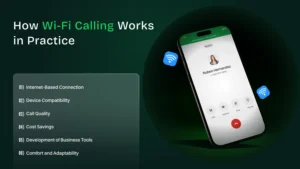
Wi-Fi calling consists of VoIP (Voice over Internet Protocol), which establishes a virtual phone line through the internet. The calls pass through a Wi-Fi network rather than cellular towers. This renders it useful in businesses that require serious communication at any location.
Applications such as WhatsApp, Skype, and Facebook Messenger are based on VoIP technology, which allows making Wi-Fi calls. These applications are compatible with tablet computers, computers, and smartphones. They can be used without a SIM card. Social networks keep businesses in touch.
In current Wi-Fi calling, high-definition audio is available. It provides a minimum number of interruptions and understandings. High-end wireless routers and network configuration minimize call drops. The businesses benefit from enhanced customer service and team collaboration, as well as reduced mobile call costs.
Wi-Fi calls using VoIP allow the business to avoid high cell phone or roaming costs. Firms can choose low-rate packages. They can deal with international calls effectively. This makes Wi-Fi calling an inexpensive way to meet global communication needs.
Wi-Fi calls can connect to business systems. It has features such as call history, call forwarding, and voicemail. This makes communications organized & professional. It assists companies in making calls and ensuring the seamless functioning of teams.
Wi-Fi calling is based on VoIP & allows employees to connect everywhere & at any moment. There is no break in calls, whether at home, in the office, or on the road. Companies can transact with each other regardless of distance without relying on a cellular signal, ensuring that day-to-day processes are not affected.
Understanding how Wi-Fi calling works, it’s time to explore the best apps in 2026 that make it simple and effective.
Wi-Fi calling apps let users make calls and send texts over Wi-Fi, and hold video and voice calls without relying on a cellular network. They reduce phone bills, support international calling, and improve call quality worldwide. Let’s see what the top Wi-Fi calling apps are:
Talkatone can make calls over Wi-Fi and texts even in a foreign country. Users have the option of having a personal number to make phone calls and unlimited calling & text. It offers smooth integration with contacts and plans for available cell phones, providing a straightforward and seamless service.
| Plan Type | Price | Notes |
| Free | $0 | Unlimited US & Canada calls/texts |
| International calls | Pay-per-use | Charges apply for overseas calls |
Google Duo provides high-quality Wi-Fi video and voice calling of high quality. It promotes conference calling, texts, and calls, & is compatible with Windows, Mac, iOS, & Android. Users have AR effects and family mode to communicate with the group easily and have fun.
The best use is in high-quality video calls and group video & voice calls, both inter- and intra-device, without concerns about calls not working due to cellular network problems.
| Plan Type | Price | Notes |
| Free | $0 | Unlimited video and voice calls globally |
TextNow offers a real number to call and text over Wi-Fi, supporting unlimited texting & calling in North America. Consumers have the option of purchasing a SIM card. The application enables global conference & low-cost international calls.
Free unlimited calls and texts in the US and Canada, with the option to add a SIM card for global convenience.
| Plan Type | Price | Notes |
| Free (Ad-supported) | $0 | Unlimited US & Canada usage |
| Ad-free International | $9.99/month | Low-cost global calls |
| Unlimited Data | $19.99/month | Mobile app data included |
WhatsApp allows users to make video and voice calls, send texts, and share online documents. It operates on Wi-Fi networks across international borders and offers group chats. Customers can easily and conveniently reach family, friends, or businesses around the world.
Free video and voice calls as well as text messaging internationally without the need to use a cell network or have an additional plan.
| Plan Type | Price | Notes |
| Free | $0 | Unlimited global calls and texts |
Google Voice is a product for phone, voice, and video calling, text messaging, and voicemail. Users are able to block numbers and see transcripts. It promotes international calling through Wi-Fi networks to avoid paying the phone bills.
Free domestic calls, simple international calls, and cross-device communication, including call forwarding and voicemail service.
| Plan Type | Price | Notes |
| US & Canada calls | Free | Unlimited texts and calls |
| International | $0.01–$7.25/min | Charged per country |
Viber supports secure telephony (text messaging), voice and video calls, and group communication. Users are able to take notes, share media, and make conference calls. The application safeguards personal information and operates on a Wi-Fi network with infinity calling and texting.
Group video and voice calls, along with unlimited texting, are ideal for privacy-conscious users who prioritize secure communication.
| Plan Type | Price | Notes |
| Free | $0 | Unlimited domestic calls and texts |
| International calls | Low-cost | Pay-per-use abroad |
Messenger supports video and voice calls, texts, group chats, and business connectivity. Wi-Fi networks give users the option of conference calling, AR effect, and fast messaging, saving them phone bills.
Bonding with friends, family, and companies using free Wi-Fi calls, group chat, and interactive options.
| Plan Type | Price | Notes |
| Free | $0 | Calls and texts over Wi-Fi |
These apps offer great features, but it’s important to know the benefits and limitations of Wi-Fi calling.
Wi-Fi calling is a versatile communication feature that accommodates voice and video calls over Wi-Fi networks, as well as texts. Understanding the positives and negatives of phone services helps customers save money by reducing bills, enhancing call quality, and choosing appropriate phone plans.
Wi-Fi Calling can be used to make calls over Wi-Fi when you are receiving inadequate cell coverage. It features voice and video calls, minimizes phone bills while maintaining both call forwarding and caller ID, and supports text messaging.
Subscribers can enjoy unlimited overseas calling and text messaging across resilient Wi-Fi networks. This averts roaming charges, reduces reliance on cell phone plans, & ensures effortless communication across various devices like Windows, macOS, iOS, & Android devices.
Wi-Fi calling apps support conference calling, group messaging, video calls, and text messaging. Users can send texts, share documents, and hold video and voice calls simultaneously, improving productivity for personal and professional communication.
The service supports your cell network and SIM card, ensuring that contacts, caller identification, and call forwarding remain intact. This ensures professional communication is seamless and second nature, and integrated across multiple devices.
Wi-Fi calling reduces traffic on the cell network and opportunistically optimizes calls over Wi-Fi. It provides high-quality voice calls and robust video calling, minimizing disruptions even in poor mobile coverage, ensuring communication is always smooth and reliable.
Call clarity is dependent on your Wi-Fi connection’s strength. Weak networks may lead to lost calls and delayed texts. Moreover, low-grade video and voice calls affect both home calls and overseas calling dependability.
Good voice calls & video calls require fast internet. Slow Wi-Fi networks can cause interruptions, buffering, or lagging, which may negatively impact conference calls, the quality of both video and voice calls, and text communications for office and personal use.
Some apps do not support emergency 911 calls while on Wi-Fi networks. The user is forced to rely on a cell network in emergencies. This limits Wi-Fi calling functionality when such needs are essential. This issue can affect domestic or international emergency communication.
While unlimited home calls and texts are usually free, international calls can be billed. Rates for calls over Wi-Fi outside of supported areas or within North America can send cell-phone charges soaring, so it is wise to review policies on apps prior to use.
Interchanging between the cell network and Wi-Fi coverage can also result in temporary disruptions. This impacts call clarity, calls, and texts, as well as voice and video calls, while changing Wi-Fi coverage sectors or when in travel mode, although connectivity is restored automatically.
Knowing the pros and cons, here are practical tips to choose the best Wi-Fi calling app for your needs
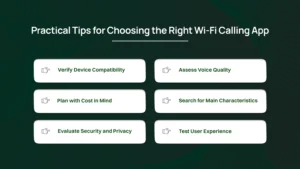
Make sure its Wi-Fi calling app is compatible with your devices. It must be compatible with iOS, Android, Windows, and Mac. This ensures seamless voice and video calls. Texting and conference calls are not interrupted.
Choose apps with high-definition audio. There should be minimal disruptions to them. Good Wi-Fi calling, as well as VoIP technology, makes call conversations clear. Good call quality makes customers satisfied. Companies can communicate comfortably on crucial domestic or international calls.
Subscriptions, pay-for-use, and international call-free versions can be compared. Successful Wi-Fi calls reduce roaming charges. Organizations should opt for apps that combine affordability with worthwhile features. This benefits both international communication as well as daily operations.
There are voice and video calls, texts, conference calls, call forwarding, as well as call history. The voicemail, document transfer, or AR effect features contribute to enhanced productivity. They facilitate greater team collaboration and improve overall communication efficiency.
Choose apps that are well-encrypted with security elements. Protecting company calls and private chat is essential. Safe Wi-Fi calling prevents data leakage. It ensures secret communication is safe on all devices and networks.
Try the app before fully adopting it. A simple interface and easy setup improve usability. Clear notifications guide users. Employees or customers navigate easily. Wi-Fi calls, texts, and video calls remain seamless, convenient, and efficient.
Beyond features, it helps to understand why people adopt Wi-Fi calling and what influences their choices.
Understanding why people choose Wi-Fi calling helps shape communication strategies and improves engagement. Understanding the psychology behind it enables businesses and individuals to choose the right app or method for calls over Wi-Fi, voice and video calls, and texts.
How Wi-Fi Calling Feels:
What People Say, or Studies Indicate:
Many users report feeling more in control using Wi-Fi calling. Discussions about calling over Wi-Fi emphasize accessibility and reduced pressure. Younger people appreciate convenience and low cost, while older users value consistent voice and video calls for personal or professional needs.
Tone, Timing, and Usage Influence Engagement:
When Wi-Fi Calling Matters Most:
Knowing the psychology behind Wi-Fi calling is beneficial to both users & businesses in choosing the most efficient communication tools. It encourages the use of Wi-Fi for calls, improves call quality, and ensures communication is efficient, trustworthy, and emotionally satisfying.
“Let’s try a quick exercise to see your Wi-Fi calling habits and communication style.”
Pick the answer that fits you best.)
When your mobile signal drops, you usually:
While working remotely, you prefer to:
During international calls, your first thought is:
When your call quality sounds distorted, you:
If your business depends on steady communication, you:
📝 Quick Check: Count your Wi-Fi calling and cellular call selections to see your style.
✨ Result:
Wi-Fi calling is reshaping how people connect. It allows voice and video calls through Wi-Fi networks instead of cellular towers. This innovation improves call quality, reduces costs, and helps users stay connected anywhere, even where traditional phone signals fail.
More people and businesses now depend on Wi-Fi calling for reliable and affordable communication. It supports international calls, texting, and caller ID, making it ideal for travel or remote work. The rise of Wi-Fi calling marks the future of flexible communication.
Wi-Fi calling works through the internet instead of a cellular network. It allows users to make voice and video calls, send texts, and use call forwarding through Wi-Fi networks without depending on a traditional SIM or carrier signal.
Some of the top Wi-Fi calling apps include Talkatone, Google Voice, Skype, TextNow, WhatsApp, Viber, and Facebook Messenger. These apps allow international calling, unlimited texting, and video and voice calls across devices like Windows, macOS, iOS, and Android.
Not entirely. Wi-Fi calling works best when you have a stable Wi-Fi connection, but emergency calls like 911 still require a cellular network. However, for international calls or low-signal areas, it’s a cost-effective and reliable communication method.
Yes. Most Wi-Fi calling apps use encryption to protect voice and video calls, texts, and shared files. However, users should always choose trusted apps like Google Voice or Viber, which offer strong security and privacy controls.
Wi-Fi calling can use slightly more battery because the phone stays connected to both Wi-Fi and the cellular network. Still, modern apps and devices manage this efficiently, so the difference is minimal for most users.
Yes. Wi-Fi calling is perfect for travelers. It lets you make international calls without roaming charges, as long as you’re connected to a Wi-Fi network. Apps like TextNow & WhatsApp are ideal for overseas communication as they work on mobile data as well as Wi-Fi.
