

How to Block No Caller ID Calls On Your Phone?

Quick Overview:
No Caller ID calls do not conceal the caller’s number, making it unclear. Block, mute, and manage anonymous calls using built-in iPhone /Android capabilities, carrier filters, or even third-party applications.
It isn’t delightful to receive a call without the caller’s name. It is always hard to tell whether it is a valuable connection or a spammer who wants to contact you. It is this uncertainty that tends to interfere with your day and tranquility. Some of them feel nervous even when answering calls from unknown numbers.
Luckily, you can block no caller ID calls on both Android and iPhone, and there are easy methods for blocking or controlling these calls. No advanced technical skills are required, and these tools could help you eliminate all those interruptions, making your phone experience more secure, smooth, and convenient.
In this manual, I am going to explain all the methods step by step. Moreover, I will tell you about clever tricks to manage hidden numbers like an expert and easily have complete control over incoming calls. You will know how to avoid missing important calls anymore.
Quick Fix Checklist
Problems |
Quick Fixes |
|---|---|
| Receiving calls with no caller ID | Enable “Silence Unknown Callers” (iPhone) / “Block Unknown Numbers” (Android) |
| Persistent spam or robocalls from hidden numbers | Use a third-party call-blocking app |
| Important calls were missed due to anonymous blocking | Add trusted contacts to favorites or the whitelist |
| Network or carrier restrictions | Contact your carrier to enable the “Block Anonymous Calls” feature |
| Lack of call management for businesses | Use VoIP or business phone systems with call filtering |
No Caller ID calls are phone calls in which the phone number of the caller is not displayed or concealed on your phone screen. Your phone might show No Caller ID, Unknown or Private Number as opposed to a real number. Such calls are annoying to many people.
These may be business calls, telemarketing calls, or even calls from friends who would rather remain anonymous. There are legitimate calls and unwanted calls. This leaves one asking whether to pick up the call that comes along.
No Caller ID calls can devastate your daily routine and cause uncertainty. They complicate the process of screening valuable calls or spam. It is beneficial to learn how to block and control these calls so that you can preserve time and your sanity.
Now that you know what No Caller ID calls are, let’s see why they appear in the first place.
Numerous instances make the calls look like No Caller ID. This knowledge of the reasons will enable you to decide whether to respond to the calls, block, or complain. These causes include privacy issues to fraud. Let’s see what the reasons are:
Some callers conceal their numbers to prevent personal or business information from being interpreted. They might not want their contact information to be disseminated or traced. This makes their identity remain confidential. People commonly employ it to increase security or maintain confidentiality.
Businesses often screen their numbers when making phone calls to carry out surveys or marketing. This does not allow the recipients to make direct calls. It is also used by businesses to keep internal numbers confidential and to reach a large number of people effectively.
The scammers and harassers usually mask their identity using No Caller ID. This complicates their tracking or reporting. They typically use anonymity to deceive or harass individuals, causing anxiety and tension to the other party.
Some agencies conceal their caller ID when making calls to people to discuss official or confidential issues. It serves to protect investigations and restricts the release of sensitive information to the public or likely suspects involved.
Sometimes, network or system errors cause calls to appear without identification. This may happen due to carrier issues or outdated phone settings. Restarting your device or updating network preferences usually fixes this temporary problem.
Some international calls display as No Caller ID due to network differences between countries. Caller details may not transfer correctly across systems. This often happens with calls from regions using incompatible or older telecommunications standards.
After understanding the causes, the next step is to learn whether you can block these calls.
Yes, calls without a caller ID can also be blocked. The majority of mobile phones have built-in features that can enable one to silence unknown contacts, block spam calls, and control unwanted contacts via the settings in the phone app.
When you block calls without a caller ID, they can be sent straight to voicemail automatically. This keeps your phone from ringing unnecessarily. It also helps reduce interruptions from blocked callers and unwanted spam messages during busy hours.
Both Android and iPhone devices let users filter or mute anonymous and scam calls. You can easily send calls from unknown numbers to voicemail or create custom blocking lists to control incoming calls directly through the phone app.
Blocking No Caller ID calls doesn’t delete or restrict known contacts. It then filters secret numbers and spam calls without compromising on the real calls. This functionality enhances your phone calling experience and keeps your privacy intact against unwanted distractions.
Once you know they can be blocked, here’s how you can stop them on your iPhone.
The instant attention breaker is receiving an unknown number of calls. It could be a telemarketer who is attempting to make a sale. Or it might be an actual client who is trying to contact you. Fortunately, the iPhones come with measures to handle such calls with ease.
Another helpful feature in Apple is Focus, which enables you to manage your callers and their timing. You can also receive calls only from the saved contacts and mute all others, including those with hidden numbers. This is ideal when one needs to concentrate or relax without undesired interruptions.
To set it up:
This is such a basic feature that keeps the iPhone distraction-free while still allowing essential calls to pass through.
The “Silence Unknown Callers” environment is a short-term solution to prevent random or personal calls. It not only silences numbers that aren’t stored in your address book but also sends them directly to voicemail. Later in your call logs, you can check these missed calls.
How to enable it:
It is an ideal option for blocking spam, robocalls, and telemarketers without missing contact with a potential genuine caller.
In many cases, you get anonymous or hidden calls; recording your voicemail message could make a huge difference. A firm and polite greeting is a deterrent to unwanted callers whilst still letting other, legitimate ones leave their name and number to call back.
Example:
“Hi, you’ve reached [Your Name]. Name and number, please, in case you are an acquainted contact. Calls that are anonymous or blocked will not be reconnected.
This SMS blocks heavy callers from spam and gives your phone call a business-like touch.
Most mobile carriers have in built protection measures that are designed to detect and block spam or anonymous calls. Some of the major carriers, such as AT&T, Verizon, and T-Mobile, have such tools as ActiveArmor or Scam Shield that identify any suspicious activity even before it can reach your phone.
To activate:
Carrier-level defense involves the use of big spam databases, and this provides you with more security against malicious or concealed numbers.
To gain even more control, you can use trusted third-party applications like Truecaller, Hiya, or RoboKiller. Through these applications, known unknown numbers can be identified using global databases, and they can automatically block potential scams or telemarketing calls.
They let you:
These applications are also practical with the help of your phone’s settings, which build a strong safeguard against spam calls.
If the same hidden number continues to bother you, report it to your carrier or local authorities. Record the time, date, and frequency of such calls. Your carrier can track or block suspicious behavior and enhance its network to detect spam for all users.
Notifying of repeat offenders will be of no benefit to this network, but it will enhance the spam block of the network as a whole.
No one best way of blocking hidden calls exists. Instead, it is better to mix and match features such as Silence Unknown Callers, Focus Mode, and carrier spam protection. This stratified system gives you complete control of your phone, and it remains productive and spam-free.
If you’re using an Android device, here’s how to block hidden or private calls effectively.
Android phones are more flexible than iPhones in blocking hidden numbers. You can use the built-in settings or reliable call-filtering applications, depending on the phone model. These alternatives will allow you to control spam, scams, and unwanted calls.
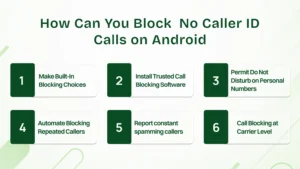
You can also opt to mute unknown callers or private callers on the Android phone. This feature is available as a native option on the Phone app and can mute unwanted callers without the need to install another app.
This is how you do it:
The names of phone settings vary slightly depending on the manufacturer, such as Samsung, OnePlus, or Xiaomi, but the procedure is similar for most Android devices.
If this feature is not offered on your phone, then setting up a call-block program is as easy as pie. These programs, such as Truecaller, Hiya, or Call Control, will automatically detect, tag, and block known spammers or scammers in real-time.
These apps constantly update the databases to ensure that you are never annoyed with a fresh number of scammers, and only confirmed contacts can reach out to you.
You can now enable the Do Not Disturb (DND) feature to block any call from unknown or private numbers at some hours. Android presents you with the option of making the feature configurable, such that nobody besides the individuals that you save can call you.
Go to Settings / Notifications /Do Not Disturb / People and put your saved numbers in the list of permitted ones. This will ensure that worthy calls can be attended to, while hidden numbers or spammers can remain quiet in the meantime.
There are ways to block dialers that repeatedly call your mobile number on your Android phone. It will block spammers or robocallers who attempt to circumvent blocking filters by calling repeatedly.
Turn on this in your Phone app settings under Call Blocking or Spam Protection by enabling Block Repeat Callers. It assists in reducing harassment and enhances peace of mind.
Some spam calls could still be visible even after all the blocking features are enabled. Reporting such numbers helps reduce disturbances in the future and improves the spam databases for everyone.
Every report used strengthens call filtering for the global community and guards other users against the same fraudster.
Some mobile operators are now offering network blocking to prevent spam and unwanted calls before they reach your phone. AT&T ActiveArmor, Verizon Call Filter, or T-Mobile Scam Shield are just a few of the services that automatically block suspicious numbers.
You are enabled to do this by using your carrier application or support sites. This provides an additional level of security beyond the blocking features present in your phone.
It’s also helpful to know the difference between these similar-sounding caller types.
When receiving mysterious calls, your phone may label them differently, such as No Caller ID, Unknown Caller, or Private Number. Though they look similar, each term has a slightly different meaning. Understanding these helps you decide which calls to answer, ignore, or block safely.
| Type of Caller | What It Means | Caller Identity Displayed | Common Reasons | How to Handle It |
|---|---|---|---|---|
| No Caller ID | The caller hides their phone number before making the call using #31# or system settings. | ❌ Not visible | Privacy protection, telemarketing, scams | Silence Unknown Callers (iPhone) or block unknown/private numbers (Android). |
| Unknown Caller | The network or carrier couldn’t recognize the number due to technical or international issues. | ⚠️ Sometimes partial or not detected | Network error, international call, signal glitch | Wait for a callback or use caller identification apps like Truecaller. |
| Private Number | The caller intentionally blocks their number to stay anonymous or confidential. | ❌ Hidden intentionally | Business confidentiality, personal privacy, or law enforcement | Use Do Not Disturb filters or carrier-level spam blocking. |
Quick Insight:
While all three types keep caller details hidden, No Caller ID is user-controlled, Unknown Caller usually results from a technical fault, and Private Number often comes from deliberate privacy choices. Recognizing these differences helps you respond more confidently & manage your call settings effectively.
Beyond blocking, here are smart ways to manage and respond to anonymous or No Caller ID calls.
Take time to note the time and frequency of the unknown numbers before you push those buttons to block calls. When these calls are made during the same period of the day or when they hang immediately, then they are not spared from being scam calls.
It is easy to see such patterns by checking your phone’s app history.
Quick Tip:
When the number appears as a hidden call a few times, record the call duration and the time. It is among the easiest methods of identifying spam activity and then taking action.
When you are not certain that the call is authentic or a spam call, leave it on voicemail. The actual businesses or clients will leave a message as to their purpose. Conversely, in scam calls, they usually hang up in silence.
This is a simple measure that allows you to determine which calls are worth your attention and which calls can be safely ignored.
Contemporary caller ID and spam-filtering applications can mark potential spam on their own. You can view details of a caller, their location, and user reports using apps such as Truecaller, Hiya, or your native phone app. These features will enable one to find blocked callers or fake numbers quickly.
To ensure the effectiveness of these filters, it is essential to update the software on your phone regularly. The frequent updates enhance the detection and minimize false alarms.
If a hidden number keeps calling and causes disturbance, it’s time to block the caller permanently. Use your device’s blocking list or install a call-filtering app. Most carriers also allow users to report scam calls directly through their network.
Taking this action helps others, too, since reported numbers are flagged across global spam databases.
Sometimes, scammers record your responses for misuse. Never say “yes” or confirm personal information to suspicious callers. Hang up immediately if the voice sounds robotic or the line is silent for a long time.
Staying alert helps prevent fraud, protects your identity, and keeps your contact list safe from manipulation.
For business users, managing these calls requires a more strategic approach.
Unknown calls may interfere with the working process and the performance of customer service. Businesses have to deal with them in a strategic fashion and not in frustration. By handling these calls intelligently, it is also possible to prevent fraud, uphold professionalism, and focus the employees on their work hours.
A transparent process will ensure your team responds consistently when you receive calls with no caller name.
Real-time screening is possible with modern phone apps and cloud PBX systems. These are tools that detect or block calls before they reach your staff.
In case legitimate clients tend to mask their numbers, develop alternative methods for them to communicate.
There is a possibility of revealing concealed data through call history on the frequency and behavior of callers.
Automation is a good way to stop spam; however, manual screening guarantees that no good call is missed.
Let’s quickly recap the key points to remember about blocking No Caller ID calls.
Let’s take a quick look at the key points we’ve covered in managing and blocking No Caller ID calls:
You can’t block them directly, but features like Silence Unknown Callers, Do Not Disturb, or creating and blocking a dummy “No Caller ID” contact can reduce unwanted anonymous call
Yes. Most Android phones include a setting to block unknown or private numbers. You can also boost protection using trusted apps like Truecaller, Hiya, or Call Control.
You can turn off your caller ID by going to Settings > Phone > Show My Caller ID on iPhone or Phone App > Settings > Caller ID > Hide Number on Android.
Yes. Dialing *Star 67 (67) before a number temporarily hides your caller ID. The receiver will see “Private” or “Blocked” instead of your phone number.
Not entirely. Some spam or robocalls may still get through. Combining built-in filters, carrier spam protection, and third-party apps can give stronger control.
Businesses can use call screening, automated routing, or tools like CallHippo to block spam, forward essential calls, and manage anonymous numbers more efficiently.
This can happen due to network issues, international calls, or technical errors where the caller’s information isn’t transmitted properly. Updating your phone and carrier settings often fixes it.
